QNAP QSW-M2106-4C-US 10-Port Layer 2 Web Managed Switch
Overview
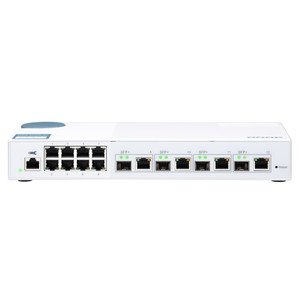
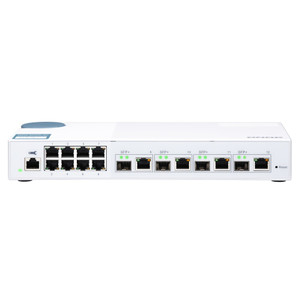
The QNAP QSW-M2106-4C-US is a 10-port Layer 2 web managed switch built for small-to-mid-scale network environments that need a clean mix of high-speed uplinks and multi-gig workgroup connectivity without the overhead of a full L3 managed platform. It pairs four 10GbE SFP+/RJ45 combo ports with six 2.5GbE RJ45 ports — a topology that maps cleanly onto NAS-centric storage networks, high-density IP camera deployments, and wireless infrastructure refresh projects where 2.5GbE client ports eliminate the bottleneck between Wi-Fi 6/6E access points and the core network.
If you're evaluating the network switch category for a surveillance or NAS-fabric project, the QSW-M2106-4C-US sits in a practical middle ground: more uplink flexibility than a pure 2.5GbE unmanaged switch, less complexity than a full-featured L3 chassis. It belongs in a rack or desktop alongside QNAP NAS appliances and high-throughput IP cameras where gigabit simply isn't enough anymore.
Key Features
- Four 10GbE SFP+/RJ45 Combo Ports: Each combo port accepts either an SFP+ fiber module or a direct RJ45 copper connection — you're not locked into one media type at purchase time. Use fiber for inter-rack runs beyond 100m, or copper for short-reach 10G NAS connections without buying separate transceivers. Backward compatibility with 1G SFP modules means existing fiber infrastructure doesn't become e-waste on a phased rollout.
- Six 2.5GbE RJ45 Ports: 2.5 Gigabit over standard Cat5e/Cat6 cabling runs at 2.5x the throughput of GbE without re-pulling wire. For IP cameras recording at 4K or multi-sensor platforms pushing 20–50 Mbps per unit, this headroom matters — you can aggregate more streams per port before hitting bandwidth ceilings. It also directly feeds Wi-Fi 6 APs, which routinely saturate a 1GbE uplink under real-world multi-user load.
- Layer 2 Web Managed: VLAN segmentation, port mirroring, link aggregation, and QoS are accessible through a browser-based interface — no CLI licensing or dedicated management software required. For integrators managing switches across multiple small sites, web-managed L2 keeps configuration reproducible without training staff on a full CLI toolchain. Consult the network switch buying guide if you're weighing L2 vs L3 managed for your topology.
- Combo Port Flexibility for NAS Fabrics: In a QNAP NAS environment, the 10GbE combo ports let you connect storage nodes directly at line rate while the six 2.5GbE ports service client workstations or edge devices — all on the same switch. This avoids a separate top-of-rack 10G switch for NAS backplane traffic, reducing both cost and cable runs in a tight rack.
- SFP+ Backward Compatibility with 1G SFP: Existing 1G SFP transceivers (single-mode, multi-mode, CWDM) install directly into the SFP+ ports and auto-negotiate to 1G. This is a meaningful migration hedge: you can connect legacy fiber runs today and swap to 10G optics when the rest of the infrastructure catches up, rather than having to replace the switch.
- Purpose-Built for High-Bandwidth Workgroups: Compared to a standard GbE managed switch, this platform handles surveillance NVR backplane traffic, backup replication between NAS nodes, and concurrent high-definition camera streams without per-port saturation. For IP camera deployments running 4K streams on a shared switch fabric, the 2.5GbE access ports provide meaningful buffer against peak burst loads.
Integration & Compatibility
The QSW-M2106-4C-US (often searched as QSW M2106 4C US) integrates directly into QNAP NAS environments via 10GbE copper or fiber uplinks, eliminating the throughput gap that appears when a NAS with a 10GbE port is plugged into a 1GbE switch. The six 2.5GbE access ports are compatible with any 2.5GbE-capable NIC or device — including modern Intel and Realtek-based workstations, Wi-Fi 6/6E access points from major vendors, and multi-sensor network video recorders with multi-gig interfaces. The SFP+ ports accept standard SFP+ DAC cables for short-reach server connections, reducing transceiver cost on rack-adjacent equipment.
Frequently Asked Questions
Q: What is the difference between the QSW-M2106-4C-US and the QSW-M2106-4S-US?
A: The QSW-M2106-4C-US has four 10GbE combo (SFP+/RJ45) ports, meaning each 10GbE port accepts either a fiber SFP+ module or a copper RJ45 cable. The QSW-M2106-4S-US has four dedicated 10GbE SFP+ fiber-only ports — no copper option on those uplinks. Choose the 4C if you need copper 10G flexibility; choose the 4S if all your 10G runs are fiber.
Q: Do the SFP+ combo ports on the QSW-M2106-4C-US support 1G SFP modules?
A: Yes. The SFP+ ports are backward compatible with 1G SFP transceivers, so existing single-mode or multi-mode fiber infrastructure can connect at 1G while you migrate to 10G optics over time.
Q: Does the QSW-M2106-4C-US support PoE on the 2.5GbE ports?
A: The available evidence does not confirm PoE capability on this model. If powering IP cameras or access points via PoE is a requirement, verify the current datasheet or consider a PoE-capable switch in the QNAP lineup.
Q: What cable type is needed for the 2.5GbE RJ45 ports?
A: 2.5GbE operates over standard Cat5e or Cat6 cabling at distances up to 100m, so most existing structured cabling plants support it without re-pulling wire.
Q: Is the QSW-M2106-4C-US a full CLI-managed switch or web-only?
A: It is a Layer 2 web managed switch — configuration is handled through a browser-based interface, not a full CLI. This is appropriate for small-to-mid deployments where browser-based VLAN and QoS configuration is sufficient, but it is not a substitute for a CLI-managed enterprise switch in complex multi-site environments.
Q: Can I use DAC (Direct Attach Copper) cables in the SFP+ combo ports?
A: Yes. Standard SFP+ DAC cables are compatible with the SFP+ combo ports, making short rack-to-rack or server connections cost-effective without purchasing fiber transceivers.
The QSW-M2106-4C-US is a switch I'd reach for in a QNAP-centric storage or surveillance environment where the 1GbE bottleneck has become a real problem — the combo port design on the four 10GbE ports is the key differentiator here. Being able to run copper RJ45 on those 10G ports rather than committing to fiber optics gives smaller deployments real flexibility during a phased buildout, and 1G SFP backward compatibility means you're not writing off existing fiber runs on day one.
Technical Highlights:
- Four 10GbE SFP+/RJ45 Combo Ports: Each port accepts fiber or copper at 10G — no forced media commitment. SFP+ DAC cables work here too, keeping inter-rack connections affordable.
- Six 2.5GbE RJ45 Access Ports: 2.5x GbE throughput over existing Cat5e/Cat6 runs addresses the Wi-Fi 6 AP uplink saturation problem and handles high-bitrate 4K camera streams without per-port congestion.
- Layer 2 Web Managed: Browser-based VLAN, QoS, and port mirroring — no licensing fee for management features, no CLI training requirement for small-team deployments.
Deployment Considerations:
- Wire the NAS nodes directly into the 10GbE combo ports using short Cat6A runs or SFP+ DAC cables; reserve the six 2.5GbE ports for cameras, APs, or workstations that would saturate a GbE port but don't justify a full 10G NIC upgrade.
- This is web-managed Layer 2 only — if you need dynamic routing, BGP/OSPF, or 802.1X RADIUS authentication for a multi-VLAN enterprise segment, this platform won't cover it; step up to an L3 managed switch instead.
Specifically well-suited for a QNAP NAS fabric in a SMB server room or a high-density IP camera head-end where the uplink mix of copper and fiber 10G on four ports eliminates the need for a separate media converter shelf — a clean, low-overhead solution for that specific topology.