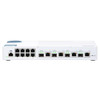
QNAP QSW-M408-2C-US 12-Port Layer 2 Web Managed Switch
Overview
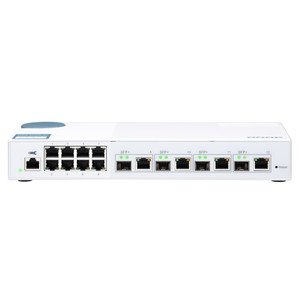
The QNAP QSW-M408-2C-US is a 12-port Layer 2 web managed switch purpose-built for small-to-midsize deployments that need 10GbE uplink bandwidth without the cost and complexity of a full L3 managed platform. It ships with four 10GbE SFP+ ports — two of which are SFP+/RJ45 combo ports, giving you a choice of fiber or direct-attach copper on those slots — backed by eight Gigabit downlink ports for edge device connectivity. If you're aggregating network switches across a NAS-heavy storage cluster, a multi-camera surveillance LAN, or a high-throughput workgroup, this is the model to evaluate before stepping up to a full L3 chassis.
The web management interface keeps configuration accessible without requiring CLI expertise, while still exposing the Layer 2 feature set your network team needs: VLAN segmentation, link aggregation, QoS prioritization, and loop protection. For a deeper look at the QNAP switching and storage line, the QSW-M408-2C-US sits at the entry point of their managed switch family.
Key Features
- Four 10GbE SFP+ Ports: Four slots running at 10 gigabits per second handle inter-switch trunks, NAS uplinks, and server connections without becoming the bottleneck. Running eight GbE devices? Their combined 8 Gbps theoretical throughput won't saturate a single 10GbE uplink — you have headroom to spare.
- Two SFP+/RJ45 Combo Ports: Two of the four 10GbE ports accept either an SFP+ module or a direct RJ45 cable. In practice this means you can connect a 10GbE NAS or server with Cat6A copper on day one and swap to a fiber SFP+ module later as your cabling changes — no hardware swap required on the switch.
- Eight Gigabit RJ45 Downlinks: Standard 1GbE access ports handle IP cameras, workstations, VoIP endpoints, and access control hardware. Eight ports covers a compact surveillance closet or a single-rack edge deployment cleanly; if you need more access density, plan for a second access layer switch trunked up to the QSW-M408-2C-US via 10GbE.
- Layer 2 Web Managed Feature Set: The web UI surfaces VLAN configuration (802.1Q), RSTP/STP for loop prevention, LACP link aggregation, and QoS prioritization. These are the controls that separate a managed switch from an unmanaged one — you can isolate camera traffic onto its own VLAN, bond two uplinks for redundancy, and prioritize VoIP or video streams without touching a CLI.
- 12-Port Total Density: Twelve ports in a single unit keeps rack space and cable management simple. For a surveillance head-end closet running 8 cameras plus a NAS, a VMS server, and an uplink — that's exactly the port budget you need without over-buying a 24-port chassis that sits half-empty.
- SFP+/RJ45 Flexibility for Mixed Environments: The combo port design is especially useful in retrofit scenarios where existing structured cabling is Cat6A (10GbE capable) but future plans call for fiber interconnects. You commit to the switch now and adapt the physical layer later without a forklift upgrade.
Integration and Compatibility
The QSW-M408-2C-US integrates directly with network video recorders and NAS-based VMS platforms via the 10GbE SFP+ uplinks — particularly relevant when your NVR or NAS has a 10GbE port and you need to avoid storage write bottlenecks during multi-stream recording. The eight GbE downlinks are standard 802.3 compatible, so any IP camera, access control reader, or PoE injector-fed device connects without special configuration.
For PoE-powered edge devices (cameras, intercoms, access readers), note that this switch does not supply PoE natively — pair it with a PoE switch at the access layer, or use individual PoE injectors, and uplink that switch to the QSW-M408-2C-US via one of the 10GbE ports. That architecture keeps your PoE budget and your aggregation switching separate, which simplifies troubleshooting and capacity planning.
The web management platform is browser-based, requiring no proprietary client software, which means it fits into multi-vendor network environments where a single management tool for all switching infrastructure isn't realistic.
Frequently Asked Questions
Q: Does the QSW-M408-2C-US support PoE for powering IP cameras or access control devices?
A: No. The QSW-M408-2C-US does not provide PoE output on any port. To power IP cameras or other PoE devices, use a dedicated PoE switch at the access layer and uplink it to the QSW-M408-2C-US via a 10GbE SFP+ port, or use individual PoE injectors per device.
Q: What is the difference between the QSW-M408-2C-US and the QSW-M408-4C?
A: The QSW-M408-2C-US has four 10GbE SFP+ ports, two of which are SFP+/RJ45 combo ports (giving copper or fiber flexibility on two slots). The QSW-M408-4C has four 10GbE SFP+/RJ45 combo ports — all four 10GbE ports accept either SFP+ modules or RJ45 copper. If you need copper 10GbE flexibility on all four uplink ports, the QSW-M408-4C is the right model.
Q: Can the SFP+/RJ45 combo ports run at 10GbE over copper (RJ45)?
A: Yes. When an RJ45 cable is inserted into a combo port, the port operates as a 10GbE BASE-T copper port — compatible with Cat6A cabling at 10Gbps over standard distances. When an SFP+ module is installed instead, the RJ45 side is disabled and the port runs as a standard SFP+ fiber or DAC connection.
Q: What Layer 2 management features does the QSW-M408-2C-US support?
A: The QSW-M408-2C-US is a Layer 2 web managed switch. It supports VLAN segmentation, Spanning Tree Protocol (STP/RSTP) for loop prevention, LACP link aggregation, and QoS traffic prioritization, all configurable through a browser-based web interface — no CLI or proprietary management software required.
Q: Is the QSW-M408-2C-US rack-mountable?
A: The QSW-M408-2C-US is a 1U rack-format switch. Verify rack mounting hardware is included or available for your specific rack type before ordering, as accessory kits vary by deployment.
Q: How many total ports does the QSW-M408-2C-US have?
A: Twelve total ports: four 10GbE SFP+ ports (with two of those being SFP+/RJ45 combo) and eight Gigabit RJ45 ports.
The QSW-M408-2C-US (often searched as QSW M408 2C US) is the switch I'd spec into a surveillance or NAS aggregation closet where you need 10GbE uplinks but don't want to pay for a full L3 managed platform or a 24-port chassis that will sit half-empty. The two SFP+/RJ45 combo ports are the detail that makes this unit practical in real deployments — you can connect your 10GbE NAS via Cat6A copper today and transition to a fiber SFP+ run later without touching the switch.
Technical Highlights:
- 4x 10GbE SFP+ Uplinks: Four 10GbE ports means you can bond two of them via LACP for a 20Gbps aggregate uplink to your core, while still leaving two free for a NAS and a VMS server — that's a real design option in a 12-port package.
- 2x SFP+/RJ45 Combo Ports: Physical layer flexibility without a hardware swap. Two of the four 10GbE slots accept either an SFP+ module or a direct RJ45 copper connection — useful when your server room uses Cat6A today but your cabling plant will eventually go fiber.
- Layer 2 Web Managed: VLAN, RSTP, LACP, and QoS are available through a browser UI — no proprietary client, no CLI requirement. That matters in environments where the person commissioning the switch isn't the same person who configured the firewall.
Deployment Considerations:
- This switch carries no PoE budget. If any downstream devices (cameras, readers, intercoms) need PoE, plan a PoE access switch at the edge and use one 10GbE port on the QSW-M408-2C-US as the aggregation uplink — don't expect to power endpoints directly from this unit.
- With only eight GbE downlinks, this isn't the right choice as a standalone access layer switch for deployments with more than eight edge devices. It's an aggregation or workgroup core, not a wiring-closet access switch.
Best fit: a NAS-centric workgroup or surveillance head-end where a QNAP NAS with a 10GbE port is the storage target, a handful of 10GbE servers or recorders need direct uplinks, and eight GbE access ports handle the remaining edge devices — all managed through a single browser tab without a dedicated network engineer on call.