QNAP QSW-M408-4C-US 12-Port Layer 2 Web Managed Switch
Overview
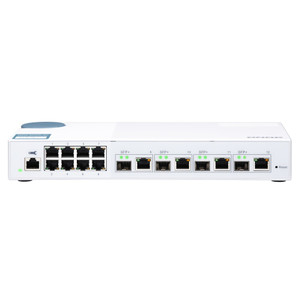
The QNAP QSW-M408-4C-US is a Layer 2 managed network switch built for small-to-mid deployments that need a cost-accessible entry point into 10GbE uplink performance without committing to a full Layer 3 platform. With four 10GbE SFP+/RJ45 combo ports and eight Gigabit access ports in a single 12-port chassis, it gives you the flexibility to aggregate NAS storage, NVR systems, or high-bandwidth workstations on 10GbE while keeping standard IP cameras, access control panels, and edge devices on the Gigabit tier — all managed through a web interface without requiring a dedicated CLI skill set.
The web managed design sits between a dumb unmanaged switch and a full enterprise CLI switch — you get VLAN segmentation and port-level control through a browser-based GUI, which is practical for teams that need network discipline without a dedicated network admin. If you're running a network video recorder alongside NAS-based storage, the 10GbE combo ports let you move both storage traffic and NVR recording streams at wire speed without a bottleneck at the uplink.
Port Configuration and Throughput
The QSW-M408-4C-US organizes its 12 ports into two tiers that match how most surveillance and SMB networks are actually structured:
- 4x 10GbE SFP+/RJ45 Combo Ports: Each port accepts either a standard RJ45 copper run (Cat6/Cat6A to 10GBASE-T distances) or an SFP+ fiber/DAC transceiver — giving you direct-attach copper for short rack runs or fiber for longer segments without buying a separate fiber switch. This is the right port for your NVR, NAS, or server uplink where bandwidth headroom matters as camera counts and resolution climb.
- 8x Gigabit Ethernet Ports: Standard 1GbE access layer for IP cameras, VoIP endpoints, access control readers, and other edge devices. At 1Gbps per port, a single port supports 15–20 simultaneous H.265 4K camera streams — more than enough for typical camera-per-port deployments. Aggregating these eight ports to the 10GbE uplink tier keeps trunk utilization manageable even under full load.
- 12-Port Total Density: In a compact form factor, 12 ports covers a single IDF closet, a medium-density NVR rack, or a standalone building segment without over-provisioning. When you need to expand, additional switches can be uplinked via the 10GbE combo ports.
Management and Monitoring
Layer 2 web managed means you get the core switching controls — VLAN configuration, port mirroring, link aggregation, and traffic monitoring — through a browser interface rather than a command-line session. For IP camera deployments, VLAN isolation between camera traffic and corporate LAN is a baseline security requirement; this switch handles that without requiring a full enterprise switch license or CLI expertise. Port mirroring is useful when you need to run a network tap or packet capture for troubleshooting a problem stream from a specific camera or NVR.
The web managed interface also provides visibility into port utilization and link state — practical for confirming that a newly installed camera or NVR is actually establishing a link at the expected speed before you close up a ceiling tile or seal a conduit run.
Integration and Compatibility
The SFP+/RJ45 combo architecture makes the QSW-M408-4C-US a natural fit alongside QNAP NAS and NVR appliances that ship with 10GbE interfaces, but it connects to any 10GbE-capable device from any vendor — it's not a proprietary ecosystem play. Standard DAC cables or SFP+ transceivers from third-party vendors work in the combo ports, which keeps your cabling budget in check compared to dedicated fiber runs. On the access side, any 802.3 Gigabit device connects without configuration — plug in your cameras, configure the VLANs through the web UI, and the switch handles the rest.
For integrators building out a PoE switching layer alongside this unit, note that the QSW-M408-4C-US itself does not deliver PoE on the access ports — cameras and other PoE devices will need power from a separate PoE-capable switch or midspan injectors on those eight Gigabit ports. Plan your power budget accordingly if you're mixing this switch into a rack alongside PoE access switches.
Frequently Asked Questions
Q: Does the QNAP QSW-M408-4C-US supply PoE power to connected cameras or devices?
A: No. The QSW-M408-4C-US is not a PoE switch. Its Gigabit access ports deliver data only — cameras and other PoE devices connected to this switch will require a separate PoE injector or a dedicated PoE switch upstream. Plan for midspan injectors or a parallel PoE switch if your cameras draw power from the network.
Q: Can I use fiber transceivers in the 10GbE combo ports, or are they copper-only?
A: The four 10GbE ports are SFP+/RJ45 combo ports, meaning each port accepts either a copper RJ45 cable (for 10GBASE-T connections) or an SFP+ transceiver module (for fiber or DAC connections). You choose per-port based on your cabling infrastructure. SFP+ DAC cables are the most cost-effective option for short rack-to-rack runs.
Q: Is the QSW-M408-4C-US a managed or unmanaged switch?
A: It is a Layer 2 Web Managed switch. You get browser-based control over VLANs, port mirroring, link aggregation, and traffic monitoring — more control than an unmanaged switch, without requiring command-line expertise. It does not provide Layer 3 routing functions such as inter-VLAN routing or dynamic routing protocols.
Q: How many total ports does the QSW-M408-4C-US have, and what are the speeds?
A: The switch has 12 ports total: four 10GbE SFP+/RJ45 combo ports (10 Gigabit, flexible fiber or copper) and eight standard Gigabit Ethernet access ports. This two-tier architecture suits deployments where core devices (NVRs, NAS, servers) need 10GbE while edge devices (cameras, readers) run at 1GbE.
Q: Is the QSW-M408-4C-US suitable for use as a core switch in a small surveillance network?
A: It works well as an aggregation or access switch in a small-to-mid surveillance deployment — handling camera traffic on the eight Gigabit ports while upstreaming to a NAS or NVR over 10GbE. For multi-building or multi-VLAN environments requiring inter-VLAN routing, you would need a Layer 3 switch above it in the topology.
The detail I keep coming back to on the QSW-M408-4C-US is the combo port design on those four 10GbE ports — SFP+ or RJ45, your call per port. In practice that means you can run a DAC cable to a co-located NAS for near-zero latency, and still run Cat6A copper to a server rack one row over, all from the same switch without a media converter in the path.
Technical Highlights:
- 4x 10GbE SFP+/RJ45 Combo Ports: Per-port choice of fiber/DAC or copper eliminates the need for dedicated fiber switches or media converters in mixed-cabling environments — real cost and rack-space savings on retrofit projects.
- 8x Gigabit Access Ports: Standard 1GbE access layer handles the full edge device load — IP cameras, access control, VoIP — without the cost premium of 10GbE-to-the-edge, which most surveillance devices don't need anyway.
- Layer 2 Web Managed: VLAN segmentation and port mirroring through a browser GUI means your camera network gets proper isolation from corporate traffic without requiring a certified network engineer to configure it during install.
Deployment Considerations:
- This switch does not deliver PoE — if your camera run connects here, you need a midspan injector or a PoE switch feeding those ports. Wire your power budget before you close out the BOM.
- Layer 2 only means no inter-VLAN routing on-box. If your design requires camera VLANs to talk to a management VLAN without a separate router or Layer 3 switch in the topology, this unit can't do it alone — plan your L3 device upstream.
The QSW-M408-4C-US fits cleanly in a single-building surveillance deployment where you have a QNAP NAS or NVR with a 10GbE interface as the storage backbone, eight or fewer camera drops on the access tier, and no requirement for on-switch routing. That's a common SMB or mid-market security closet build, and this switch handles it without overbuying into a full enterprise platform.