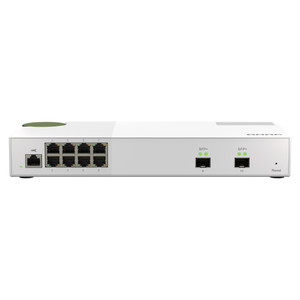
QNAP QSW-M2108-2C 10-Port 2.5GbE Layer 2 Web Managed Switch
Overview
The QNAP QSW-M2108-2C is a 10-port Layer 2 web managed switch built around the bandwidth demands of modern NAS environments, multi-gigabit workstations, and high-throughput IP surveillance deployments. Eight 2.5 Gigabit RJ45 ports handle client and device connections at speeds that standard GbE simply cannot match — a direct response to the bottleneck that appears when 4K multi-stream recording or large file transfers saturate a 1GbE uplink. Two 10GbE SFP+/RJ45 combo ports serve as high-speed uplinks or NAS direct-attach connections, providing the headroom to aggregate traffic from all eight 2.5GbE ports without congestion. For integrators building out QNAP NAS and switching infrastructure, the QSW-M2108-2C fills the gap between unmanaged consumer gear and complex fully managed enterprise switches — web management gives you the control you need without a CLI certification requirement.
Key Features
- Eight 2.5GbE RJ45 Ports: Each port runs at 2.5 Gbps — 2.5× the throughput of a standard GbE port over the same Cat5e or Cat6 cable already in your walls. No recabling required. This matters in camera deployments where a single 4K multi-sensor device can push 50–80 Mbps sustained, or in NAS environments where workstation-to-NAS transfers regularly saturate a 1GbE link.
- Two 10GbE SFP+/RJ45 Combo Uplink Ports: The combo form factor gives you flexibility — use SFP+ DAC cables for short rack runs or RJ45 for longer copper runs to your core switch or NAS. At 10Gbps, these ports carry the aggregated load of all eight 2.5GbE clients without becoming the choke point.
- Layer 2 Web Managed: Web management means VLAN segmentation, QoS prioritization, and traffic control are accessible through a browser interface — no separate management software to install, no command-line required. For smaller deployments or teams without dedicated network engineers, this lowers the barrier to proper network segmentation significantly.
- 10-Port Total Density: Ten ports in a compact form factor keeps rack space and cabling manageable. The 8+2 port split (2.5GbE access + 10GbE uplink) is purpose-built for the hub-and-spoke topology common in NAS clusters, edge recording nodes, and small-to-mid surveillance closets.
- Multi-Gigabit Without Full 10GbE Cost: 2.5GbE access ports land at a significantly lower per-port cost than 10GbE access switching. For deployments where devices top out at 2.5GbE — including most current-generation QNAP NAS units with 2.5GbE base ports — you are not paying for bandwidth the endpoints cannot use.
- Flexible Uplink Media (SFP+ or RJ45): The two combo ports support both fiber and copper at 10GbE, making the QSW-M2108-2C usable as an edge switch connecting back to fiber-uplinked core infrastructure or as a direct peer to a 10GbE-equipped NAS over copper.
Integration and Compatibility
The QSW-M2108-2C fits naturally into environments already running multi-gigabit network switches or planning a migration from 1GbE. It is designed to pair directly with QNAP NAS units equipped with 2.5GbE or 10GbE interfaces — the two 10GbE combo uplinks can connect directly to a NAS's 10GbE port, delivering a dedicated high-speed path while the eight 2.5GbE ports serve workstations, IP cameras, or additional storage nodes. For surveillance integrators, the switch pairs well with network video recorders and IP camera infrastructure where per-camera bandwidth has grown beyond what 1GbE access switching can reliably handle. Layer 2 management features including VLAN support allow camera traffic, NAS management, and workstation data to be segmented on the same physical infrastructure — a standard requirement in any security-conscious installation. Review the network switch selection guide if you are evaluating whether 2.5GbE access is the right tier for your deployment scale. For larger camera counts requiring PoE delivery at the access layer, pair this switch with a dedicated PoE switch upstream — the QSW-M2108-2C does not provide PoE output and is not a replacement for PoE access switching.
Frequently Asked Questions
Q: Does the QSW-M2108-2C provide PoE power to connected devices?
A: No. The QSW-M2108-2C is a non-PoE switch. It does not deliver power over Ethernet to cameras, access points, or other PoE-powered devices. If your deployment requires PoE at the access layer, you will need a separate PoE switch or midspan injectors for those devices.
Q: Can I use the 10GbE combo ports with either SFP+ modules or copper RJ45 cables?
A: Yes. The two 10GbE ports are combo ports — each accepts either an SFP+ module (DAC cable or optical transceiver) or a standard RJ45 copper connection at 10GbE. You choose the media type that fits your cabling and distance requirements. Only one medium per port is active at a time.
Q: What does 'web managed' mean, and how does it differ from a fully managed switch?
A: Web managed (also called smart managed) means the switch is configurable through a browser-based GUI — you get VLAN support, QoS, port monitoring, and traffic management without needing CLI access. A fully managed switch adds CLI, SNMP, advanced routing, and broader automation capabilities. For most NAS and small surveillance deployments, web managed is sufficient and considerably easier to operate.
Q: Is the QSW-M2108-2C compatible with standard Cat5e or Cat6 cabling for 2.5GbE?
A: Yes. 2.5GbE operates over Cat5e at up to 100 meters — the same cable runs already installed for 1GbE deployments. No recabling is required to upgrade access ports from 1GbE to 2.5GbE, which is one of the primary reasons 2.5GbE has become the preferred upgrade path for NAS and camera environments.
Q: How many total ports does the QSW-M2108-2C have, and what is the port breakdown?
A: The QSW-M2108-2C has 10 ports total: eight 2.5GbE RJ45 access ports and two 10GbE SFP+/RJ45 combo uplink ports. There are no additional GbE or management ports beyond these ten.
Q: Can the QSW-M2108-2C be used as a standalone switch without connecting to a NAS?
A: Yes. While the QSW-M2108-2C is optimized for NAS and storage environments, it operates as a standard Layer 2 web managed switch and can be deployed in any network requiring 2.5GbE access with 10GbE uplinks — surveillance edge closets, small office multi-gigabit segments, or workgroup switching for video editing environments.
The QSW-M2108-2C hits a specific architectural gap that trips up a lot of integrators: you have devices — NAS units, high-bitrate cameras, video editing workstations — that have outgrown 1GbE but don't actually need 10GbE per port. Eight 2.5GbE RJ45 ports at 2.5× the throughput of standard GbE over existing Cat5e runs is the cleanest upgrade path I've seen for these environments, and the two 10GbE combo uplinks mean your aggregation path to the core is never the bottleneck.
Technical Highlights:
- 8x 2.5GbE RJ45 Access Ports: Runs over Cat5e to 100m — no infrastructure spend. At 2.5Gbps per port, eight cameras or NAS clients can each push roughly 2× their current 1GbE ceiling simultaneously before the access layer becomes a constraint.
- 2x 10GbE SFP+/RJ45 Combo Uplinks: The combo port design means you're not locked into fiber or copper at procurement — swap based on what your rack or IDF actually has. A DAC cable to a QNAP NAS 10GbE port gives you a direct 10Gbps path that won't saturate even under heavy concurrent NAS access.
- Layer 2 Web Managed: Browser-based management means VLAN segmentation between camera traffic and management traffic is achievable without a CLI-trained engineer on staff — relevant for integrators handing off to end-customer IT teams who won't touch a terminal.
Deployment Considerations:
- This switch does not supply PoE — budget for separate PoE injectors or a PoE access switch if any downstream devices (cameras, APs) require powered Ethernet. Mixing the QSW-M2108-2C as an aggregation layer above a PoE access switch is a common and clean topology for mid-size camera deployments.
- Ten ports is a hard ceiling. At eight 2.5GbE access ports, you hit capacity fast in a growing deployment — plan for uplink-only use of the combo ports and size your camera or device count to eight or fewer per switch before specifying this unit.
The QSW-M2108-2C is the right call for a NAS-centric edge closet or a small surveillance segment where you need multi-gigabit access without the cost or complexity of full 10GbE access switching — particularly when the existing Cat5e plant rules out a full recabling project.