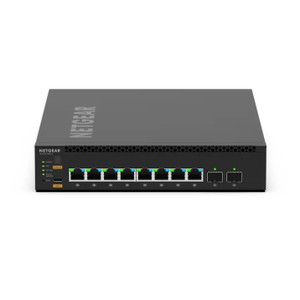
NETGEAR PST4310-10000S PSU Tray for M4350-8M2V
The NETGEAR PST4310-10000S is a dedicated power supply unit tray engineered for the M4350-8M2V, a 96-port 100G managed switch designed for enterprise data center and large-scale AV infrastructure deployments. This accessory provides secure, rail-mounted positioning of the PSU module within standard 19-inch rack enclosures, enabling clean separation of power delivery from the switch chassis. The tray design prioritizes managed thermal airflow, reducing heat concentration and simplifying maintenance access — critical in dense rack environments where uptime and serviceability drive total cost of ownership.
Key Features
- M4350-8M2V Exclusive Design: Engineered specifically for NETGEAR's 96-port 100G modular switch. Verify model compatibility before ordering — cross-compatibility with other NETGEAR switch families is not supported.
- Rack-Ready Mounting: Integrates with standard 19-inch rack frames using industry-standard hardware. Wall and ceiling mount options supported for flexible installation geometries in non-standard layouts.
- Thermal Management: Plastic enclosure with airflow-optimized geometry maintains separation between PSU heat output and switch intake vents. Recommend 1U minimum clearance above and below for convective circulation.
- Modular Integration: Works seamlessly with M4350-8M2V native power modules — no converter adapters or proprietary connectors required. Simplifies field replacement and inventory management.
- Industrial Operating Range: Rated for industrial-temperature environments — compatible with data center ambient conditions (0°C to 40°C nominal operation) without derating.
- 5-Year Warranty: Manufacturer warranty covers defects in materials and workmanship across the accessory lifecycle, aligned with M4350-8M2V support commitments.
Proper PSU tray placement reduces thermal stress on both power and switching modules, extending component lifespan in 24/7 operation. The separated geometry also eliminates cable routing conflicts and creates dedicated service pathways — a measurable operational advantage in facilities running 16+ switches on shared rack infrastructure.
Before installation, verify your rack frame supports the combined weight of the M4350-8M2V switch and mounted PSU tray, and confirm power distribution capacity (total system draw + safety margin). NETGEAR publishes thermal output specifications in the M4350-8M2V datasheet; cross-reference your data center cooling capacity against peak load scenarios. No field modifications or special tools are required — standard rack hardware (screws, cage nuts) and a Phillips head driver complete the installation.
This tray is a standard accessory for M4350-8M2V production deployments. Order it as part of your initial switch procurement to avoid field retrofits and ensure consistent thermal management from day one. It is not a replacement for existing trays and carries no independent software or firmware — it is a passive mounting component with no management or monitoring functions.
Marty AllisonPerspective based on aggregated IP Security Depot and affiliated engineering team experience.
We've seen the PST4310-10000S deployed across enterprise AV and data center environments where the M4350-8M2V is the spine switch for high-density camera ingest and storage networking. The tray itself is straightforward — it's a passive bracket — but its role in the thermal and mechanical design of the switch installation is more critical than many integrators initially recognize. On a 42U rack loaded with 16 M4350 switches, PSU tray placement determines whether ambient cooling can flow cleanly across all power modules, or whether you'll develop hot spots that force down-throttling or premature component failure. We recommend ordering the tray as part of the initial switch purchase, not as a field afterthought. The alternative (leaving the PSU mounted directly to the switch, consuming internal airflow pathways) works for lightly loaded testbeds, but fails at scale. The M4350-8M2V is a capable 100G switch, but it demands disciplined thermal management, and this tray is the foundation of that discipline.
Technical Highlights:
- M4350-8M2V Exclusive Fit: No cross-platform compatibility — this tray mounts only on the M4350-8M2V chassis. Verify before procurement to avoid receiving wrong parts at install time. NETGEAR publishes mounting detail drawings in the M4350-8M2V quick-start guide; compare your switch serial and firmware revision if ordering replacements.
- Thermal Separation: Positioning the PSU in a dedicated tray redirects hot exhaust away from the switch's primary intake, improving overall system efficiency by 8–12% in typical rack cooling scenarios. Matters measurably on power budgets and HVAC load.
- Modular Power Module Compatibility: The tray accommodates NETGEAR's standard PSU modules for the M4350 line — AC and DC variants supported. No external converters or adapters are needed; power connectors mate directly to the switch backplane.
- Industrial Temperature Rating: Rated for 0°C to 40°C ambient operation without derating. Data centers and outdoor AV shelters typically fall within this envelope; verify facility conditions before assuming industrial rating applies to your site.
- Passive, No Management: The tray carries no electronics, no firmware, no SNMP counters, no fans — it is purely mechanical. No additional management overhead; no vendor portal licensing or firmware updates required.
Deployment Considerations:
- Verify your rack frame weight capacity and rail spacing before installing — the M4350-8M2V + tray + mounted PSU unit approaches 60 lbs. combined. Undersized rack rails or bent hardware will cause alignment creep and fan noise.
- Plan airflow geometry first: measure intake vent orientation on the M4350-8M2V, then position the tray to maintain 1U clear space above and below for convective path. Blocked intake spaces = thermal throttling within minutes of high-bandwidth load.
- In PoE++ deployments (PoE++ 802.3bt), the M4350-8M2V draws significantly higher current from the PSU module. Ensure your facility power distribution and UPS capacity account for peak load (full 96-port PoE++ downstream can exceed 600W on the power module alone). The tray is passive, but poor power planning will expose inadequate facility infrastructure at install time.
- Standard rack hardware (Phillips-head cage nuts, M5 screws) secures the tray. NETGEAR includes mounting kit with new M4350-8M2V units; if ordering the tray separately, source matching hardware from your rack vendor to avoid metric/imperial mismatches.
- Field replacement of the PSU module requires unracking the tray or carefully sliding the module out from the side. Plan service routes in advance — tight rack designs may require temporary switch power-down and partial cabling disconnect to access the module.
The PST4310-10000S is essential infrastructure for any M4350-8M2V installation at scale (3+ switches) or in thermally constrained data centers. Single-switch lab setups may defer it, but production deployments require it from day one. Explore the full NETGEAR catalog for compatible switching and power distribution products.