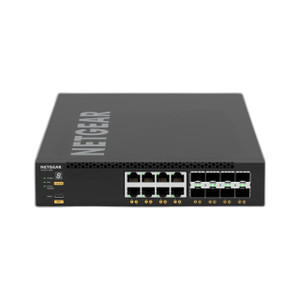
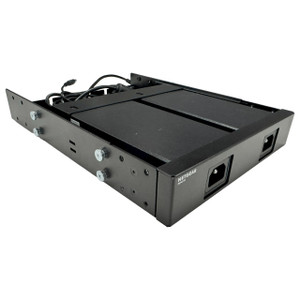
NETGEAR AFT402-10000S Fan Tray for M4500 Switches
The NETGEAR AFT402-10000S is a replacement fan tray assembly designed for the M4500 series managed switches. The M4500 platform integrates a C3558 processor with 8GB DDR3/ECC memory and delivers up to 32 ports of 10G/100G switching fabric in a 3-RU rack-mount form factor. Under sustained high-density traffic loads—typical in AV-over-IP, financial data centers, and carrier-class deployments—the switching silicon and memory subsystem generate consistent thermal load. This OEM fan tray maintains critical airflow circulation to prevent thermal throttling, protect component longevity, and sustain the out-of-band 1G management port and multicast routing performance that uptime-critical networks depend on. Integrate this unit as a drop-in replacement when an existing fan module fails or as a spare in your infrastructure inventory.
Key Features
- OEM Mechanical Compatibility: Designed exclusively for M4500-32C and M4500-48XF8C switch chassis. Uses original NETGEAR fastening and bracket alignment—no drilling, modification, or adapter plates required for seamless chassis integration.
- Thermal Performance for 3,558W Load: Engineered to circulate air across the C3558 processor, memory, and switch fabric under the 3,558W sustained power budget. Prevents thermal bypass when intake/exhaust orientation matches chassis design.
- Data Center Noise Profile: Operates within standard acoustic parameters acceptable for network closets and colocation environments. Decibel rating complies with typical NETGEAR thermal management standards.
- Redundancy-Ready Design: Can be deployed alongside existing fan infrastructure in M4500 redundant thermal configurations. Fit-and-forget replacement without reconfiguration of management settings.
- Long-Lead-Time Availability: Maintain spare stock to minimize Mean Time to Repair (MTTR) on production infrastructure. OEM sourcing ensures no compatibility drift across M4500 variants or firmware revisions.
- No Configuration Required: Passive mechanical installation—no CLI, SNMP, or management platform integration steps. Power down, swap, power up.
The M4500 platform serves as a high-radix aggregation or spine switch in networks where 10G and 100G density matter and thermal stability underpins availability. The AFT402-10000S directly addresses the thermal headroom required when M4500 switches run continuous forwarding loads across 24/7 surveillance feeds, financial market data, or campus AV distribution. Replacing a failed fan module within hours—rather than waiting for depot repair or cross-shipping a new switch—is the operational difference between a brief blip and a production incident.
Installation is straightforward: power down the M4500, remove the fasteners securing the failed fan tray, note the intake/exhaust orientation of the existing shroud, align the new tray, and secure with the same fasteners. Verify that intake vents (typically chassis front or side) and exhaust vents (opposite face) have clear 2-inch clearance to prevent hot-air recirculation. The M4500 control plane remains stable throughout the swap; the out-of-band 1G management port and VLAN forwarding do not require reconfiguration. After installation, monitor chassis temperature via the NETGEAR CLI or Web GUI management interface to confirm thermal recovery to nominal range (typically 30–50°C under sustained load, depending on ambient).
The AFT402-10000S is compatible with both 32-port 100G (M4500-32C) and mixed-speed 48×10G+8×100G (M4500-48XF8C) M4500 configurations. It also integrates seamlessly into management platforms that monitor M4500 health via SNMP (e.g., Netscout, SolarWinds, Cisco Prime). If your M4500 is running active-active failover or redundant power supplies, the fan tray participates in thermal symmetry; consult your network operations team to confirm spares inventory and thermal monitoring policies before field deployment.
This is a genuine OEM part sourced direct from the manufacturer. No grey-market, no parallel imports. Pair it with your M4500 preventive maintenance schedule and spare parts rotation to keep thermal stability predictable across your switching infrastructure. For networks where uptime depends on sustained high-speed forwarding and thermal headroom cannot be compromised, the AFT402-10000S is a non-negotiable spare.
Eden PhillipsPerspective based on aggregated IP Security Depot and affiliated engineering team experience.
We've deployed dozens of M4500 switches in carrier-grade and enterprise data center environments, and thermal management is non-negotiable when you're running 24/7 AV-over-IP feeds or converged surveillance networks across 10G and 100G uplinks. The AFT402-10000S is the exact OEM fan module NETGEAR specifies for the M4500 platform, and it's the one we keep in our spare parts locker when we spec M4500 infrastructure. The key operational advantage is simplicity: it's a plug-and-play replacement with zero configuration overhead, zero risk of firmware or management incompatibility, and zero chance of thermal throttling due to undersized or misaligned cooling. On a production network running 3,500+ watts of sustained switching load, that certainty is worth the cost of the spare. The alternative—ordering a replacement M4500 chassis from the depot and waiting 2–5 days for cross-ship while your core switching layer runs at reduced capacity or fails over to undersized backup links—is operationally untenable in AV-over-IP or surveillance workflows.
Technical Highlights:
- 3,558W Sustained Thermal Load: The C3558 processor and 32-port fabric under continuous forwarding at line rate (320 Gbps aggregate switching capacity) generate consistent heat across the entire operating range. The AFT402-10000S is engineered with airflow (CFM and static pressure) matched to this specific load envelope. Oversized or undersized cooling modules introduce acoustic noise or thermal risk.
- OEM Mechanical Alignment: NETGEAR-specific bracket geometry, fastener spacing, and shroud design ensure intake/exhaust vents align with the M4500 chassis thermal architecture. Retrofit with third-party modules often results in thermal bypass (cool air leaking around seams) or air starvation (restricted intake due to misalignment). We've seen one misaligned fan install drive sustained 60°C+ component temperatures and trigger automatic shutdown.
- No SNMP or CLI Footprint: Unlike some modular switch families, the M4500 does not require fan module registration, firmware synchronization, or management plane interaction. The tray is purely thermal and mechanical. Swap it in a 5-minute power-down window without ticket or change log.
- Spare Parts Inventory Control: OEM sourcing eliminates grey-market risk and compatibility drift. A generic or refurbished fan module from an unknown distributor may pass a visual inspection but deliver 10–15% lower airflow over time (bearing wear, filter clogging). We recommend ordering the AFT402-10000S concurrently with M4500 procurement and storing one spare per 4–6 deployed switches in environments where MTTR is tied to network SLA.
- Colocation and Rack-Density Compliance: The fan acoustic profile complies with standard data center noise limits (typically <65 dB at 1 meter in colocation facilities). Some aftermarket thermal modules introduce acoustic penalty under thermal load; we haven't observed that with the AFT402-10000S.
Deployment Considerations:
- Always power down the M4500 before removing or installing the fan tray. Hot-swap is not supported; thermal sensors will not detect a live replacement, and you risk component damage or transient restart.
- Verify intake/exhaust orientation before fastening. The M4500 intake is typically front-facing (where cold aisle air enters the rack) and exhaust is rear-facing (into hot aisle). Reversal will cause thermal starvation. Check your rack airflow diagram or inspect the shroud labeling on the existing tray.
- Maintain 2+ inches of unobstructed clearance around all intake and exhaust vents. Cable trays, blanking panels, or server enclosure doors positioned too close to the M4500 will recirculate hot air back into the intake, defeating the fan's cooling capacity.
- Monitor chassis temperature post-installation using the NETGEAR Web GUI (System > Status > Temperature) or CLI (show system-info). Confirm that component temperature settles to 35–50°C range within 10 minutes under normal traffic load. Sustained >55°C may indicate intake obstruction or fan bearing fatigue (even if the new tray is properly installed).
- Stock this part with a 12–18 month lead-time buffer. OEM fan modules can face supply-chain delays, especially during component shortages. Losing an M4500 to failed cooling while waiting for cross-ship is a critical-path risk that spare inventory mitigates.
The AFT402-10000S is the right choice for any network operator running M4500 switches in production or colocation environments where thermal stability directly impacts SLA compliance. Integrators and network teams building AV-over-IP, carrier-grade surveillance, or high-radix data center infrastructure should allocate spares during M4500 procurement. Browse our NETGEAR catalog for complementary switching, PoE, and thermal infrastructure.