Black Box ACU1500A-R3 DVI-D USB HID KVM Extender over CATx
Overview
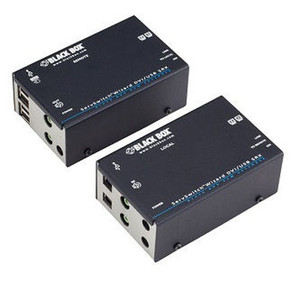
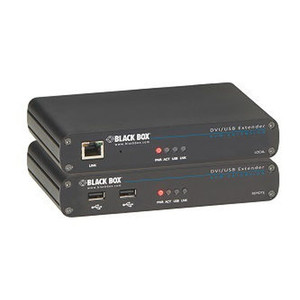
The Black Box ACU1500A-R3 is a KVM extender purpose-built for deployments where a DVI-D video source and USB HID peripherals — keyboard and mouse — need to operate at a distance from the host system over standard CATx cable infrastructure. Designed for environments where running dedicated copper to a remote workstation or control console is the practical path, the ACU1500A-R3 supports resolutions up to 1920x1200, keeping full-detail display performance intact at the remote end. If your control room, broadcast desk, or secure operator station needs clean pixel-accurate DVI-D extension without converting to a different signal type, this unit addresses that requirement directly. For a broader look at the Black Box product catalog, including KVM switches and signal extension solutions, the brand page covers the full range.
Key Features
- 1920x1200 Maximum Resolution: Full WUXGA output at the remote end means pixel-accurate rendering of high-density dashboards, CAD views, or video surveillance monitoring grids — no resolution stepping that forces you to compromise display layout.
- DVI-D Signal Extension: Pure digital video path over CATx eliminates analog conversion artifacts. If your source and display are both DVI-D, you keep the signal chain clean without introducing an HDMI or DisplayPort adapter in the path.
- USB HID Support: Keyboard and mouse traffic rides the same CATx run as video, reducing cable count to a single infrastructure cable. HID-class USB covers standard keyboards, mice, and compatible input devices — not bulk-transfer peripherals like storage or webcams.
- CATx Cable Infrastructure: Leverages existing Cat5e/Cat6 runs already deployed in the facility. If structured cabling is already in place to the remote operator position, you may not need to pull new cable at all — check your structured cabling inventory before ordering extension media.
- Black Form Factor: Compact chassis in black finish integrates cleanly at both the local and remote ends of a rack or desktop installation without drawing attention in a tidy control room environment.
Integration & Compatibility
The ACU1500A-R3 operates on the KVM extender model of a local transmitter (at the host) and a remote receiver (at the operator position), connected by a CATx cable run. Verify cable run length against Black Box's supported distance specification before deployment — CATx-based KVM extenders are distance-sensitive and performance degrades beyond rated range. USB HID compatibility covers standard boot-class input devices; verify any specialty input device against the HID profile before committing to this unit in a specialized workstation environment. For installations requiring PoE-powered endpoints or fiber-based extension over longer runs, consider a fiber KVM extender variant suited to the distance and media type. If you're pairing this with a KVM switch upstream, confirm DVI-D port availability and USB HID passthrough support on the switch side.
Frequently Asked Questions
Q: What video connector does the ACU1500A-R3 use?
A: The ACU1500A-R3 uses DVI-D — pure digital, no analog component. It does not support DVI-A or DVI-I analog signals. Ensure your source and display both have DVI-D ports, or use an appropriate adapter at the display end only if signal conversion is not required.
Q: What is the maximum display resolution supported?
A: The ACU1500A-R3 supports resolutions up to 1920x1200 (WUXGA). This covers 1080p and most standard widescreen resolutions used in control room and operator workstation deployments.
Q: What USB devices are supported over the extension link?
A: The ACU1500A-R3 supports USB HID class devices — primarily keyboards and mice. USB HID does not cover bulk-transfer devices such as USB storage drives, webcams, or audio interfaces. If you need those device classes extended, a different unit with full USB 2.0 extension support would be required.
Q: What type of cable does the ACU1500A-R3 use for extension?
A: The ACU1500A-R3 extends over CATx cable — Cat5e or Cat6 structured cabling. This allows you to leverage existing horizontal cable runs in the facility rather than pulling dedicated video cable to each remote operator position.
Q: Can the ACU1500A-R3 be used with a KVM switch?
A: Yes, the local transmitter unit connects to a host system or KVM switch output. Confirm that the KVM switch provides DVI-D ports and USB HID passthrough before pairing. The extender operates transparently in the signal path between switch output and remote operator console.
The ACU1500A-R3 is a straightforward answer to a specific problem: you have a DVI-D source and need to put the operator console somewhere other than directly beside the host — over CATx cable you likely already have in the ceiling. The 1920x1200 ceiling matters in control room contexts where WUXGA monitors running 16:10 aspect ratio panels are common; lesser extenders that cap at 1080p force you to either letterbox or underutilize the display.
Technical Highlights:
- 1920x1200 Resolution Support: WUXGA is the native resolution of many 24-inch professional monitors. Hitting that ceiling cleanly means no scaling artifacts or soft edges on text-heavy operator displays — critical when reading alarm status fields or VMS camera grids.
- USB HID over CATx: Keyboard and mouse on the same cable as video keeps the remote operator position to a single structured-cabling drop. In a clean-room or secure-room installation where cable penetrations are minimized and audited, this matters.
- DVI-D Digital Path: No DAC/ADC in the signal chain between host GPU and remote display. In environments where signal integrity is a compliance concern — broadcast, defense, financial trading floors — keeping the path all-digital is often a stated requirement, not just a preference.
Deployment Considerations:
- CATx extension is distance-sensitive. Confirm the rated maximum cable run length for the ACU1500A-R3 against your actual floor-plan cable path before pulling cable — actual run distance with patch legs almost always exceeds the straight-line distance.
- USB HID only covers boot-class input devices. If the remote operator needs to plug in a USB token, smartcard reader, or specialty input device beyond keyboard and mouse, verify HID class compatibility explicitly — or plan for a separate USB extension path for those peripherals.
The ACU1500A-R3 fits cleanest in a secure operations center or broadcast control room where the host hardware lives in a locked equipment room and the operator sits at a clean remote console — DVI-D monitors, keyboard, mouse, CATx already in the walls. It is not the right choice for multi-monitor setups, DisplayPort or HDMI sources, or any deployment needing USB device classes beyond HID.