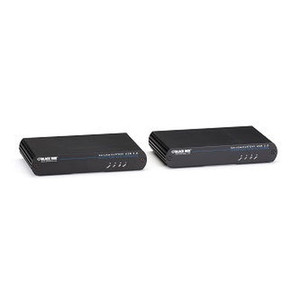
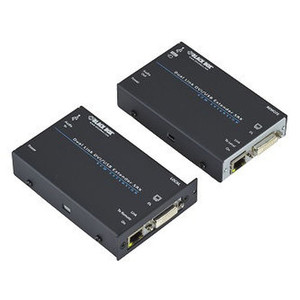
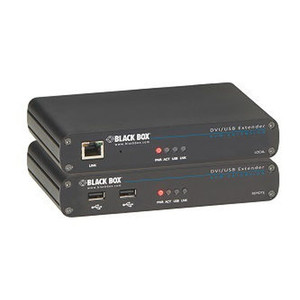
Black Box ACU5502A-R3 Dual-Monitor DVI-D USB 2.0 KVM Extender
Overview
The Black Box ACU5502A-R3 is a single-access KVM extender designed for dual-monitor DVI-D deployments that need to push keyboard, video, mouse, USB 2.0, and audio signals across CATx infrastructure — without running separate cables for every function. If you're operating a control room, broadcast suite, or secure workstation environment where the compute hardware needs to live in a separate rack or equipment room, this extender lets you place the host system remotely while the operator works from a clean desk with two full DVI-D displays.
The dual-monitor capability is the defining spec here. Single-monitor KVM extenders are common; supporting two independent DVI-D outputs over a single CATx run is a less common requirement that the ACU5502A-R3 addresses directly — relevant for trading desks, dispatch stations, and industrial HMI setups where operators routinely work across two screens.
Key Features
- Dual DVI-D Video: Two independent DVI-D channels mean you're not limited to mirroring — each display can carry a separate signal, which is the standard expectation on any multi-monitor workstation or control console.
- USB 2.0 Support: USB 2.0 extension over the same CATx link covers keyboards, mice, and peripheral devices at the remote end — no need for a local USB hub or additional infrastructure at the host location.
- Audio Extension: Integrated audio pass-through keeps the operator's audio environment intact at the remote console, which matters in dispatch, broadcast, and command center applications where audio cues are operationally significant.
- CATx Transmission: Running over standard CATx cabling means you're using existing structured cabling infrastructure rather than proprietary fiber or coax — straightforward to integrate into any site already wired with Cat5e or Cat6.
- Single-Access Architecture: One operator session at a time, which is the correct model for workstations where access control and session integrity matter — no shared-access risk at the remote console.
Integration & Compatibility
The ACU5502A-R3 (often searched as ACU5502A R3) pairs with compatible Black Box KVM receiver units at the remote console end. Verify receiver compatibility against the Black Box KVM extender family before ordering — the transmitter and receiver must be matched. CATx cable quality and run length directly affect signal integrity; consult the Black Box product catalog for distance specifications and cable grade recommendations. For installations involving multiple extended workstations, also review KVM switches to understand how extenders integrate into larger matrix or multi-user switching configurations. If your site uses structured cabling infrastructure, see the structured cabling category for compatible patch panels and cable management.
Frequently Asked Questions
Q: Does the ACU5502A-R3 support two independent DVI-D displays or just mirroring?
A: The ACU5502A-R3 is specified as a dual-monitor DVI-D extender, meaning it carries two DVI-D video channels. For confirmation that both channels operate independently versus mirrored, consult the Black Box datasheet for this specific model.
Q: What CATx cable grade is recommended for the ACU5502A-R3?
A: Black Box's KVM extender line generally supports Cat5e or Cat6. Maximum extension distance and required cable grade should be confirmed against the manufacturer's specifications for ACU5502A-R3 before planning your cable runs.
Q: Does the ACU5502A-R3 require external power at the remote console end?
A: Power requirements for both the local transmitter and remote receiver units are product-specific. Confirm power supply requirements in the Black Box documentation before installation.
Q: Is the ACU5502A-R3 compatible with Black Box KVM switches for multi-user environments?
A: KVM extenders in this family can integrate with compatible Black Box KVM switching infrastructure, but receiver/transmitter and switch compatibility must be verified against Black Box's current compatibility matrix for the ACU5502A-R3.
Q: What USB device types are supported at the remote console?
A: The ACU5502A-R3 extends USB 2.0, which covers standard HID devices (keyboard, mouse) and many peripherals. USB 3.0 or isochronous USB devices (webcams, audio interfaces) may have limitations — check Black Box's documentation for supported device classes.
The ACU5502A-R3 fills a specific gap that single-monitor extenders can't address: dual DVI-D over a single CATx run with USB 2.0 and audio in the same link. That combination targets control room and dispatch deployments where operators are running two-screen setups and the compute hardware needs to be physically separated from the operator position — either for security zoning, noise control, or equipment room density reasons.
Technical Highlights:
- Dual DVI-D channels: Two video outputs over a single CATx run eliminates the need for two separate extender links per workstation — reduces cable count and switch port consumption in multi-seat installations.
- USB 2.0 extension: Covers the full HID peripheral set (keyboard, mouse, and most standard USB devices) at the remote console without a local USB hub or powered repeater at the workstation end.
- Integrated audio: Audio extension in the same link matters in dispatch and command center environments — operators get their full console experience without a separate audio cable run to the remote position.
Deployment Considerations:
- Match the ACU5502A-R3 transmitter to a verified compatible Black Box receiver unit before ordering — mismatched extender pairs are a common installation error that surfaces after the cable plant is already dressed.
- CATx run length and cable grade directly affect maximum resolution and signal stability; confirm the manufacturer's distance table for this model against your actual cable runs before committing to the design.
The ACU5502A-R3 is best suited for security operations centers, broadcast production desks, and industrial control rooms where dual-display operator positions need clean separation from rack-mounted compute — and where existing Cat5e/Cat6 infrastructure is already in place.