Buyer’s notePoE switch sizingTotal PoE budget matters more than port count: sum your camera wattage and multiply by 1.25 for headroom.

PoE Switches

Selecting a sort option will reload the product list.

Showing Results for PoE Switches

  • Save $119.41
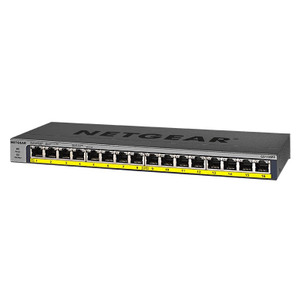
    NETGEAR GS116PP-100NAS PoE Network Switch
    Add to Cart The item has been added

    NETGEAR GS116PP-100NAS

    NETGEAR GS116PP-100NAS PoE Network Switch

    16-port unmanaged gigabit network switch with integrated PoE+ (IEEE 802.3at) power delivery across all ports

    • All 16 ports deliver PoE+ (802.3at) power within a 183W shared budget.
    • 32 Gbps non-blocking switching handles full wire-rate on every gigabit port.
    • Unmanaged design means zero configuration — plug in and devices go live instantly.
    Usually Ships in 2-3 Weeks Free shipping over $499
    $342.40 $222.99 Save $119.41
    The item has been added Add to quote
    $342.40 $222.99 Save $119.41
    Save $119.41 Add to cart Add to quote
  • Save $121.89
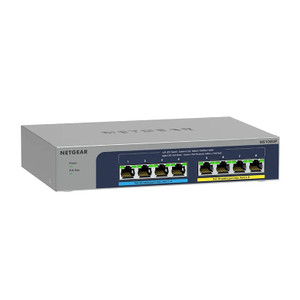
    Netgear MS108UP-100NAS
    Add to Cart The item has been added

    NETGEAR MS108UP-100NAS

    Netgear MS108UP-100NAS

    Compact, unmanaged network switch purpose-built for network switch deployments in warehouse automation, IP surveillance, and distributed edge

    • All 8 ports deliver 2.5G throughput, eliminating bottlenecks on 4K IP camera feeds.
    • PoE++ (802.3bt) supplies up to 95W per port, powering PTZ cameras and illuminators on one cable.
    • Unmanaged plug-and-forward operation enables zero-config deployment at edge and warehouse sites.
    Usually Ships in 2-3 Weeks Free shipping over $499
    $410.88 $288.99 Save $121.89
    The item has been added Add to quote
    $410.88 $288.99 Save $121.89
    Save $121.89 Add to cart Add to quote
  • Save $1,296.20
    NETGEAR GSM4248PX-TAANAS PoE Network Switch
    Add to Cart The item has been added

    NETGEAR GSM4248PX-TAANAS

    NETGEAR GSM4248PX-TAANAS PoE Network Switch

    • All 24 ports run at 10 Gbps simultaneously with zero oversubscription on a 480 Gbps fabric.
    • 740W PoE+ budget powers up to 24 high-draw IP cameras or access control panels per switch.
    • Layer 3 management with VLAN, QoS, SNMP, and CLI simplifies segmented security deployments.
    Usually Ships in 2-3 Weeks Free shipping over $499
    $4,866.19 $3,569.99 Save $1,296.20
    The item has been added Add to quote
    $4,866.19 $3,569.99 Save $1,296.20
    Save $1,296.20 Add to cart Add to quote
  • Save $143.37
    Netgear MS108EUP-100NAS
    Add to Cart The item has been added

    NETGEAR MS108EUP-100NAS

    Netgear MS108EUP-100NAS

    N 8-port PoE++ switch designed for deployments requiring multi-gigabit connectivity in space-constrained or industrial environments

    • Each of 8 ports delivers 2.5 Gbps throughput plus 95W PoE++, eliminating separate injectors.
    • Managed via CLI, Web GUI, and VLAN support — isolate camera, IoT, and access control traffic.
    • Wall and ceiling mounting options enable PoE distribution without dedicated rack space.
    Usually Ships in 2-3 Weeks Free shipping over $499
    $479.36 $335.99 Save $143.37
    The item has been added Add to quote
    $479.36 $335.99 Save $143.37
    Save $143.37 Add to cart Add to quote

PoE Switches — Engineering-Grade Network Infrastructure for Commercial Deployments

This category covers 0 working models of poe switches sourced manufacturer-direct or through channel-direct US distribution. Build the rest of your system around the architectural choices below — compatibility, environmental rating, and lifecycle decisions made here propagate through every downstream component you specify.

What to Look For

Port count and PoE budget come first. An 8-camera install needs at least 9 ports (cameras + uplink), with PoE budget covering the sum of per-camera PoE class. Account for uplink speed: 1 Gbps uplinks bottleneck under heavy video load on switches with 8+ high-resolution cameras. SFP+ or 10 Gbps uplinks remove that bottleneck on growing sites.

Managed versus unmanaged switches affect troubleshooting and VLAN segmentation. Managed switches (HPE Aruba, Cisco, Netgear ProSAFE M-series) support VLANs, link-aggregation, port mirroring, and SNMP monitoring — essential for any deployment over 16 cameras or with mixed traffic. Unmanaged switches work for small isolated camera networks but limit growth and troubleshooting visibility.

Layer 3 capability (routing, VLAN inter-VLAN routing) becomes important when surveillance, access control, and corporate traffic share the same physical network. Surveillance VLAN isolation is now standard practice — segregate camera traffic from corporate Wi-Fi and guest networks to prevent broadcast storms and lateral attack paths. Confirm the switch supports the VLAN count and ACL complexity you need.

Outdoor/industrial deployments need ruggedized switches. ComNet, Antaira, and Moxa make hardened switches rated for -40°C to +75°C, vibration, and waterproof housings. DIN-rail mounting fits standard outdoor enclosures. Standard data-closet switches in outdoor enclosures fail within 1-2 years from condensation and temperature swings; spec the right environment rating up front.

Frequently Asked Questions

What's the difference between managed and unmanaged PoE switches?

Unmanaged switches power-on and forward traffic without configuration — simplest deployment but no VLAN, no monitoring, no troubleshooting visibility. Managed switches add VLANs, link-aggregation, port mirroring, SNMP, and remote-management interfaces. For deployments above 16 cameras or those sharing infrastructure with other systems, managed is the right choice; the per-port cost is modest and the operational benefit is large.

How much PoE budget should I size for?

Sum the PoE-class budget of all PoE-powered devices, then add 20-30% headroom for growth. Eight 802.3at cameras at 30W max each is 240W minimum — but a 130W-budget 8-port PoE+ switch can't deliver that. Confirm both per-port budget and total PoE budget; many entry-level switches advertise PoE+ ports but cap aggregate budget at half the per-port maximum.

Do I need 10 Gbps uplinks?

For installations under 32 cameras with mid-resolution streams, 1 Gbps uplinks suffice. Above that, or when you need fast investigative playback for many simultaneous reviewers, 10 Gbps (SFP+) uplinks remove the choke point. NVRs writing to NAS over the network also benefit. SFP+ has become reasonably affordable on managed switches; opt for it on new installs over 16 cameras.

Can I run VoIP and video on the same switch?

Yes — modern managed switches use VLAN segregation to keep VoIP, video, and data traffic separated even on shared physical ports. Use QoS (Quality of Service) to prioritize VoIP for low latency and assign video its own queue. Avoid mixing untagged traffic types on a single switch port without VLAN configuration; broadcast storms and bandwidth competition cause both voice and video quality issues.

What's the right uplink between buildings on a campus?

Single-mode fiber for runs over 100 m, multi-mode for shorter runs (typically up to 550 m on OM3, 300 m on OM4 at 10 Gbps). Bidirectional SFPs (single fiber instead of pair) save fiber count when the run is already deployed. Avoid copper between buildings — ground-potential differences during lightning strikes destroy switch SFP modules even when surge-protected.

Need help choosing? Talk to a Senior Specialist — direct line 877-277-7147 or request a quote.