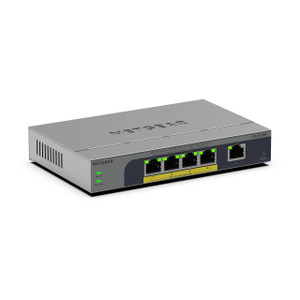
NETGEAR MS108UP-100NAS 8-Port PoE++ Multi-Gigabit Unmanaged Switch
Overview
The NETGEAR MS108UP-100NAS is a compact, unmanaged network switch purpose-built for network switch deployments in warehouse automation, IP surveillance, and distributed edge environments where simplicity and immediate functionality matter more than centralized control. This 8-port unit operates at multi-gigabit speeds (2.5G per port) with integrated PoE++ power delivery — meaning you run cameras, wireless access points, and industrial IoT sensors on a single cable run without a separate power injector or wall outlet. The design is straightforward: plug it in, wire your devices, and it works. No configuration required.
Key Features
- 8 PoE++ Ports at 2.5G: Each port supports up to 2.5 Gbps throughput with PoE++ (95W per port maximum). This speed matters when you're pulling high-bitrate video from 4K or multi-sensor IP cameras or synchronizing bulk data from warehouse scanners and mobile computers. Standard 1G switches become a bottleneck; this one avoids it.
- PoE++ Power Budget: Delivers sufficient power per port for demanding edge devices — your high-drain PTZ cameras, thermal imaging modules, and illuminators won't throttle or fail mid-deployment. No external power supplies cluttering the installation.
- Unmanaged Operation: No CLI, no web interface, no SNMP to configure. Plug and forward — every port learns MAC addresses automatically and switches frames in hardware. Ideal when you need to deploy quickly and your network topology is flat and simple. Downside: no VLAN isolation, no quality-of-service tuning, no per-port monitoring. If you need any of those, step up to a managed variant in the NETGEAR catalog.
- Industrial Operating Temperature: Rated for industrial ambient conditions, so the unit handles equipment closets and outdoor junction boxes that standard office switches would fail in. Check the exact temperature range against your site conditions.
- Wall and Ceiling Mounting: Compact form factor with mounting options means you can tuck this near your camera clusters or edge compute nodes rather than forcing everything back to a server room.
- Plastic Housing: Lightweight, corrosion-resistant in dry indoor and sheltered outdoor environments. Not suitable for direct rain or salt spray; for that, look for metal-enclosure variants with IP67 environmental ratings.
Deployment Context
Deploy the MS108UP-100NAS (often searched as MS108UP 100NAS) where you have a small cluster of PoE devices and want deterministic, zero-configuration plug-and-play behavior. Typical scenarios: a warehouse zone with 6–8 IP cameras and one wireless access point, a parking lot with a few thermal sensors and a mobile hotspot, or a manufacturing floor subsection with edge cameras feeding local analytics. It works equally well in a lab or small remote site where you're prototyping before full rollout.
If your deployment grows beyond 8 PoE devices, or if you need VLAN segmentation to isolate guest WiFi from production surveillance, or if you require detailed port-level monitoring and uptime alerting, this unit is not the answer. Step up to a managed switch or consider daisy-chaining multiple unmanaged units (though that sacrifices redundancy and control).
Integration Notes
The MS108UP-100NAS integrates with any standard IP cameras, wireless access points, industrial scanners, and edge devices that support PoE or PoE++ input. No special drivers or firmware required. It will sit happily behind an enterprise managed switch or standalone in a remote location with a single uplink back to your core network. Bandwidth-wise, the 2.5G per-port speed handles sustained 4K 30fps video streams per camera without congestion, assuming your uplink to the core network is at least gigabit (and preferably 10G if you're aggregating multiple high-bitrate streams).
Frequently Asked Questions
Q: Does the MS108UP-100NAS require any configuration?
A: No. It is an unmanaged switch. Plug in power, connect your devices to the ports, and it automatically forwards Ethernet frames. There is no web interface, CLI, or management protocol to configure.
Q: What is the maximum PoE power budget on the MS108UP-100NAS?
A: Each of the 8 ports can deliver up to 95W via PoE++. Your specific power budget depends on the number and wattage of connected devices and any thermal management constraints under sustained load. Consult the detailed manufacturer specifications for worst-case budget calculations.
Q: Can I use this switch with standard 802.3af PoE devices?
A: Yes. PoE++ is backward-compatible with standard PoE (802.3af, 15.4W) and PoE+ (802.3at, 30W). The switch will negotiate the appropriate power level with each device.
Q: Is the MS108UP-100NAS suitable for outdoor installation?
A: It has an industrial operating temperature range, but the plastic housing is not rated for direct rain or salt spray. Install it in a sheltered enclosure, under an eave, or in a sealed junction box if outdoor mounting is required. For full outdoor duty, confirm the IP rating against your environment or choose a metal-enclosure variant.
Q: Does the MS108UP-100NAS support VLAN or QoS?
A: No. It is unmanaged, so there is no VLAN isolation, QoS queuing, or per-port configuration. If you need those features, upgrade to a managed switch in the NETGEAR portfolio.
Q: What is the warranty on this unit?
A: Limited Lifetime Warranty. Confirm the exact coverage and terms with the distributor or manufacturer.
The MS108UP-100NAS occupies a narrow but real niche in edge infrastructure. It is unmanaged, which means zero operational overhead — ship it to a remote site, plug it in, and it works. But that simplicity comes with hard constraints: no VLAN segmentation, no traffic shaping, no per-port analytics. For small, flat deployments with predictable device counts and no multi-tenant isolation requirements, it is pragmatic. For anything larger or more complex, you will outgrow it quickly.
Technical Highlights:
- 2.5 Gbps per port: Handles sustained 4K video streams (30–50 Mbps per stream depending on codec) without saturation. Eight cameras running simultaneously consume roughly 240–400 Mbps, leaving headroom for the uplink and device management traffic.
- 95W PoE++ per port: Eliminates wall-mounted power supplies for high-drain devices. A thermal PTZ camera (60–70W) or a thermal imaging module with IR illuminator plugs directly in. Single-cable simplicity reduces labor and failure points.
- Plastic housing, industrial temperature range: Trade-off: lighter weight and corrosion resistance in dry conditions, but no IP67 gasket or metal shielding for rain or electromagnetic interference. Suitable for indoor equipment rooms, sheltered outdoor cabinets, and warehouse utility closets; not suitable for wet or harsh industrial zones without secondary enclosure.
Deployment Considerations:
- No management interface: You cannot monitor per-port status, packet errors, or power draw remotely. If a port fails, you must walk to the switch to confirm. Add a managed switch upstream if you need alerting and diagnostics.
- Flat network topology: All eight ports are in a single broadcast domain. Broadcast storms from misconfigured devices or ARP floods will congest the entire switch. If you need to isolate guest WiFi, maintenance VLANs, or separate camera zones, this unit cannot do it. You will need a managed switch or multiple smaller unmanaged units (with operational complexity).
- Uplink bottleneck: The switch itself supports 2.5G per port, but if your core network connection is 1G or slower, aggregating multiple high-bitrate streams will back up at that link. Verify your backhaul bandwidth before committing.
Position the MS108UP-100NAS for greenfield warehouse deployments where you are provisioning a single remote zone (parking lot, loading dock, cold storage) with a handful of cameras and sensors. Avoid it for multi-tenant environments, high-security facilities requiring traffic isolation, or sites where you expect rapid device growth. For those scenarios, jump to a managed alternative or a modular distributed architecture.