
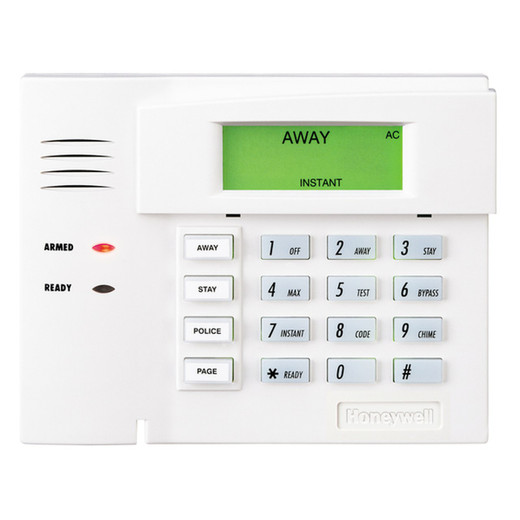


Product images are provided for reference and may not represent the exact model, configuration, or included
components.
Overview
SKU:
6150
UPC:
781410351943
Availability:
Usually ships in 24 hours
Warranty
Manufacturer Warranty

Honeywell 6150 Fixed-English Alarm Keypad
Honeywell 6150 Fixed-English Display Keypad Overview The Honeywell 6150 is a hardwired keypad featuring a fixed-English LCD display with 3-digit zone …

Honeywell 6150 Fixed-English Alarm Keypad
$188.99
$89.99
Your recommended setup
Review items below — quantities update pricing automatically.
Item
Qty
Status
Price
Optional Add-Ons recommended
Services optional
Bundle Summary
Bundle Subtotal:
$0.00
Optional Add-Ons:
$0.00
Services:
$0.00
Total:
$0.00
Overview
SKU:
6150
UPC:
781410351943
Availability:
Usually ships in 24 hours
Warranty
Manufacturer Warranty
Description

Honeywell 6150 Fixed-English Display Keypad
Overview
The Honeywell 6150 is a hardwired keypad featuring a fixed-English LCD display with 3-digit zone numbers, a backlit keypad, and a built-in piezoelectric sounder. Four oversized programmable function keys provide one-touch access to Fire, Burglary, Panic, and Emergency functions. The 6150 connects to the panel via the standard 4-wire keypad data bus.
Deployment scenarios
The 6150 is the standard user interface for VISTA-series alarm panels in residential and commercial installations. It is commonly deployed at primary and secondary entry points where users need to arm, disarm, and view system status. Multiple keypads can be installed on the same data bus for multi-door access or multi-floor buildings.
Interface and display
The fixed-English display shows plain-language status messages and 3-digit zone identifiers. The backlit LCD and keys provide visibility in low-light entry areas. The built-in sounder provides audible feedback for entry/exit delays, alarms, and trouble conditions. Standby current is 40 mA, rising to 70 mA during active use.
Installation notes
The 6150 connects via 4-wire bus (Red +12V, Black GND, Green Data In, Yellow Data Out). Dimensions are 4-7/8" H x 6-1/4" W x 1" D (125 mm x 160 mm x 25 mm). Flush or surface mounting is supported. Compatible with all VISTA-series control panels.
Marty Allison
The 6150 is the default keypad I specify for VISTA installations when the customer does not require a touchscreen interface. The fixed-English display is significantly easier for end users to understand than the older numeric-only keypads, and the oversized function keys reduce errors during high-stress alarm events.
Technical Highlights:
- Fixed-English display: Plain-language messages eliminate user confusion compared to numeric-only keypads
- Built-in sounder: Integrated piezoelectric sounder provides audible feedback without an external annunciator
Deployment Considerations:
- Run a dedicated 4-wire homerun from the panel to each keypad for clean signal integrity on long bus runs
- Program the four function keys to match the end user training documentation for consistent operation across all keypads on the system
For larger installations, pair the 6150 at secondary doors with a Tuxedo Touch at the primary entry for a tiered interface strategy that balances cost and capability.
Specifications
Product Type:
Fixed-English Display Alarm Keypad
Display Type:
Fixed-English LCD with 3-digit zone numbers
Backlight:
Yes, backlit LCD and keys
Sounder:
Built-in piezoelectric sounder
Function Keys:
4 programmable (Fire, Burglary, Panic, Emergency)
Connection:
4-wire keypad data bus
Standby Current:
40mA
Active Current:
70mA
Dimensions:
4-7/8" H x 6-1/4" W x 1" D
Compatible Panels:
All VISTA-series control panels
Mounting:
Flush or surface mount
Series:
6000 Series
warranty:
Manufacturer Warranty
Have Questions?
Ask an Expert.
Your recommended setup
Review items below — quantities update pricing automatically.
Item
Qty
Status
Price
Optional Add-Ons recommended
Services optional
Bundle Summary
Bundle Subtotal:
$0.00
Optional Add-Ons:
$0.00
Services:
$0.00
Total:
$0.00
RELATED PRODUCTS

Honeywell
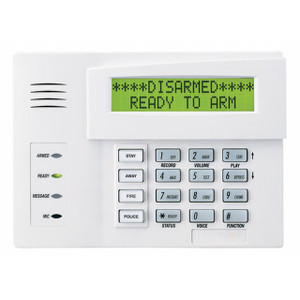
Honeywell 6160RF Alpha Display Alarm Keypad with Built-in Transceiver
$523.99
$247.99
Save $276.00

System Design, Deployment & Technical Support
Support services and planning resources for commercial surveillance, access control, and infrastructure deployments.
Fixed scope • Fixed price
System Design Assistance
- Get help validating product compatibility
- Coverage requirements
- Storage planning and deployment architecture before you buy.
Deployment & Configuration Support
- Access fixed-scope support for rollout planning
- User setup guidance
- Migration and system standardization across single-site or multi-site deployments
Guides, Tools & Calculators
- PoE requirements
- Storage retention
- Camera selection and deployment methodology