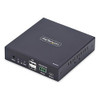
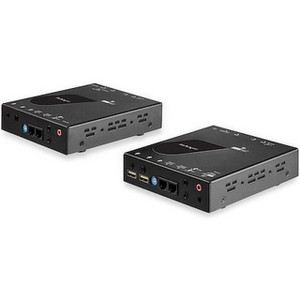
StarTech IH2006-KVM-RX HDMI KVM Receiver Over IP Network
Overview
The StarTech IH2006-KVM-RX is the receiver-side component for the IH2006 IP KVM series, purpose-built to extend 4K 60Hz HDMI video, USB keyboard/mouse control, and stereo audio across a standard IP network — without requiring drivers or dedicated software on the host machine. If you're distributing workstation access across a facility or data center using existing Ethernet infrastructure, this receiver handles the endpoint side of that equation. It is designed exclusively for use within the StarTech IH2006 product family and pairs with the corresponding transmitter unit to complete the KVM-over-IP link.
The IH2006-KVM-RX (often searched as IH2006 KVM RX) ships in a compact steel enclosure measuring 4.2 × 4.1 × 1.0 inches and weighing 10.4 oz — small enough to tuck behind a monitor or mount at a user station without consuming desk real estate.
Key Features
- 4K 60Hz via HDMI 2.0: The single HDMI 2.0 output supports 3840 × 2160 at 60Hz — full 4K at full frame rate. For operators working on color-accurate design workflows, medical imaging displays, or any application where a downscaled or choppy image creates real workflow problems, this matters. Many IP KVM solutions cap at 4K/30Hz; this one doesn't.
- No Drivers Required: OS compatibility is listed as driver-free. That means IT teams don't need to push a software package to every receiver endpoint before deployment, and OS agnosticism is built in. This is especially useful in mixed-OS environments or locked-down endpoint builds where installing third-party drivers triggers change management processes.
- Dual USB 2.0 Type-A Console Ports: Two USB 2.0 Type-A ports handle the local keyboard and mouse at the receiver end. Standard USB 2.0 HID peripherals work without setup — plug in and operate. No proprietary connectors required at the user station.
- 3.5mm Stereo Audio Output: A 3.5mm stereo female jack provides local analog audio output at the receiver, letting operators connect headphones or powered speakers directly. HDMI carries 2-channel audio over the network link; the 3.5mm jack breaks it out locally without needing an HDMI audio extractor downstream.
- Serial Terminal Block Interface: A 3-wire terminal block serial interface is available for integration with room control systems, AV controllers, or other serial-driven automation. For AV-over-IP deployments in conference rooms or control rooms where a room controller needs to trigger source switching, this port provides that control pathway.
- 10W Power Consumption with Universal AC Input: The unit draws a maximum of 10W from a 100–240V AC supply (0.3A input), producing a regulated 5V DC / 2A output internally. Universal AC input means no region-specific power adapters are needed across international deployments. At 10W, it adds negligible load to standard outlet circuits.
- Wide Operating Temperature Range: Rated -20°C to 60°C operating and -30°C to 70°C storage. That operating floor of -20°C covers unheated server rooms, utility spaces, and light industrial environments where temperature control is inconsistent. Most enterprise AV gear cuts off at 0°C.
- Steel Enclosure: The steel chassis provides physical durability appropriate for equipment rooms, under-desk mounting, or wall-mounting scenarios where the unit may be handled during maintenance cycles or isn't rack-mounted in a controlled environment.
- USB Micro-B Service Port: A USB Micro-B (5-pin) port is present for firmware or configuration access. This is a maintenance interface rather than a user-facing port — useful during commissioning or firmware update cycles without needing to pull the unit off the network.
Integration and Compatibility
The IH2006-KVM-RX operates within the StarTech IH2006 KVM-over-IP product series and requires the corresponding transmitter (sold separately) to function. The receiver connects to the local network via its single RJ-45 port and communicates with the transmitter over a standard IP infrastructure — no proprietary cabling runs, no dedicated VLAN required beyond what your network team chooses to configure for AV traffic isolation.
The driver-free design means it will work with Windows, Linux, and macOS hosts on the transmitter side without endpoint software dependencies. For environments running KVM extension infrastructure across multiple operating systems or thin-client environments, that's a meaningful operational simplification.
The serial terminal block expands integration options beyond basic KVM — room automation controllers, matrix switchers, and building management systems that support RS-232 serial can trigger actions via this interface, making the IH2006-KVM-RX a workable fit for AV-over-IP control room and broadcast environments where control system integration is expected.
For deployments requiring PoE planning or structured cabling considerations, reviewing a PoE and network infrastructure guide before commissioning can help avoid bandwidth contention issues on shared switches carrying 4K video streams.
Frequently Asked Questions
Q: Does the IH2006-KVM-RX require any drivers or software to operate?
A: No. The IH2006-KVM-RX is listed as requiring no drivers or software on the connected host. It functions as a plug-and-play endpoint, which simplifies deployment across mixed operating system environments.
Q: What is the maximum video resolution supported by the IH2006-KVM-RX?
A: The IH2006-KVM-RX supports 3840 × 2160 (4K UHD) at 60Hz via HDMI 2.0 output.
Q: What is the warranty on the IH2006-KVM-RX?
A: StarTech provides a 2-year manufacturer warranty on the IH2006-KVM-RX.
Q: Can the IH2006-KVM-RX be used as a standalone KVM receiver with any transmitter?
A: No. The IH2006-KVM-RX is designed specifically for use within the StarTech IH2006 product series and requires the compatible IH2006 transmitter unit. It is not a universal receiver compatible with third-party KVM-over-IP transmitters.
Q: What audio output does the IH2006-KVM-RX provide at the receiver end?
A: The unit includes a 3.5mm stereo female audio jack for local analog audio output, in addition to the 2-channel audio carried over the HDMI 2.0 output.
Q: What is the operating temperature range of the IH2006-KVM-RX?
A: The IH2006-KVM-RX operates from -20°C to 60°C, making it suitable for environments that are not climate-controlled to typical office standards, such as utility rooms or light industrial spaces.
The IH2006-KVM-RX catches my attention specifically because of the -20°C operating floor combined with the driver-free design — two specs that typically don't appear together on IP KVM receivers at this form factor. In practice, deploying the IH2006-KVM-RX in a facility where endpoint rooms aren't always heated (think edge data closets, warehouse control stations, or broadcast truck bays) means you're not babysitting temperature thresholds or worrying about a cold-start failure at 2 AM.
Technical Highlights:
- 4K 60Hz HDMI 2.0 Output: Full 3840 × 2160 at 60Hz without frame rate compromise — relevant if the receiver station is running engineering, design, or medical display workloads where 30Hz introduces perceptible motion lag.
- 10W / Universal AC Input: Draws only 10W at 100–240V AC input. This makes power planning trivial — standard outlet, no dedicated circuit, and no localized power adapter swap when units ship internationally.
- Dual USB 2.0 + 3.5mm Audio: Two Type-A USB 2.0 ports plus a dedicated 3.5mm stereo jack at the receiver means a full user workstation — keyboard, mouse, and headset — connects directly without a USB hub or external audio adapter.
Deployment Considerations:
- This unit is receiver-only and is series-locked to the IH2006 transmitter — budget and plan for the paired transmitter before spec'ing quantities. Mixing with other StarTech KVM-over-IP lines is not supported.
- The USB Micro-B port is a firmware/service interface, not a user data port — don't assign it a front-panel role in your station design. Keep it accessible for maintenance but don't expect it to carry HID or storage traffic.
The IH2006-KVM-RX is the right receiver for government facility operations centers, industrial control rooms, and broadcast environments where 4K fidelity, OS-agnostic operation, and tolerance for variable ambient temperatures are all non-negotiable in the same deployment.