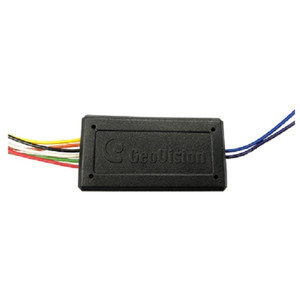
Product images are provided for reference and may not represent the exact model, configuration, or included components.

No Bots, Just Experts

Questions about this product? Free pre-sales support from a senior specialist — product questions, compatibility checks, BOM quotes, price confirmation — typically answered within one business day. Need camera placement or system design work? Engineering time is $175 per hour (qty 1 = 1 hour). Hardware buyers get up to one hour ($175) credited back on their order.

Description

Geovision 81-GP232-001 GPS Receiver RS232

Overview

The Geovision 81-GP232-001 is an RS232 GPS receiver module designed to integrate with Geovision DVR systems. It attaches via RS232 serial connection to inject GPS location and precise timestamps into video metadata and recordings — essential for fleet or mobile surveillance where geotagging video evidence matters (vehicle trackers, mobile command units, asset tracking rigs). The receiver decodes standard GPS NMEA sentences and writes coordinates directly into the DVR's event log and recorded streams.

Compatibility

Designed for Geovision Comp DVR systems with available RS232 serial ports. Verify your DVR model includes an unused RS232 interface before ordering — older Geovision units use serial for modem or alarm integration, so port availability is a prerequisite. Does not support USB or Ethernet connection; serial wiring is required.

Installation Notes

Requires a standard RS232 cable (typically 3–9 conductor) wired from the 81-GP232-001 to the DVR's RS232 port. No external power supply needed — the module draws minimal current from the DVR's serial interface. Mount the GPS antenna in an unobstructed location with clear sky view (roof, exterior bracket, or vehicle body). Install the Geovision GPS driver software on the DVR control PC if not bundled; configure the serial port speed (usually 4800 or 9600 baud) to match the receiver's output rate in the DVR's system settings. Allow 30–60 seconds for initial GPS lock after power-up.

What's in the Box

  • 1x Geovision GPS Receiver Module (81-GP232-001)
  • 1x RS232 connector cable
  • 1x GPS antenna with magnetic base
Specifications
Cable Category: CDVR
Brand: Geovision
MPN: 81-GP232-001
Type: Receiver RS232 FOR Comp DVR
Connectivity: RS-232
Cable_Category: CDVR
Compatible With: Comp
hide_reason: pricing_violation_2026-05-06
Q&A
Reviews

Geovision GPS Receiver M RS232 FOR Comp DVR - 81-GP232-001

$50.00
$49.99

RELATED PRODUCTS

Geovision GV-GPS GPS Receiver RS232

Geovision GV-GPS

Geovision GV-GPS GPS Receiver RS232

GPS receiver with RS232 for Geovision DVRs—geolocation and UTC sync

  • Embeds satellite geolocation and UTC time directly into DVR video metadata.
  • RS232 serial interface connects to compatible Geovision DVR systems without adapters.
  • Supports wall, ceiling, and rack mounting for flexible deployment at any site.
Usually Ships in 2-3 Weeks Free shipping over $499
$62.99
The item has been added Add to quote
$62.99
Add to quote
Save $0.01
Geovision 81-P1030-001 Power Box AC24AC 72VA
Add to Cart The item has been added

Geovision 81-P1030-001

Geovision 81-P1030-001 Power Box AC24AC 72VA

Regulated 24V AC power box designed for IP PTZ camera installations and associated field equipment

  • Delivers regulated 24V AC at 72VA to support PTZ motors and auxiliary heater loads.
  • Isolation transformer design blocks ground-loop interference and mains transient surges.
  • Thermal overload protection guards against sustained overcurrent from motor jams or faults.
Usually Ships in 2-3 Weeks Free shipping over $499
$147.00 $146.99 Save $0.01
The item has been added Add to quote
$147.00 $146.99 Save $0.01
Save $0.01 Add to cart Add to quote
Save $0.01
Image coming soon
Add to Cart The item has been added

Geovision 81-PB220-001

Geovision 81-PB220-001 PB22 Push Button Green

Green illuminated push button control switch designed for manual activation in AC-powered security and access control systems

  • Green illuminated button provides clear visual confirmation of activation state.
  • 86mm width fits standard wall-mount enclosure cutouts for straightforward panel integration.
  • Designed for AC control systems; verify panel input wiring before deployment.
Usually Ships in 2-3 Weeks Free shipping over $499
$40.00 $39.99 Save $0.01
The item has been added Add to quote
$40.00 $39.99 Save $0.01
Save $0.01 Add to cart Add to quote
Save $34.01
Geovision 81-LSH01-001 12VDC Electromagnetic Lock Surge Protected
Add to Cart The item has been added

Geovision 81-LSH01-001

Geovision GV-ML600 Electromagnetic Lock With - 81-LSH01-001

12VDC electromagnetic lock assembly with integrated voltage spike suppression, designed for door access control installations where power transients

  • Operates on 12VDC, compatible with standard access control panel outputs.
  • Built-in voltage spike suppression protects the lock coil without external diodes.
  • Door frame/header mount fits existing GV-ML600 installations as a direct replacement.
Usually Ships in 2-3 Weeks Free shipping over $499
$154.00 $119.99 Save $34.01
The item has been added Add to quote
$154.00 $119.99 Save $34.01
Save $34.01 Add to cart Add to quote
Save $8.01
Geovision 81-PB410-001 PB41 Push Button Red
Add to Cart The item has been added

Geovision 81-PB410-001

Geovision 81-PB410-001 PB41 Push Button Red

Manual control push button designed for integration with Geovision access control and alarm systems

  • Red housing enables instant visual identification in multi-button panels and kiosks.
  • ACControl connector ensures direct compatibility with Geovision alarm panels and relay modules.
  • Momentary contact switching delivers immediate gate or door strike release on each press.
Usually Ships in 2-3 Weeks Free shipping over $499
$35.00 $26.99 Save $8.01
The item has been added Add to quote
$35.00 $26.99 Save $8.01
Save $8.01 Add to cart Add to quote

System Design, Deployment & Technical Support

Support services and planning resources for commercial surveillance, access control, and infrastructure deployments.

Fixed scope • Fixed price

System Design Assistance

  • Get help validating product compatibility
  • Coverage requirements
  • Storage planning and deployment architecture before you buy.
Request Design Help

Deployment & Configuration Support

  • Access fixed-scope support for rollout planning
  • User setup guidance
  • Migration and system standardization across single-site or multi-site deployments
View Support Services

Guides, Tools & Calculators

  • PoE requirements
  • Storage retention
  • Camera selection and deployment methodology
Open Technical Resources