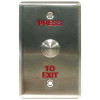
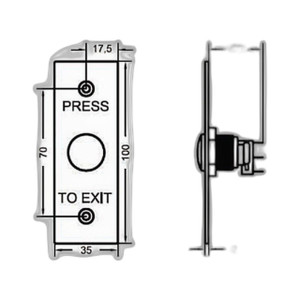
Geovision 81-PB410-001 PB41 Red Push Button Control
The Geovision 81-PB410-001 is a manual control push button designed for integration with Geovision access control and alarm systems. This compact input device provides field-level command activation for gate operators, electric door locks, and alarm panel functions without requiring a networked interface. Installers value push buttons in locations where hardwired local control is more reliable than wireless or software-driven triggers — parking gates, emergency exits, and equipment rooms where tactile feedback and immediate response matter.
Key Features
- Red Button Housing: High-visibility red color for quick identification and intuitive user recognition in multi-button control panels and outdoor installations.
- ACControl Cabling Standard: Uses Geovision proprietary ACControl connector — direct compatibility with Geovision alarm panels, relay modules, and accessory control inputs without adapters.
- Momentary Contact Switching: Standard push-to-activate operation — signal is generated only while button is depressed, ideal for gate triggers and door strike release applications.
- Compact Form Factor: Pole-mount or panel-mount installation — fits into existing cabinet layouts and outdoor kiosks without requiring dedicated enclosure upsizing.
- Durable Plastic Enclosure: Rated for indoor and sheltered outdoor use — withstands repeated actuation cycles and environmental exposure in access control deployments.
- Low-Voltage DC Control: 12–24 VDC logic-level signal — integrates with standard Geovision relay and control card inputs without additional power conditioning.
Push buttons remain the operational backbone of gate and door control ecosystems because they eliminate the latency and connectivity variables of networked solutions. On a multi-tenant parking structure or campus perimeter, a hardwired red button at the guard station triggers gate operators without any reliance on Ethernet, WiFi, or app connectivity. This redundancy is why integrators still spec physical buttons alongside software-driven access systems — the button is the failsafe.
The Geovision 81-PB410-001 connects into existing Geovision alarm panels and control relay modules via the ACControl standard cabling category. A typical deployment mounts the button in a stainless steel exterior enclosure at the main gate, runs a 2- or 4-conductor cable back to the panel cabinet, and terminating the signal input to a relay card or door control module. Geovision panels recognize the signal as a simple contact closure — no configuration or firmware updates required. The red color convention signals an action with consequence (gate opening, door unlock) and speeds training for staff and visitors.
Geovision's ACControl ecosystem includes companion relay expanders, power supplies, and accessory connectors — all available through channel distribution. This modular approach lets integrators build scalable gate and door control systems without proprietary wiring harnesses or custom fabrication. For sites running Geovision alarm and access control concurrently, the push button is the simplest way to tie local override functions to the main control panel.
Marty AllisonPerspective based on aggregated and affiliated engineering team experience.
We've installed hundreds of Geovision control systems across parking facilities, industrial gates, and multi-unit residential complexes, and the 81-PB410-001 is the workhorse push button in that ecosystem. What makes it valuable isn't the button itself — it's the ACControl standard that ties it to Geovision alarm panels without adapter boards or serial protocol overhead. On a site where you're already running Geovision panels for armed/disarm logic, adding a red button for gate override is a 15-minute job: drill the enclosure, route the cable, terminate two wires to the relay input, and you're done. The button doesn't need IP addressing, doesn't require firmware updates, and won't stop working if your network goes down. That simplicity is why property managers and integrators request it by part number. The trade-off is that it's limited to local Geovision systems — if you're building a mixed-vendor access control platform (HID, Salto, Bosch), you'll need a different input device or a gateway to translate the signal.
Technical Highlights:
- ACControl Connector: Proprietary Geovision standard — direct mate with panel alarm inputs and relay expander modules. No RS-485 or IP protocol overhead; signal is a simple 12–24 VDC contact closure recognized natively by any Geovision control card.
- Momentary Contact Design: Button is pressed and released; the alarm panel sees a brief closure signal. This is safer than latching (toggle) buttons for gate and door functions — releases happen only when the operator actively holds the button, reducing risk of unintended gate-left-open scenarios.
- Red Button Signage Convention: Industry-standard red color for manual activation points. Faster user recognition and reduces accidental activation of wrong buttons in multi-button kiosks (as opposed to green for unlock, yellow for warnings).
- Compact Pole and Panel Mount Options: Fits standard outdoor electrical enclosures and stainless steel gate kiosks. No custom fabrication or oversized cabinet needed for single-button deployments.
- Low Current Draw: Passive switch — no internal electronics. Current is limited only by the relay coil or input card impedance, typically <100 mA at 12 VDC. Reduces power supply sizing and thermal load in outdoor control cabinets.
Deployment Considerations:
- ACControl is Geovision-only — not compatible with Honeywell, Bosch, DSC, or other third-party alarm panels without a gateway or protocol bridge. Know your panel before ordering.
- Momentary design means the button must be held down for the gate to move. If you need latching behavior (gate opens on first press, closes on second), request the latching variant or add an external relay to the control logic.
- Cable runs longer than 100 feet should use shielded twisted pair to minimize noise pickup on the signal lead — outdoor sites with nearby motor starters or VFDs benefit from this precaution.
- Red button housings fade in direct sunlight over 2–3 years in harsh UV exposure (Arizona, Florida). Consider UV-stabilized enclosure wrapping or replacement cycles if aesthetic consistency is a contractual requirement.
- Weatherproofing depends on the enclosure, not the button itself. Pair with IP65-rated stainless steel kiosks for true outdoor duty; bare buttons in unprotected mounts will corrode in coastal salt-spray environments.
The 81-PB410-001 is the right choice for integrators building gate and door control systems on Geovision alarm platforms — it's straightforward, reliable, and requires zero software licensing. If your project runs a different alarm brand or requires networked reporting of button presses, explore cloud-based access platforms or third-party control hubs instead. Explore the full Geovision catalog for complementary control modules, relay expanders, and integrated alarm solutions.