

Product images are provided for reference and may not represent the exact model, configuration, or included components.

Overview

SKU: 81-PB210-001
UPC: 4717095104587
Condition: New
Availability: Usually Ships in 2-3 Weeks
Write a Review 0% OFF

Geovision 81-PB210-001 PB21 Push Button Green

Geovision 81-PB210-001 PB21 Push Button Green Overview The Geovision 81-PB210-001 is a hardwired push button control accessory designed for Geovision …

$35.00 $34.99 SAVE $0

Quantity:

Adding to cart… The item has been added
Compatibility guidance available for your deployment
Senior specialists for pre and post-sales support
Authorized sourcing and documentation support
Shipping and lead-time confirmation before install

Laura Bennett, IPSD Senior Specialist

Talk to Laura

200+ hrs training • U.S - based

Senior Specialist • 877-277-7147

Geovision 81-PB210-001 PB21 Push Button Green

$35.00
$34.99

Overview

SKU: 81-PB210-001
UPC: 4717095104587
Condition: New
Availability: Usually Ships in 2-3 Weeks

No Bots, Just Experts

Questions about this product? Free pre-sales support from a senior specialist — product questions, compatibility checks, BOM quotes, price confirmation — typically answered within one business day. Need camera placement or system design work? Engineering time is $175 per hour (qty 1 = 1 hour). Hardware buyers get up to one hour ($175) credited back on their order.

Description

Geovision 81-PB210-001 PB21 Push Button Green

Overview

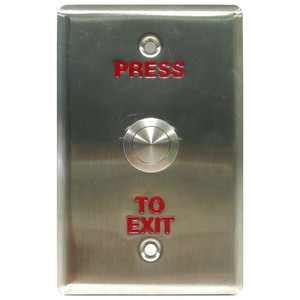
The Geovision 81-PB210-001 is a hardwired push button control accessory designed for Geovision access control and security system integration. The green color coding signals a standard or enable function within access control panel layouts — useful for straightforward identification in multi-button installations. This component connects via AC control cabling and provides manual activation of system functions or connected devices.

Compatibility

The 81-PB210-001 is designed for integration with Geovision access control systems and security platforms that support AC control wiring. Verify compatibility with your specific Geovision control panel model before ordering — confirm that your panel includes AC control input terminals rated for standard push button switching.

Installation Notes

The push button connects via standard AC control cabling. Wire terminals directly to the access control panel's push button input terminals following your system's wiring diagram. The 35mm body footprint fits standard wall-mounted control enclosures. Ensure the control panel has adequate input capacity for the button function you are assigning (e.g., door unlock, emergency exit, system reset). No power supply or separate electronics required — the button itself is a passive switch.

Specifications
Cable Category: ACControl
Brand: Geovision
MPN: 81-PB210-001
Type: PB21 Push Button Green
Cable_Category: ACControl
Compatible With: integration
Q&A
Reviews
Have Questions?

RELATED PRODUCTS

Geovision 81-PB220-001 - Geovision 81-PB220-001 PB22 Push Button Green
Add to Cart The item has been added

Geovision

SKU: 81-PB220-001

Geovision 81-PB220-001 PB22 Push Button Green

  • Green illuminated button provides clear visual confirmation of activation state.
  • 86mm width fits standard wall-mount enclosure cutouts for straightforward panel integration.
  • Designed for AC control systems; verify panel input wiring before deployment.
$40.00 $39.99 Save $0.01
The item has been added
Free shipping over $499
$40.00 $39.99 Save $0.01
Add to cart Add to quote
Geovision 81-P1030-001 Power Box AC24AC 72VA
Add to Cart The item has been added

Geovision

SKU: 81-P1030-001

Geovision 81-P1030-001 Power Box AC24AC 72VA

  • Delivers regulated 24V AC at 72VA to support PTZ motors and auxiliary heater loads.
  • Isolation transformer design blocks ground-loop interference and mains transient surges.
  • Thermal overload protection guards against sustained overcurrent from motor jams or faults.
$147.00 $146.99 Save $0.01
The item has been added
Free shipping over $499
$147.00 $146.99 Save $0.01
Add to cart Add to quote
Geovision 81-MT750-002 Extension Tube
Add to Cart The item has been added

Geovision

SKU: 81-MT750-002

Geovision 81-MT750-002 Extension Tube

  • Extends standoff distance for MT750-series mounts without requiring adapter kits.
  • Supports dome, turret, and box housings with vibration damping under mechanical load.
  • Quick-connect threading reduces on-site labor; fits standard installation toolkits.
$101.00 $100.99 Save $0.01
The item has been added
Free shipping over $499
$101.00 $100.99 Save $0.01
Add to cart Add to quote
Geovision 81-MK1KF08-FF03 Mifare 13.56MHz Tag
Add to Cart The item has been added

Geovision

SKU: 81-MK1KF08-FF03

Geovision 81-MK1KF08-FF03 Mifare 13.56MHz Tag

13.56MHz MIFARE contactless tag for Geovision GV-AS ID access control

  • Operates at 13.56MHz MIFARE for direct enrollment in Geovision GV-AS ID readers.
  • Contactless proximity tag requires no physical contact for credential authentication.
  • Indoor-rated, durable form factor handles repeated daily use at high-traffic entries.
$4.40 $3.99 Save $0.41
The item has been added
Free shipping over $499
$4.40 $3.99 Save $0.41
Add to cart Add to quote
Geovision 81-MT50300-0001 Wall Mount Bracket
Add to Cart The item has been added

Geovision

SKU: 81-MT50300-0001

Geovision 81-MT50300-0001 Wall Mount Bracket

  • Mounts to walls or equipment racks, giving installers flexible PTZ placement options.
  • Engineered specifically for Geovision IP PTZ cameras, ensuring a precise, secure fit.
  • Integrated cable routing keeps power and control lines organized during deployment.
$47.00 $46.99 Save $0.01
The item has been added
Free shipping over $499
$47.00 $46.99 Save $0.01
Add to cart Add to quote

System Design, Deployment & Technical Support

Support services and planning resources for commercial surveillance, access control, and infrastructure deployments.

Fixed scope • Fixed price

System Design Assistance

  • Get help validating product compatibility
  • Coverage requirements
  • Storage planning and deployment architecture before you buy.
Request Design Help

Deployment & Configuration Support

  • Access fixed-scope support for rollout planning
  • User setup guidance
  • Migration and system standardization across single-site or multi-site deployments
View Support Services

Guides, Tools & Calculators

  • PoE requirements
  • Storage retention
  • Camera selection and deployment methodology
Open Technical Resources