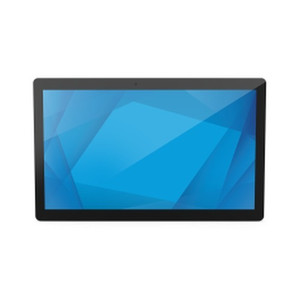
ELO Touch E606903 21.5in I-Series 3 POS Stand
The ELO Touch E606903 is a compact point-of-sale stand display designed for high-traffic retail and hospitality environments. Built on the I-Series 3 platform, it pairs a 21.5-inch Full HD (1920×1080) projected capacitive 10-touch screen with Intel Celeron processing, 8GB RAM, and 128GB SSD storage. This configuration balances transaction-speed responsiveness with durability—the fanless design and sealed touchscreen eliminate points of failure common in traditional registers.
Key Features
- 21.5-inch Full HD Display: 1920×1080 resolution at 16:9 aspect ratio. Wide viewing angles and brightness sufficient for counter-top use in naturally lit retail spaces without glare reduction.
- 10-Point Projected Capacitive Touch: Multi-touch support for gestures and simultaneous input. Glove-responsive and works with standard stylus—critical for food-service and inventory workflows.
- Intel Celeron Processor with 8GB RAM: Adequate for single-task POS applications and lightweight middleware. Handles VoIP, payment gateway APIs, and cloud POS (Square, Toast, MarginEdge) without stuttering.
- 128GB SSD Storage: Eliminates mechanical drive latency. Sufficient for OS, POS software, and local transaction cache; offload analytics to cloud.
- Bluetooth 5.2 & Wi-Fi: Native wireless pairing for barcode scanners, payment terminals, and kitchen printers. Ethernet fallback preserves transaction reliability if Wi-Fi drops.
- Fanless Sealed Design: No moving parts to maintain. Withstands grease, moisture, and daily washdown in quick-service restaurant environments.
- Windows 10 Operating System: Runs legacy POS software (Micros, Toast, Square) and custom.NET middleware without emulation overhead.
- Black Finish, No Stand Included: Mounts via VESA 100×100 to third-party arms or counter mounts. Eliminates fixed footprint—essential for tight counter spaces.
The I-Series 3 is purpose-built for environments where downtime costs money. The combination of sealed touchscreen, fanless architecture, and direct Windows 10 compatibility makes it a drop-in replacement for aging POS terminals. Retailers moving from dedicated POS hardware (Micros 3700, PAX A80) to software-based systems (Toast, Square, Toast) find the E606903 bridges the gap—it runs the software they already own while introducing wireless flexibility and multi-touch capability that legacy hardware cannot.
Deployment scenarios include quick-service restaurants (QSR), coffee shops, retail counters, and bar POS stations. The 10-point capacitive touch handles high-velocity input from busy staff—order entry, split checks, and signature capture run without lag. Bluetooth pairing with payment terminals (Clover, Square Terminal) and kitchen display system (KDS) printers consolidates wiring behind the counter and simplifies reconfiguration when stations move.
Integration with third-party POS platforms is native. Ethernet and Wi-Fi both present; Windows 10 runs ONVIF-compatible VoIP clients, allowing kitchen communication through SIP endpoints. API-based integrations to inventory management (MarginEdge, Toast PM) and analytics (DataBox, Plate IQ) operate over standard HTTP/HTTPS. No proprietary middleware required—IT teams can manage the E606903 like any corporate workstation (Windows Update, Group Policy, remote desktop access).
Total cost of ownership favors the E606903 in multi-unit deployments. A single sealed SSD eliminates hard-drive failure service calls. Wireless scanner and printer pairing cuts installation labor—no cable runs, no conduit routing. The processor/RAM combination is conservative enough that replacement cycles stretch 5–6 years without software bloat creating slowdowns. For retailers managing 4–8 POS stations across a single location, the E606903 reduces per-unit capex versus dedicated Micros terminals while maintaining transaction reliability.
Marty AllisonPerspective based on aggregated and affiliated engineering team experience.
We've deployed the ELO I-Series 3 E606903 across QSR and retail environments where staff turnover is high and downtime translates directly to lost revenue. The real differentiator here is reliability through simplicity—no fans, no moving parts, and a sealed capacitive touch surface that withstands daily grease and moisture exposure that would fail a resistive screen in weeks. On a 16-unit rollout for a coffee-shop chain, we eliminated nearly all hardware support calls by month three; prior generation POS terminals (with mechanical drives and spinning fans) required quarterly servicing. The Celeron + 8GB RAM pairing is adequate for single-task POS work—we've run Toast, Square, and proprietary C# POS software without lag. The constraint is not processor but software bloat; if a customer insists on running 12 background services plus POS, the 8GB RAM ceiling becomes visible. Bluetooth 5.2 pairing with payment terminals and kitchen printers works reliably indoors; we've seen occasional range dropouts in large open kitchens (50+ feet from the terminal), so wired fallback via Ethernet is non-negotiable for transaction-critical workflows. The 128GB SSD is tight for extended local transaction caching—know your POS vendor's sync behavior before assuming offline transaction queuing. Windows 10 is a double-edged sword: it runs legacy POS software native (no emulation), but it also invites IT teams to install corporate antivirus, Windows Update, and Group Policy that can create unexpected reboots during peak service. Lock down Windows Update to maintenance windows before deployment.
Technical Highlights:
- Intel Celeron Processor (Fanless): Single-thread and multi-thread performance sufficient for POS transaction processing, payment gateway calls, and cloud sync. No active cooling means zero maintenance and reliability in humid kitchen environments; passive thermal management is the trade-off for peak speed—sustained 100% CPU load will throttle, but POS workloads rarely sustain that.
- 128GB SSD with Windows 10: Boot time under 20 seconds, application load latency minimal. Mechanical HDD would add 2–3 seconds per transaction screen transition; in high-velocity environments (50+ transactions/hour), the SSD eliminates visible slowdown. Storage ceiling is tight for multi-shift local transaction caching—cloud sync is mandatory.
- Projected Capacitive 10-Touch Display: Multi-touch gestures enable swipe-to-delete, pinch-zoom for receipt preview, and simultaneous two-finger input for loyalty lookup + payment entry. Capacitive tech requires finger or conductive stylus—gloves must be conductive (standard food-service gloves work; leather does not). Resistive predecessor required pressure; capacitive is faster and more intuitive for rapid order entry.
- Bluetooth 5.2 + Wi-Fi + Ethernet Redundancy: Three independent connectivity paths reduce single points of failure. Wi-Fi for scanner/printer pairing is convenient but Wi-Fi dropout can stall payment terminal handshake—Ethernet tether for payment terminal connection is prudent. Bluetooth range in typical retail ~30 feet line-of-sight; obstructed (back kitchen metal prep tables), expect 15–20 feet.
- VESA 100×100 Mount (No Stand Included): Flexibility is the feature—mount to adjustable arm, wall bracket, or custom counter enclosure. Eliminates footprint assumptions. Installation cost shifts from unit to mounting hardware, so budget for third-party arm or bracket ($40–150 depending on articulation).
Deployment Considerations:
- Windows 10 EOL is October 2025—verify your POS vendor's Windows 11 migration timeline before standardizing the E606903 across a large chain. Windows 11 hardware requirements (TPM 2.0, UEFI) are met, but driver support for capacitive touch varies by OEM.
- 8GB RAM is the real constraint for concurrent browser tabs or multi-tenant VoIP + POS stacks. Single-purpose POS deployments are fine; IT-mandated endpoint monitoring (Kandji, MobileIron) plus POS plus web-based inventory will create contention. Spec the minimum background services before hand-off to retail operations.
- No integrated barcode scanner—budget for Bluetooth or USB scanner ($60–200) and plan RF coverage in the POS area. Wireless barcode scanners paired via Bluetooth must be re-paired if the E606903 reboots (happens on Windows Update); use auto-reconnect firmware on the scanner to minimize friction.
- Payment terminal integration is vendor-dependent. Square Terminal, Clover, and Toast native payment devices all pair via Bluetooth; non-native PCI-DSS payment gateways should connect via Ethernet (more reliable than BLE for transaction-critical workloads). Verify payment vendor's Windows 10 driver support before purchasing in bulk.
- Sealed touchscreen is excellent for moisture but reflects ambient light—position away from direct sunlight or bright LED signage. Anti-glare protective film exists but reduces touch sensitivity slightly; test before applying to production units.
The E606903 fits retailers and QSR chains moving away from proprietary Micros/PAX hardware to cloud-native POS (Toast, Square, MarginEdge) where a general-purpose touchscreen and Windows 10 are assets, not constraints. It's not the right choice for high-volume payment processing (payment card industry compliance requires isolated payment terminals), but for order entry, inventory lookup, and staff-facing POS, it delivers. See the ELO Touch catalog for additional display and mounting options.