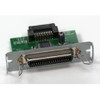
Epson C823891 Parallel Interface Card for Receipt Printers
Overview
The Epson C823891, designated as the UB-P02 interface card, is a parallel port adapter designed to retrofit parallel connectivity into compatible Epson receipt and label printing systems. This accessory card bridges legacy parallel infrastructure to modern inkjet-based Epson printers, eliminating the need for costly system replacements when parallel integration is a hard requirement in existing warehouse automation, point-of-sale, or logistics environments.
Parallel connectivity remains common in industrial and retail settings where serial-based device integration predates modern network printing. The C823891 addresses this reality directly: if you have parallel hardware already in place and Epson printer hardware that supports this card, you avoid equipment swaps that would otherwise disrupt operations.
Key Features
- Parallel Port Interface: Enables bidirectional parallel communication (Centronics or IEEE 1284 standard protocols supported via compatible Epson printer hardware). This matters if your warehouse management system, point-of-sale network, or label application software has parallel-only printer drivers — you won't need to rewrite integration logic or purchase a separate printer model.
- 600 dpi Resolution Support: The card integrates with Epson 600 dpi receipt and label printers. 600 dpi is sufficient for barcode legibility (GS1-128, Code 128, QR codes all scan reliably at this resolution) and text clarity on standard 4x6 and 2x4 label stock — no resolution loss compared to native USB or network models.
- Inkjet Print Method: Works with Epson's inkjet printing platform, meaning lower per-page ink costs and broader media compatibility (thermal labels, coated receipt stock, glossy labels) compared to thermal-only alternatives. Relevant if your operation runs mixed label and receipt workflows.
- Compatible Epson Printer Integration: Installation requires an Epson receipt or label printer model with available expansion slots and driver support for the UB-P02 card. Before ordering, confirm your specific printer model supports this interface card — compatibility is model-specific, not universal across the Epson line.
- Legacy Infrastructure Preservation: Avoids forced hardware replacement. If parallel cabling and drivers are already deployed in your facility, retrofitting the C823891 is typically cheaper and faster than swapping to network or USB printers and reconfiguring downstream systems.
- Straightforward Hardware Installation: The card mounts inside the printer chassis. No external modules, no additional power draw beyond the printer's built-in supply. Installation should be verified against your specific printer's service manual or an specialty distributor familiar with your model.
Integration & Compatibility
The C823891 is designed for Epson receipt and label printers with 600 dpi inkjet engines. Compatibility is hardware-dependent — not all Epson printers in the 600 dpi range support interface card expansion. Before purchasing, verify your printer model's documentation or consult with your integrator to confirm the UB-P02 is compatible with your specific hardware revision.
Once installed, the card presents a standard parallel port. Existing parallel drivers and applications should recognize the printer without additional firmware updates, though driver reinstallation may be necessary after hardware installation.
Parallel communication does not inherently support modern print job queuing or network-wide printer discovery — you will manage jobs through the host device directly or via legacy print server infrastructure. If you need centralized print management across multiple printers or cloud-based job tracking, a network-capable receipt printer model may be a better fit than parallel retrofitting.
When to Choose a Different Approach
If your facility is building a new system or planning a hardware refresh, a native USB or Ethernet-capable Epson printer eliminates the need for interface cards and simplifies network integration. Parallel is mature, stable, and widely documented, but it is not future-proof — IT teams are increasingly moving away from parallel infrastructure. If you have flexibility on hardware, consider whether a modern network-capable label printer would reduce long-term maintenance overhead.
Frequently Asked Questions
Q: Is the C823891 compatible with all Epson 600 dpi printers?
A: No. The UB-P02 is designed for specific Epson receipt and label printer models with expansion card slots. Check your printer's technical documentation or contact an specialty distributor to confirm compatibility before ordering.
Q: Do I need new drivers after installing the C823891?
A: Once the card is installed, you may need to reinstall your parallel printer driver or configure the port settings in your operating system, but the C823891 itself does not require separate driver software — it acts as a transparent interface between the parallel port and the printer's internal electronics.
Q: Can the C823891 be used for network printing?
A: No. The parallel interface is a direct device-to-host connection. It does not support Ethernet, TCP/IP, or cloud-based print job management. If you need network or wireless printing, choose a printer model with native USB or Ethernet connectivity.
Q: What is the typical installation time for the C823891?
A: Installation is a hardware procedure that requires opening the printer chassis and seating the card in the expansion slot. Plan 15–30 minutes if you are comfortable with basic hardware installation; otherwise, have an professional service technician perform the work to avoid damage to the printer.
Q: Does the C823891 support bidirectional status feedback?
A: The card supports parallel communication standards (IEEE 1284 where compatible with the printer model), which include handshake and status signals. Confirm your printer model's documentation for specific status signal support after installation.
Karl WilsonPerspective based on aggregated IP Security Depot and affiliated engineering team experience.
The Epson C823891 is a straightforward hardware solution, but it's not a retrofit for every printer. This is a model-specific expansion card — you cannot assume it will work with every 600 dpi Epson receipt printer. I've seen teams order one on the assumption of compatibility, only to discover their printer revision doesn't have the expansion slot or the firmware doesn't recognize the card after installation. Verify against your printer's part number and available service bulletins before committing.
Technical Highlights:
- 600 dpi Inkjet Output: Sufficient resolution for barcode scans (GS1-128, Code 128, QR all perform well at this dpi). Inkjet means lower consumable cost per page versus thermal, and broader media support — you can run glossy labels, coated receipt stock, and standard paper without switching printers.
- Parallel Port Interface (Legacy): IEEE 1284 parallel communication is deterministic and low-latency — no network latency, no DHCP negotiation, no wireless dropout. If your warehouse management system or POS system has hardcoded parallel printer drivers, this card eliminates the need for software rewrite or equipment replacement.
- No External Power: The card draws power from the printer's internal supply. No separate PSU, no additional cabling — one less point of failure on the floor.
Deployment Considerations:
- Compatibility is Not Guaranteed Across the Line: The C823891 works only with Epson printers that have expansion slots and firmware support for the UB-P02 interface card. Legacy printer models, even if they are 600 dpi, may not support card installation. Pull your printer's service manual and confirm the part is listed as compatible before order placement.
- Parallel is Not Future-Proof: If you are retrofitting an aging receipt or label printer, you're buying time on legacy infrastructure. Parallel drivers are becoming harder to find on modern operating systems, and Windows 11 has deprecated parallel port drivers by default. This card is a real solution for existing parallel infrastructure, but it's not a permanent strategy.
The C823891 makes sense for warehouse automation or retail environments where parallel printer integration is locked into the software stack and replacing the printer would require costly application rewrites. It's a pragmatic bridge, not a modernization. If you're deploying new systems, use network-capable label and receipt printers instead.