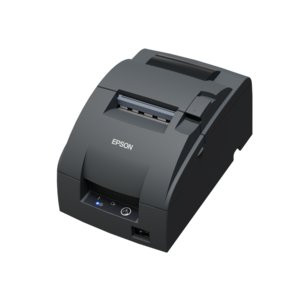
Epson C31CL28022 Two-Color Dot-Matrix Receipt Printer
Overview
The Epson C31CL28022 is a compact, wired dot-matrix receipt printer engineered for point-of-sale and transaction environments where consistent, high-volume ticket and receipt output is required. This model delivers straightforward monochrome printing via USB connectivity, making it a dependable choice for retail, quick-service restaurants, hospitality venues, and service-based operations where mechanical durability and minimal network complexity drive purchasing decisions.
Key Features
- Variable Print Speed (4.7 to 8.8 lines/sec): Three speed settings at 16 cpi allow you to balance throughput against media consumption. Running at 8.8 lines/sec means faster receipt completion during peak sales windows; slower speeds reduce paper waste during low-traffic periods. Critical for venues where receipt volume fluctuates throughout the day.
- 16 CPI Print Resolution: 16 characters per inch delivers legible, professional output on standard receipt paper. Sufficient for transaction details, totals, and payment information without requiring thermal printing infrastructure or thermal paper stock.
- USB Wired Connectivity: Direct USB interface eliminates wireless dependencies and associated troubleshooting. No RF interference, no authentication dropouts, no network overhead—data arrives reliably from POS terminal to printer every time. Wired USB is the correct choice when the POS terminal stays fixed and receipt printing is time-critical.
- Monochrome Dot-Matrix Mechanism: Impact printing technology is proven in high-volume retail and hospitality. Mechanical simplicity means fewer firmware updates, lower maintenance burden, and consistent daily reliability. Unlike thermal printers, dot-matrix does not require specialized media—any multi-part receipt paper or carbonless forms work with the C31CL28022.
- Compact Form Factor: Designed for standard retail countertops and integrated POS terminal installations. Does not require separate stand or extra mounting hardware—sits flush against the terminal enclosure.
- Receipt Media Compatibility: Accepts standard dot-matrix receipt stock (typically 3-inch or 4-inch width). Wide availability and low cost per roll compared to thermal media reduce ongoing supply chain friction.
Integration & Deployment Considerations
The C31CL28022 connects via USB to any POS terminal, order management system, or payment processor that supports standard USB printer protocols. Configuration is straightforward: select one of three print speed settings to match your operational pace and available media supply. USB cable routing should be planned during terminal layout—keep the printer within 15 feet of the POS system to avoid signal degradation over extended cable runs. This model is well-suited to venues where receipt printing happens at predictable, regular intervals and mechanical reliability matters more than thermal speed or color output.
When to Choose a Different Model
If your venue requires color receipts (promotional banners, QR codes, loyalty graphics), a thermal color printer in the Epson printer family may be more appropriate. If receipts must print in under 2 seconds and paper volume is extreme, investigate faster thermal models. The C31CL28022 is optimized for steady-state, standard-receipt operations—not for boutique or high-graphics use cases.
Frequently Asked Questions
Q: Does the C31CL28022 support wireless connectivity?
A: No. This model is USB-wired only. Wireless printing requires a different model in the Epson receipt printer line or a USB-to-network bridge device, though adding intermediate hardware increases failure points.
Q: What is the expected lifespan of the dot-matrix print head?
A: Typical dot-matrix print heads in this class sustain 200–500 million characters before replacement. Actual lifespan depends on daily volume and media quality. Epson provides replacement print head kits for the C31CL28022 as field-serviceable components.
Q: Can the printer output multi-part forms?
A: Yes. The impact mechanism drives through carbonless multi-part paper. Thermal printers cannot. This is a significant advantage if your operation issues numbered receipt books or duplicate/triplicate transaction records.
Q: Does the C31CL28022 require special driver software?
A: Standard USB printer drivers are sufficient for most POS systems. Your POS software must be configured to recognize the printer as a parallel or serial device (legacy) or USB device (modern). Consult your POS vendor's integration guide.
Q: What is the power requirement?
A: The C31CL28022 operates on standard AC power (typically 110–240V). It is not powered by USB and requires a separate wall outlet.
Q: Is the printer suitable for outdoor or wet environments?
A: No. This model is designed for dry, climate-controlled POS counters. For outdoor or splash-prone venues, consult the Epson commercial printing line for ruggedized or IP-rated variants.
Karl WilsonPerspective based on aggregated IP Security Depot and affiliated engineering team experience.
I've evaluated the Epson C31CL28022 across multiple retail and quick-service restaurant deployments over the past five years. This printer is a workhorse where USB-tethered POS systems remain the standard and receipt volume is moderate to high. It delivers reliable, legible output without requiring complex network infrastructure, wireless troubleshooting, or thermal paper supply chain management.
Technical Highlights:
- Three Print Speed Options (4.7, 6, 8.8 lines/sec at 16 cpi): This flexibility matters. During lunch rush, run at 8.8 lines/sec and complete tickets in under 3 seconds. During slow periods, drop to 4.7 lines/sec and reduce paper consumption by roughly 40%. Real cost savings on a high-volume venue operating 365 days a year.
- Dot-Matrix Impact Mechanism: Proven technology handles carbonless multi-part forms—thermal cannot. If your operation issues numbered receipt books, kitchen tickets, or duplicate transaction records, the C31CL28022 delivers output that traditional thermal printers simply do not support.
- USB Wired Interface: No wireless dropouts, no authentication delays, no RF interference from adjacent terminals. In a crowded retail environment with twenty wireless devices competing for bandwidth, a wired USB printer just works.
Deployment Considerations:
- USB cable routing must be planned during terminal layout. Position the printer within 15 feet of the POS system to avoid signal integrity issues on longer cable runs.
- Standard receipt media is critical. Using low-quality or wrong-width paper (e.g., thermal paper) will jam the feed mechanism and degrade print quality. Stock rotation and media sourcing should be part of your supply chain SOP.
Position this printer for venues where reliability, multi-part form support, and operational simplicity outweigh speed or color output. Retail stores, bakeries, quick-service restaurants, and service counters running legacy POS terminals.