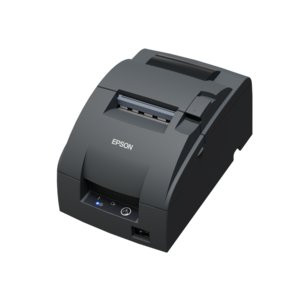
Epson C31CL27042A3 Two-Color Dot-Matrix Receipt Printer
The Epson C31CL27042A3 is a wired impact dot-matrix receipt printer engineered for transaction-intensive retail, hospitality, and point-of-sale environments where carbonless multi-part receipts are required. Unlike thermal printers, this model uses impact technology to strike through carbon paper, eliminating the need for thermal paper and enabling duplicate or triplicate customer receipts in a single pass. This matters if your POS workflow requires physical duplicates for split settlements, audit trails, or customer sign-off documentation.
Key Features
- Two-Color Print Capability: Supports standard monochrome ribbon and dual-color (black/red or black/blue) ribbon cartridges. Two-color output lets you highlight promotional text, alert messages, or section headers on receipts without multiple print passes — reducing transaction time and improving visual hierarchy on busy receipts.
- Print Speed: 8.8 lines per second at 16 cpi. At maximum throughput, you'll print a standard 3-inch receipt in roughly 2–3 seconds. The C31CL27042A3 also supports variable speed operation (4.7 and 6 lps settings) to balance speed against ribbon wear and noise in low-transaction periods.
- Fixed 16 cpi Resolution: Character density is fixed at 16 characters per inch, which is appropriate for receipt text, numeric transaction data, and barcode encoding. This resolution is standard across POS receipt printers and will not be a bottleneck for typical retail receipts.
- USB and Parallel Connectivity: Dual-interface design supports both modern USB connections (plug-and-play on Windows and Linux) and legacy parallel (Centronics) ports. This flexibility matters if you're integrating into a mixed-age terminal fleet without needing serial adapters or protocol converters.
- Impact Dot-Matrix Print Method: Strike-through impact technology enables carbonless multi-part paper support — a requirement for environments requiring duplicate receipts, customer signatures, or offline audit records. Thermal printers cannot produce carbon copies.
- Compact Counter Footprint: Designed for direct counter mounting or tight integration into POS enclosures. The small form factor is practical in space-constrained checkout areas without requiring a separate stand or pedestal.
Integration and POS Compatibility
The C31CL27042A3 integrates via standard printer control language (PCL) commands issued from POS software. Configuration of print density, speed, and output formatting is managed at the application level, allowing each retailer or restaurant to customize receipt appearance without hardware reconfiguration. Both USB and parallel interfaces support legacy POS terminals running DOS or older Windows POS applications, as well as modern cloud-based POS platforms on standard operating systems.
Media compatibility includes standard receipt roll widths without requiring pre-treatment or specialized paper types. The impact mechanism provides reliable media feed and advance control, reducing jam risk compared to friction-feed systems.
Print Method and Media Handling
Impact dot-matrix technology stamps character patterns onto receipt paper through a striking ribbon. This mechanism accommodates 2-part and 3-part carbonless paper, delivering simultaneous copies without multiple printer passes. The two-color ribbon option extends visual functionality without hardware redesign — swapping ribbon cartridges takes seconds and requires no configuration changes.
When to Choose a Different Model
If your environment does not require carbonless multi-part receipts and speed is the primary constraint, consider a thermal receipt printer from the same manufacturer. Thermal printers operate significantly faster (up to 12 inches per second) and generate no impact noise, but they require thermal paper and cannot produce carbon copies. If your transaction volume exceeds 5,000 receipts per day and noise is a concern in customer-facing areas, evaluate thermal alternatives.
Frequently Asked Questions
Q: Does the C31CL27042A3 work with modern cloud-based POS systems?
A: Yes. USB connectivity and standard PCL printer commands enable integration with any POS software that supports Windows or Linux USB printer drivers. Most modern POS platforms (Square, Toast, Lightspeed, etc.) can address this printer via standard operating system print queues.
Q: Can I print barcodes on the C31CL27042A3?
A: Yes. The 16 cpi fixed resolution is adequate for standard barcodes (Code 39, Code 128, UPC) at typical receipt widths. Verify barcode module width compatibility with your POS software before deployment.
Q: What is the cost-per-receipt comparison between impact and thermal?
A: Impact printers use lower-cost plain or carbonless paper and standard ribbon cartridges. Thermal printers require thermal paper, which is typically 15–25% more expensive per roll. If carbonless duplicates are required, only impact technology delivers that capability.
Q: Is the parallel port interface obsolete for new deployments?
A: For new installations, USB is the standard choice. Parallel support is present for backward compatibility with legacy terminals and legacy POS systems that lack USB drivers.
Q: What is the warranty on the C31CL27042A3?
A: Consult the manufacturer's documentation or your distributor for warranty terms. Typical Epson receipt printers include a 12-month parts-and-labor warranty.
Q: How often must the ribbon be replaced?
A: Ribbon life depends on transaction volume and print density settings. At 8.8 lps with standard settings, expect ribbon replacement every 3–6 months in a high-volume retail environment. Ribbon cartridges are low-cost consumables and easy to install without tools.
Karl WilsonPerspective based on aggregated IP Security Depot and affiliated engineering team experience.
I evaluated the Epson C31CL27042A3 during a POS infrastructure refresh for a retail client requiring carbonless receipt capability. This is a straightforward impact dot-matrix printer designed for environments where duplicate paper receipts are non-negotiable — auction houses, contract services, signature-required transactions. The 8.8 lps throughput at 16 cpi meets the speed expectations of retail staff, and the dual-interface design (USB + parallel) eliminates integration friction across legacy and modern POS hardware.
Technical Highlights:
- 8.8 lines per second maximum throughput: At fixed 16 cpi resolution, a standard 3-inch thermal paper receipt (approximately 22–24 lines) prints in 2.5–3 seconds. In a typical retail transaction cycle, this is fast enough not to bottleneck checkout. Variable speed modes (4.7 and 6 lps) extend ribbon life in low-traffic periods.
- Two-color ribbon support: Swapping black/red or black/blue ribbon cartridges takes 30 seconds and requires no POS reconfiguration. This allows dynamic receipt formatting — highlighted promotions, alert text, section breaks — without multiple print passes or secondary labeling systems.
- Impact dot-matrix technology: Unlike thermal printers, this mechanism strikes through carbon paper, enabling 2-part and 3-part receipt duplication in a single pass. Carbonless paper is cheaper than thermal paper, and duplicates are generated immediately without a second printer or manual carbon separation.
Deployment Considerations:
- Impact printing generates audible noise (approximately 75–80 dB during operation). In quiet customer-facing environments (fine dining, boutique retail), this may be distracting. Thermal printers operate nearly silently.
- Ribbon consumption correlates directly with transaction volume and print density. At high density settings, ribbon life shortens to 2–3 months. Budget for consumable costs and keep spare cartridges on hand; a single ribbon failure halts all receipts until replacement.
- Media is standard receipt roll paper (typically 2.5–3 inches wide). Verify roll core diameter and width compatibility with your current paper supplier before committing to the C31CL27042A3 to avoid order delays.
Position the C31CL27042A3 for high-volume, multi-part receipt environments where transaction speed is secondary to compliance and duplicate documentation. If your workflow does not require carbon copies and noise is a concern, a thermal printer will outperform this model.