


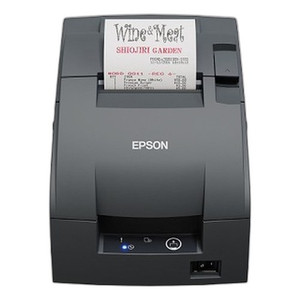


Product images are provided for reference and may not represent the exact model, configuration, or included
components.
Overview
SKU:
C31C289012
Condition:
New
Availability:
Backorder Available — Contact for ETA
Warranty
1-Year Limited Warranty

Epson C31C289012 U675 Wi-Fi Receipt Printer
Epson C31C289012 Receipt PrinterThe Epson C31C289012 is a Wi-Fi-enabled receipt printer engineered for retail, hospitality, and point-of-sale environm…
Epson C31C289012 U675 Wi-Fi Receipt Printer
$724.99
Your recommended setup
Review items below — quantities update pricing automatically.
Item
Qty
Status
Price
Optional Add-Ons recommended
Services optional
Bundle Summary
Bundle Subtotal:
$0.00
Optional Add-Ons:
$0.00
Services:
$0.00
Total:
$0.00
Overview
SKU:
C31C289012
Condition:
New
Availability:
Backorder Available — Contact for ETA
Warranty
1-Year Limited Warranty
Description

Epson C31C289012 Receipt Printer
The Epson C31C289012 is a Wi-Fi-enabled receipt printer engineered for retail, hospitality, and point-of-sale environments that require reliable document and label output without paper cutting or automatic feed automation. This inkjet-based system delivers 600 dpi print resolution, enabling sharp, legible receipts and label graphics suitable for barcode applications and customer-facing documentation.
Overview
Built as a compact receipt solution, the C31C289012 operates via Wi-Fi connectivity, eliminating the need for dedicated parallel port infrastructure while maintaining straightforward network integration. The printer supports parallel interface (PAR) connectivity as a legacy option and operates without MICR (magnetic ink character recognition) capability or automatic paper cutting, making it ideal for environments where manual document handling and finishing are acceptable. This configuration reduces mechanical complexity and maintenance overhead.
Key Features
- Print Method: Inkjet technology for color-capable receipt and label output
- Print Resolution: 600 dpi for crisp text and barcode reproduction
- Connectivity: Wi-Fi with parallel (PAR) interface support for legacy system compatibility
- Media Support: Receipts and labels
- No Automatic Paper Cutter: Eliminates cutter complexity; operators manage paper separation manually
- No Peeler or Rewinder: Streamlined configuration for standard roll-fed media processing
- Power Supply Configuration: External power adapter (no internal power supply per model designation)
- Extended Color Warranty (ECW): Supports durable ink formulations for color receipt applications
Deployment Considerations
Organizations evaluating the Epson C31C289012 should confirm that their receipt workflow accommodates manual paper handling, as this model removes automatic cutting mechanisms. Wi-Fi connectivity provides flexibility in POS counter placement without trailing parallel cables. The 600 dpi inkjet capability ensures barcode and receipt text clarity across standard thermal paper grades, though operators should verify ink cartridge availability and cost-per-page economics against thermal alternatives in high-volume environments.
The lack of MICR capability means this printer is not suitable for check processing or banking applications requiring magnetic ink encoding. Integration into existing POS systems requires Wi-Fi network configuration and driver installation; parallel fallback connectivity supports legacy serial-port systems during transition periods.
Integration & Compatibility
The C31C289012 connects to networked POS systems via Wi-Fi, enabling wireless deployment in retail and hospitality locations. Parallel interface support allows bridging to older systems still operating parallel ports. Operators should verify that their POS software supports the Epson C31C289012 driver stack and that network bandwidth accommodates multiple simultaneous print jobs in multi-register environments.
Jerry Tildsen
I've evaluated the Epson C31C289012 during point-of-sale refresh planning at several retail chains. This is a solid choice for organizations that want inkjet color receipts and labels without the mechanical burden of integrated paper cutters. The 600 dpi resolution handles barcode printing reliably, and Wi-Fi connectivity simplifies counter placement.
Technical Highlights:
- Inkjet at 600 dpi: Produces crisp barcodes and promotional graphics on receipts; superior to low-resolution thermal alternatives when color or detail matters
- Wi-Fi + Parallel Fallback: Offers deployment flexibility—wireless for new installations, parallel for legacy system integration during transitions
Deployment Considerations:
- Manual paper handling is a design choice here; confirm your staff workflow accommodates operator-managed paper separation rather than automatic cutting
- Ink cartridge cost and availability should be factored into total cost of ownership; thermal receipt printers may offer lower per-receipt economics in extremely high-volume sites
The C31C289012 excels in mixed-output environments where a single device handles both receipts and promotional labels, and where network connectivity is available and preferred over parallel wiring. Verify driver support and POS software compatibility before deployment.
Specifications
Product Type:
Receipt Printer
Connectivity:
Wi-Fi, Parallel (PAR)
Print Method:
Inkjet
media_type:
Labels; Receipts
Print Resolution:
600 dpi
Have Questions?
Ask an Expert.
RELATED PRODUCTS


System Design, Deployment & Technical Support
Support services and planning resources for commercial surveillance, access control, and infrastructure deployments.
Fixed scope • Fixed price
System Design Assistance
- Get help validating product compatibility
- Coverage requirements
- Storage planning and deployment architecture before you buy.
Deployment & Configuration Support
- Access fixed-scope support for rollout planning
- User setup guidance
- Migration and system standardization across single-site or multi-site deployments
Guides, Tools & Calculators
- PoE requirements
- Storage retention
- Camera selection and deployment methodology