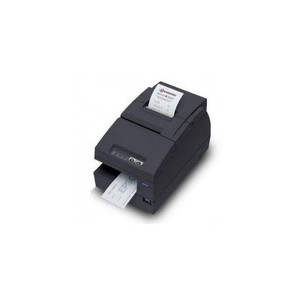
Epson C31C283A8921 Wi-Fi Receipt Printer
Overview
The Epson C31C283A8921 is a Wi-Fi enabled receipt printer built for retail counters, hospitality ticketing, and warehouse labeling where wireless connectivity and straightforward media handling matter more than mechanical finishing. This inkjet-based device outputs 600 DPI resolution—sharp enough for barcode and QR code scanning without the added cost and complexity of automatic cutting or MICR encoding. The C31C283A8921 supports both Wi-Fi and legacy parallel interfaces, so you can integrate it into modern network environments or patch it into existing POS systems without hardware overhaul.
Key Features
- 600 DPI Print Resolution: Renders barcodes, QR codes, and receipt text cleanly enough for reliable scanning—no bleed or smudging across typical receipt stock. Barcode readability is the practical floor here; higher resolution adds cost without meaningful compliance benefit for standard retail applications.
- Wi-Fi Connectivity: Eliminates ethernet runs to the printer. Useful for mobile carts, kiosk deployments, and counter reconfigurations where cabling becomes a logistical headache. TCP/IP networking means straightforward printer discovery and job queuing from standard POS or label-generation software.
- Parallel Interface Option: Maintains backward compatibility with legacy cash registers and POS terminals still running parallel-port drivers. A pragmatic hedge if you're migrating systems gradually rather than in one cut-over.
- Inkjet Print Method: Ink cartridges cost less than thermal ribbons on a per-page basis when volume is high. No heated platen means lower power draw and simpler maintenance—trade-off is that you'll need to manage ink inventory and occasional nozzle cleaning on idle equipment.
- Receipt and Label Media Support: Single device handles both 3-inch receipts and label stock via edge-feed mechanism. Reduces SKU sprawl if you operate mixed retail and fulfillment workflows.
- No Automatic Cutter: You tear or cut manually. This is a cost and maintenance win—no jam-prone mechanism to service—but it requires operational discipline. Not suitable if your POS demands automated batch cutting or continuous-feed output.
- MICR-Free Design: No magnetic ink character recognition hardware. Lowers acquisition cost and reduces physical footprint, making this a fit for small counters and limited-space installations where check printing is not a requirement.
Integration & Compatibility
Deploy the C31C283A8921 on a retail counter, service desk, or warehouse packing station without dedicated power supplies or external finishing hardware. Dual connectivity (Wi-Fi + parallel) lets you position it in network-first environments or plug it directly into legacy terminals. The compact form factor and lack of an automatic cutter mean minimal installation footprint—useful in space-constrained retail environments or when you're retrofitting equipment into existing counter configurations. Ink-based printing supports label stock as well as thermal receipt paper, so you can consolidate receipt and shipping-label output on one device rather than maintaining separate thermal and inkjet printers.
When to Choose a Different Model
If your workflow demands automated batch cutting, continuous high-volume label printing (over 1,000 labels per shift), or integrated MICR check printing, look for a thermal printer with automatic cutter or a dedicated label printer in the same manufacturer family. The C31C283A8921 is not a match for full-service checks or pre-cut label stacks requiring precise positioning—manual feed and tear-off operation will bottleneck throughput in those scenarios.
Frequently Asked Questions
Q: Can I print both receipts and labels on the C31C283A8921 without changing drivers?
A: Yes. The edge-feed configuration and multi-media support allow you to load receipt or label stock interchangeably. Your POS or label application will handle media size and feed logic; the printer itself does not auto-detect stock type, so you control which media you load.
Q: Does the C31C283A8921 include an automatic cutter?
A: No. It is configured without automatic cutting. You manually tear or cut receipts and labels. This reduces mechanical complexity and maintenance burden but requires operator discipline in high-volume environments.
Q: What is the warranty on the Epson C31C283A8921?
A: Warranty details are not specified in available documentation. Contact the retailer or Epson directly for coverage terms.
Q: Is the C31C283A8921 suitable for mobile point-of-sale carts?
A: Yes. Wi-Fi connectivity and low power consumption make it a practical choice for carts and kiosks where cabling is impractical. Ensure your cart's Wi-Fi network reaches the deployment location reliably.
Q: Does the C31C283A8921 support MICR encoding for check printing?
A: No. The device is MICR-free, which reduces cost and maintenance. If check printing is required, specify a model with MICR capability or use a dedicated check printer.
Q: Can I integrate the C31C283A8921 with legacy POS systems?
A: Yes. The parallel port option ensures compatibility with older cash registers and terminal systems. Confirm your POS vendor supports the C31C283A8921 driver before deployment.
Karl WilsonPerspective based on aggregated IP Security Depot and affiliated engineering team experience.
I've evaluated the Epson C31C283A8921 for small-to-medium retail and warehouse installations where wireless convenience and mixed media handling drive procurement. This is a pragmatic choice if your team values simplicity over automation and you're not locked into a thermal-only ecosystem.
Technical Highlights:
- 600 DPI Inkjet Output: Barcode and QR code scanning is reliable at this resolution on standard receipt stock. You trade thermal printing's speed and longevity for lower ink-per-page cost and multi-media flexibility—a sensible tradeoff for retail environments with mixed receipt and label workflows.
- Wi-Fi + Parallel Dual Interface: Removes the wiring constraint from mobile carts and kiosk deployments while preserving backward compatibility with legacy terminals. This dual-interface approach is uncommon and valuable if you're mid-migration from parallel-only systems.
- No Automatic Cutter: Eliminates jam points and reduces service calls, but operationally requires staff discipline. High-volume, unattended label printing will bottleneck without automation—know your throughput expectations before committing.
Deployment Considerations:
- Wi-Fi positioning matters: deploy on or near your retail network, and confirm signal strength at the intended counter or cart location. Printer discovery and job queuing depend on stable TCP/IP connectivity.
- Ink inventory management: unlike thermal printers, you'll need to stock cartridges and monitor levels. Plan spare cartridge supply for high-volume sites to avoid surprise downtime.
- The lack of MICR and automatic cutting is a cost win but an operational constraint. If your workflow changes to require check printing or high-speed label cutting, you'll need a different device.
The C31C283A8921 fits best in mixed retail and fulfillment environments—hospitality ticketing, small-warehouse labeling, service desks—where wireless convenience and media flexibility matter more than thermal speed or cutting automation. Not a universal receipt printer, but a solid match for space-constrained, network-forward deployments.