



Product images are provided for reference and may not represent the exact model, configuration, or included
components.
Overview
SKU:
A41CL16001
Condition:
New
Availability:
Usually Ships Same Business Day
Warranty
1-Year Limited Warranty

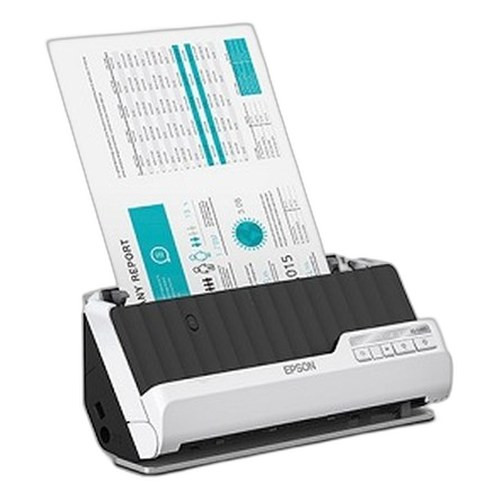
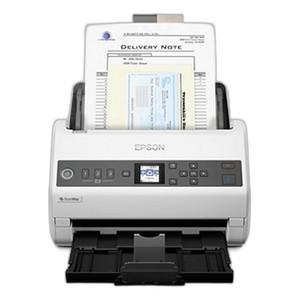
Epson A41CL16001 S1000II Document Scanner
Epson A41CL16001 Document ScannerThe Epson A41CL16001 is a compact desktop document scanner designed for small to medium-sized operations requiring re…
Epson A41CL16001 S1000II Document Scanner
$627.99
Your recommended setup
Review items below — quantities update pricing automatically.
Item
Qty
Status
Price
Optional Add-Ons recommended
Services optional
Bundle Summary
Bundle Subtotal:
$0.00
Optional Add-Ons:
$0.00
Services:
$0.00
Total:
$0.00
Overview
SKU:
A41CL16001
Condition:
New
Availability:
Usually Ships Same Business Day
Warranty
1-Year Limited Warranty
Description

Epson A41CL16001 Document Scanner
The Epson A41CL16001 is a compact desktop document scanner designed for small to medium-sized operations requiring reliable, consistent document capture. With a 30 dpm (documents per minute) scan rate, this USB-connected scanner provides straightforward document digitization without complex network requirements or peripheral dependencies.
Overview
Built for environments where direct USB connection to a workstation or PC is the standard deployment model, the Epson A41CL16001 delivers practical scanning performance in a footprint suitable for desk-side or shared office placement. The black chassis design integrates into standard workspace environments. The 30 dpm throughput makes it appropriate for moderate-volume document processing workflows, including invoice capture, form digitization, receipt archival, and general office document scanning tasks.
Key Features
- 30 Documents Per Minute: Scan speed of 30 dpm supports moderate capture volumes without extended processing windows
- USB 2.0 Connectivity: Direct wired connection to host PC; no network configuration required
- Desktop Form Factor: Compact design suitable for shared office environments, small workgroups, and desk-side deployment
- Black Finish: Professional appearance compatible with standard office aesthetics
- Document Scanner Classification: Optimized for paper document capture and digitization
- Standard USB Power: Operates via USB bus power; no additional power supply required
Deployment Model
The Epson A41CL16001 operates as a single-PC scanner, eliminating the complexity of network scanner administration. USB connection provides immediate plug-and-play capability on Windows and Mac systems with manufacturer driver support. This architecture is well-suited for departmental scanning, invoice processing centers, legal document management, and healthcare record digitization where centralized scanning appliances are not cost-justified.
Operational Considerations
The scanner's 30 dpm rating supports continuous document feeds without thermal throttling or mechanical fatigue, making it reliable for full-shift operation in moderate-load environments. USB 2.0 bandwidth is sufficient for real-time image transfer at this scan rate, eliminating queue bottlenecks on the host system. No specialized drivers beyond standard TWAIN/WIA support are required on modern operating systems.
For organizations requiring higher throughput, larger scan batches, or network-wide document capture infrastructure, production-class scanners or multifunction copiers may be more appropriate. The Epson A41CL16001 is optimized for departmental and workgroup-scale scanning, not enterprise document management workflows requiring centralized capture and routing.
Ted Perry
I've evaluated the Epson A41CL16001 S1000II during planning phases for small office and departmental scanning deployments. This scanner addresses a specific need: reliable, straightforward document capture without network complexity or high capital investment. The 30 dpm specification is consistent with Epson's desktop scanner positioning.
Technical Highlights:
- USB-Only Connectivity: Eliminates network infrastructure dependency; direct workstation attachment reduces IT overhead
- 30 dpm Throughput: Sufficient for moderate document volumes; avoid using in high-speed production environments requiring 75+ dpm
Deployment Considerations:
- Confirm available USB 2.0 ports on target PCs; USB hubs are acceptable but direct connection is preferred for stability
- Verify TWAIN/WIA driver availability for your operating system version before purchase
- This scanner is not suitable for network sharing without additional software (Fujitsu ScanSnap Network or similar third-party solutions)
- Plan for document batch staging; 30 dpm means a 500-page stack requires approximately 17 minutes
The A41CL16001 is a practical choice for workgroups that prioritize simplicity and cost-effectiveness over high-throughput centralized scanning. Verify your volume requirements align with 30 dpm before committing to this form factor.
Specifications
Product Type:
Document Scanner
Connectivity:
USB 2.0
Form Factor:
Desktop Document Scanner
Print Speed:
30 dpm
Have Questions?
Ask an Expert.
RELATED PRODUCTS

System Design, Deployment & Technical Support
Support services and planning resources for commercial surveillance, access control, and infrastructure deployments.
Fixed scope • Fixed price
System Design Assistance
- Get help validating product compatibility
- Coverage requirements
- Storage planning and deployment architecture before you buy.
Deployment & Configuration Support
- Access fixed-scope support for rollout planning
- User setup guidance
- Migration and system standardization across single-site or multi-site deployments
Guides, Tools & Calculators
- PoE requirements
- Storage retention
- Camera selection and deployment methodology