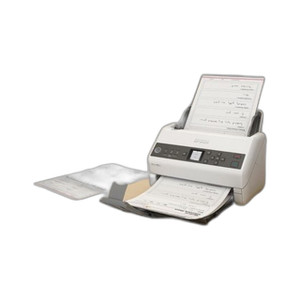
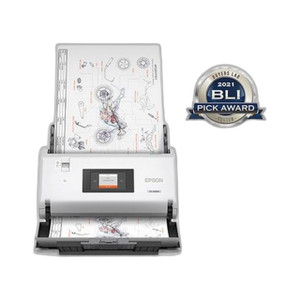
Epson A41CL16001 Desktop Document Scanner
The Epson A41CL16001 is a compact desktop document scanner designed for departmental and workgroup scanning environments where direct USB connection to a host PC is the deployment standard. Scan speed of 30 documents per minute (dpm) supports moderate-volume document processing workflows—invoice capture, form digitization, receipt archival, and general office document management—without introducing queue bottlenecks or extended processing windows. USB 2.0 connectivity eliminates the need for network infrastructure, driver complexity, or IT administration overhead typical of network-attached scanners.
Overview
The A41CL16001 operates as a single-workstation scanner, making it suitable for small to medium-sized operations where centralized scanning appliances are not cost-justified. The black chassis integrates into standard office environments. USB bus power means no separate power supply is required, reducing cable clutter and power management complexity. This design positions the scanner for direct integration into existing Windows and macOS workstations via plug-and-play installation with manufacturer driver support and standard TWAIN/WIA compatibility.
For organizations evaluating document capture infrastructure, consider whether your workload aligns with departmental scanning (invoices, HR forms, legal documents, healthcare records) rather than enterprise-scale centralized capture requiring network distribution, high-speed batch processing, or multifunction copier integration.
Key Features
- 30 Documents Per Minute Scan Speed: Throughput sufficient for continuous document feeds without thermal throttling, mechanical fatigue, or workstation queue delays during full-shift operation in moderate-load departments. Avoid this model for high-speed production environments requiring 75+ dpm throughput.
- USB 2.0 Wired Connectivity: Direct connection to workstation eliminates network scanner administration, authentication, and driver deployment overhead. USB 2.0 bandwidth (480 Mbps theoretical) is sufficient for real-time image transfer at 30 dpm without host-side bottlenecks.
- USB Bus-Powered Operation: Draws power directly from the host USB port, eliminating need for a separate AC adapter or power supply. Reduces desk clutter and simplifies deployment in shared workgroup environments.
- Desktop Form Factor: Compact footprint suitable for desk-side placement, shared office scanning stations, or small workgroup areas. Professional black finish integrates into standard office aesthetics without requiring dedicated appliance space.
- Standard Driver Support: Compatible with TWAIN and Windows Image Acquisition (WIA) on modern Windows and macOS systems. No proprietary middleware or specialized software dependencies required for basic document capture workflows.
- Document Scanner Classification: Optimized for paper document digitization. Intended for continuous single-sided or duplex sheet feeding of office documents (invoices, forms, receipts, contracts), not high-speed production scanning or specialty media handling.
Deployment Context
The A41CL16001 is engineered for departmental scanning, not enterprise document management infrastructure. Typical deployments include invoice processing centers, legal document digitization, healthcare record archival, accounts payable automation, and small office form capture. The scanner operates reliably at 30 dpm during full-shift operation without mechanical stress or image quality degradation.
Organizations requiring higher throughput (75+ dpm), network-wide document routing, centralized scanning queues, or integration with enterprise document management systems (DMS) should evaluate production-class scanners or multifunction copiers. For small to mid-size departmental operations with moderate document volumes and workstation-attached deployment preferences, the A41CL16001 delivers practical scanning performance without network complexity.
Frequently Asked Questions
Q: What operating systems does the Epson A41CL16001 support?
A: The scanner supports Windows and macOS systems with standard TWAIN and Windows Image Acquisition (WIA) drivers. Consult Epson support documentation for specific OS version compatibility.
Q: Does the A41CL16001 require a separate power supply?
A: No. The scanner draws power directly from the host USB port (USB bus-powered), eliminating the need for an AC adapter.
Q: What is the scan speed of the Epson A41CL16001?
A: The scanner delivers 30 documents per minute, suitable for moderate-volume departmental scanning workflows. It is not intended for high-speed production environments requiring 75+ dpm throughput.
Q: Is the A41CL16001 suitable for network scanning?
A: No. The A41CL16001 is a USB-connected workstation scanner. For network-attached scanning infrastructure, consider production-class network scanners or multifunction copiers.
Q: What types of documents can the A41CL16001 scan?
A: The scanner is optimized for standard office documents: invoices, forms, receipts, contracts, and general paper sheets. Consult documentation for acceptable media types and weight specifications.
Ted PerryPerspective based on aggregated IP Security Depot and affiliated engineering team experience.
I've evaluated the Epson A41CL16001 during planning phases for departmental scanning deployments in accounts payable, legal document management, and healthcare record digitization environments. This scanner addresses a specific and well-defined need: reliable, straightforward document capture without network administration complexity or high capital investment. The 30 dpm specification is consistent across Epson's desktop scanner positioning and delivers predictable throughput for moderate-load departmental operations.
Technical Highlights:
- USB-Only Connectivity: Direct workstation attachment eliminates network infrastructure dependency, driver deployment overhead, and IT administration burden. Reduces time-to-deployment in small office and departmental scanning scenarios where centralized network scanning is not justified.
- 30 DPM Throughput: Sufficient for continuous document feeds during full-shift operation without mechanical stress or thermal throttling. This spec is realistic—avoid positioning this scanner in production environments requiring 75+ dpm or high-volume batch processing.
- USB Bus Power: Eliminates separate AC power supply, cable clutter, and power management complexity. Particularly valuable in shared workgroup scanning stations where minimizing infrastructure footprint is a deployment priority.
Deployment Considerations:
- Confirm workload aligns with departmental scanning (invoice capture, form digitization, record archival) rather than enterprise-scale centralized capture requiring network distribution or multifunction copier integration.
- USB 2.0 bandwidth is sufficient for 30 dpm throughput. Do not expect this scanner to function as a network-attached shared device without additional network adapters or infrastructure not included with the unit.
- Driver support depends on OS version and manufacturer support status. Validate TWAIN/WIA compatibility with your specific Windows or macOS configuration before procurement.
Position the A41CL16001 as the right choice for departmental invoice processing centers, legal document management shops, and healthcare records digitization where workstation-attached scanning, moderate throughput (under 75 dpm), and low administrative overhead align with operational requirements. It is not the correct choice for high-speed production scanning, network-wide document routing, or centralized enterprise document management infrastructure.