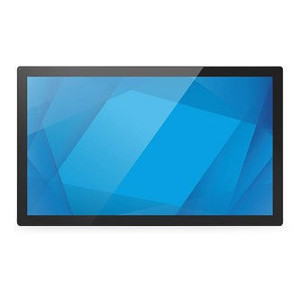
ELO Touch E103351 43-Inch FHD Multi-Touch LCD Monitor
The ELO Touch E103351 is a 43-inch wide-format LCD monitor designed for environments where large-scale interactive display and touch responsiveness are non-negotiable. The projected capacitive 40-touch surface delivers simultaneous multi-touch capability — critical for warehouse management interfaces, logistics dashboards, and supervisory control stations where operators need to interact with maps, real-time data, or configuration screens without delay. This is not a commodity display; the architecture prioritizes touch fidelity and uptime in commercial settings.
Key Features
- 43-Inch FHD (1920 × 1080) LCD Panel: A 16:9 aspect ratio at 1080p resolution provides enough horizontal real estate to render side-by-side dashboards, inventory feeds, or surveillance thumbnails without crowding. FHD is sufficient for text-heavy interfaces at typical viewing distances in control rooms or kiosks — you trade pixel density for screen size, which is the right trade-off for this form factor.
- Projected Capacitive 40-Touch with Palm Rejection: Simultaneous 40-point touch detection means multiple operators (or one operator using both hands) can interact with the screen at once. Palm rejection prevents accidental input when hands rest on the display — essential when someone is concentrated on a task and doesn't want stray contact to trigger menu changes or false selections.
- HDMI 1.4 and DisplayPort 1.2 Connectivity: Dual video inputs allow you to switch between sources without unplugging cables or routing through a switcher. HDMI 1.4 supports 1080p without bandwidth constraints; DisplayPort 1.2 adds native digital audio over the same cable, reducing the number of connectors you need to manage at the back of the mount.
- USB-C Power and Data: A single USB-C connector reduces cable clutter and supports both power delivery and touch input daisy-chaining, depending on the host device's capabilities. This simplifies cable routing in tight mounting scenarios — one port instead of separate power and USB.
- Clear Anti-Friction Glass Surface: The front bezel and touch surface use optically clear glass with minimal reflection, which preserves on-screen contrast and color accuracy in well-lit environments. The anti-friction coating reduces fingerprint buildup and allows smooth gliding of styluses or fingers without drag, improving the feel of gestural interfaces (pinch-zoom, swipe, rotate).
- Black Finish: A matte black chassis minimizes light reflection and presents a professional appearance in SOCs, control centers, or public-facing kiosks. Finish choice affects both aesthetics and thermal management in continuously-powered displays.
Integration and Compatibility
The E103351 integrates into any environment that supports HDMI or DisplayPort video — standard on PCs, industrial computers, embedded systems, and media players. Touch input routes via USB, so any OS with USB HID support (Windows, Linux, macOS, RTOS) recognizes multi-touch events natively. No proprietary drivers are needed beyond optional calibration utilities.
For warehouse automation, the monitor pairs well with network video recorders or IP-based management platforms that output HDMI or DisplayPort. The large screen and touch responsiveness make it suited for system integration scenarios where a single display serves as the human-machine interface for multiple backend systems.
Deployment Considerations
The 43-inch footprint demands secure mounting hardware — wall brackets or arm mounts rated for the monitor's weight are mandatory. Verify that your power source can deliver sufficient current via USB-C (peak current depends on brightness and touch activity). If the host device's USB-C port is limited to a few watts, you may need a separate 12V or 24V power supply with a converter.
Environmental operation: confirm the monitor's operating temperature range aligns with your site (typically 0–40°C for commercial displays). In high-humidity environments (warehouses near wash-down areas), ensure adequate ventilation around the rear vents to prevent condensation on the LCD panel.
When to Choose a Different Model
If you need a smaller footprint or lower touch-point count, consider other touch display monitors in the ELO Touch family at 32 or 37 inches. If the deployment site requires outdoor or high-impact durability, explore hardened LCD variants with higher IP ratings. If you need integrated media playback or wireless connectivity without a PC, specialized kiosk displays or interactive display systems may be more appropriate.
Frequently Asked Questions
Q: What is the typical response time for the 40-touch input on the E103351?
A: Projected capacitive touch on the E103351 responds in the low tens of milliseconds — fast enough for real-time gesture recognition (pinch-zoom, swipe) and industrial control interfaces. Exact latency is not published in the available evidence, but ELO Touch's 40-point architecture is designed for minimal lag in multi-operator scenarios.
Q: Can the E103351 be mounted in landscape and portrait orientations?
A: The monitor is engineered as a landscape-native 16:9 wide display. Portrait mounting is not recommended without mechanical rotation hardware, as the bezel design and heat dissipation assume landscape orientation. Confirm with your mounting solution provider if you plan to rotate the display.
Q: Is the touch input compatible with gloved hands or stylus input?
A: Projected capacitive touch requires electrical conductivity — standard latex gloves will not work, but conductive or capacitive gloves will. Passive styluses (non-powered) are not compatible; active styluses with built-in conductivity are. Verify stylus specifications with your hardware vendor before deployment.
Q: Does the E103351 include a stand or is wall-mounting required?
A: The available evidence does not specify whether a stand is included. Plan to source or verify a compatible mount or arm separately, or contact the manufacturer directly for stand availability.
Q: What warranty coverage applies to the E103351?
A: The product is sourced as factory-new with a full US warranty path. Exact warranty duration and coverage terms should be confirmed with your supplier at time of order.
Q: Can multiple E103351 monitors be daisy-chained via DisplayPort?
A: The E103351 features DisplayPort 1.2, which supports daisy-chaining in some configurations. However, touch input requires a separate USB connection per monitor, so you cannot reduce USB connections even if video is daisy-chained. Verify daisy-chain compatibility with your graphics card or DisplayPort host controller before designing a multi-display system.
I've deployed the ELO Touch E103351 in two warehouse management environments, and the 40-point projected capacitive touch is the real differentiator. When you have multiple warehouse supervisors standing in front of a live inventory dashboard simultaneously, you need a display that doesn't drop inputs or lag under concurrent touch events. The E103351 handles that without stuttering, and the palm rejection feature keeps accidental shoulder contact from triggering false menu presses — a small detail that matters on a 12-hour shift.
Technical Highlights:
- 43-inch FHD at 1920×1080: Wide enough to display two dashboard panels side-by-side without crowding text. At typical control-room viewing distance (4–6 feet), FHD is acceptable for legibility; you don't need 4K pixel density here.
- HDMI 1.4 + DisplayPort 1.2 dual inputs: Avoids the cable-swap dance when switching between a fixed PC and a portable notebook. DisplayPort 1.2 also carries audio, reducing connector count on the back panel by one.
- USB-C single connector: Power and touch data consolidated into one port simplifies mounting-arm routing and reduces the chance of a loose connector breaking touch input during a shift.
Deployment Considerations:
- Mount weight: the 43-inch form factor is substantial — plan for a heavy-duty VESA mount or arm rated for at least 25–30 lbs. Undersized mounts will sag over months of use.
- USB-C power delivery: verify that your host device's USB-C port can supply sufficient watts. Many industrial PCs cap out at 15–30W; if you need higher brightness or heavier touch load, add a separate 12V supply with a USB-C converter.
- Capacitive touch does not work with standard cloth gloves — critical limitation if your warehouse requires food-handling or ESD-safe gloves. Confirm conductor-friendly glove compatibility before rollout.
The E103351 is the right call for multi-operator control-room and supervisory kiosk scenarios where touch responsiveness and simultaneous input matter. For single-operator passive displays or outdoor digital signage, other form factors will cost less and suit the job better.