ELO Touch E448547 23.8-Inch FHD LCD Monitor
Overview
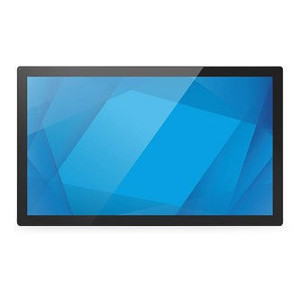
The ELO Touch E448547 is a 23.8-inch LCD monitor purpose-built for point-of-sale and commercial display environments where brightness, color accuracy, and durability matter. This model delivers 1920x1080 (FHD) resolution across a wide LCD panel with anti-glare coating — reducing reflections in bright retail or warehouse settings where ambient lighting is variable and unpredictable. The zero-bezel design minimizes visual interruption when multiple displays are tiled, a key advantage in command centers, control rooms, or multi-display POS walls. No integrated stand ships with the E448547; this is intentional — you choose your own arm, pole mount, or VESA bracket to fit your exact cabinet or wall topology. Connectivity covers the essentials: HDMI, DisplayPort, and VGA, allowing integration with legacy video sources as well as modern compute platforms.
Key Features
- 1920 × 1080 (FHD) Resolution: Delivers sharp text and graphics across the 23.8-inch diagonal — adequate for detailed transaction screens, inventory dashboards, and document review without the cost and power overhead of 4K. Real-world trade-off: FHD is less dense than 27-inch 1440p alternatives, so if you need to pack fine details into a small screen, step up to a higher resolution family.
- Anti-glare Panel Coating: Matte finish reduces specular reflections from overhead lights, windows, or flash photography — critical in retail floors and warehouse picking stations where gloss would create wash-out and viewing-angle distortion. Slight grain texture is visible if you look closely; not an issue for normal viewing distance.
- Zero-Bezel Design: Edges are minimized, leaving nearly full-frame picture-to-edge coverage. When mounting multiple E448547 units side-by-side, the visual gap is negligible — a real advantage over bezeled displays in large POS arrays or security monitor walls where continuity of image matters.
- HDMI, DisplayPort, and VGA Inputs: Three connection options let you daisy-chain from a single source (if supporting DP 1.2+), swap between compute platforms, or plug in older VGA-equipped devices without adapters. VGA is analog and susceptible to EMI in noisy electrical environments; HDMI and DP are preferred for industrial settings.
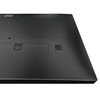
- No Integrated Stand Included: Ships without a stand — you mount it on your own VESA-compatible bracket (75mm or 100mm VESA pattern assumed, though verify before purchase). This reduces shipping weight and cost, and gives you full control over positioning — wall arm, pole mount, cabinet rail, or under-counter swing arm. Flexibility in mounting is essential in retrofit deployments where dock space or cabinet geometry is non-standard.
- Black Finish, North America Configuration: Unit is factory-new, sourced direct from the manufacturer or US direct manufacturer source, with full US warranty path. Color temperature and black levels typical for commercial LCD technology — not optimized for color-grading work, but suitable for transactional and industrial UI display.
Typical Deployment Scenarios
The E448547 fits best in fixed-location POS terminals (retail checkout, quick-service restaurants), warehouse management system displays, order-picking workstations, and security control rooms. The lack of touch input means this is a display-only monitor — pair it with a separate keyboard, barcode scanner, or touch overlay if you need user input. If your use case requires integrated touch, ELO's touchscreen-enabled lineup is a documented alternative within their product family.
Integration & Compatibility
Connect via HDMI to modern PCs, single-board computers, or video sources; use DP for daisy-chain and resolution flexibility; fall back to VGA for legacy equipment. Mount on any 75mm or 100mm VESA bracket (confirm your bracket supports the monitor's weight, typically under 10 lbs). Confirm input resolution and refresh rate compatibility with your graphics adapter — most modern GPUs lock to 60 Hz @ 1080p HDMI by default, which is appropriate for transactional interfaces.
Frequently Asked Questions
Q: Does the E448547 come with a mounting bracket or stand?
A: No. The E448547 ships without a stand. You must source a separate VESA-compatible bracket (75mm or 100mm pattern) or wall arm to install it.
Q: Can I use the E448547 in a bright retail environment?
A: Yes. The anti-glare matte coating reduces reflections from overhead lights and windows. However, brightness specifications (nits) are not detailed in available evidence. If you operate in extreme direct sunlight, contact the manufacturer for measured luminance values under your specific lighting condition.
Q: Is this monitor touch-capable?
A: No. The E448547 is a non-touch LCD monitor. If you need touch input, ELO Touch manufactures separate touchscreen monitors within their commercial display line.
Q: What's the warranty on the E448547?
A: Warranty details are not specified in current sourced data. Contact the distributor or manufacturer directly for warranty period and coverage scope.
Q: Can I stack or daisy-chain multiple E448547 displays?
A: You can physically position multiple E448547 units side-by-side using separate VESA mounts or wall arms. Daisy-chaining video (cascading one display output to feed another) depends on your graphics adapter's DisplayPort 1.2+ capability. HDMI and VGA do not support display daisy-chaining — each unit requires its own independent input.
The E448547 is a straightforward, no-frills commercial display. It's not a POS touch terminal — it's a display monitor you install into your own fixed cabinet or wall configuration. That distinction matters: if you're building a fleet of self-checkout kiosks or warehouse workstations, you control the mechanics (bracket, arm, enclosure), which gives you flexibility but also responsibility for the full mechanical design.
Technical Highlights:
- 1920 × 1080 FHD across 23.8 inches: Pixel density is around 93 DPI — adequate for transaction fonts and dashboards at arm's length, but don't expect magazine-quality image sharpness. This resolution is the sweet spot for cost and power efficiency in commercial displays under 27 inches.
- Anti-glare coating: Reduces specular glint in high-ambient-light environments (retail floors, factory floors). Matte surfaces scatter light, reducing brightness slightly; if your application is in a low-light control room, a glossy panel might deliver more perceived brightness, but reflections become a liability.
- Triple video input (HDMI, DP, VGA): Covers legacy and modern compute. DP 1.2+ supports daisy-chaining if your graphics card is equipped, which can simplify cabling in multi-display walls. HDMI and VGA are 1:1 connections — one graphics output per one input.
Deployment Considerations:
- No stand means you own the mounting design: Upside: you can build exactly the form factor you need. Downside: you must verify VESA compatibility and weight capacity of your bracket before installation. A 10 lb (approximate) LCD panel on a flimsy pole mount can tip in traffic areas.
- Non-touch is a gotcha if you're expecting transactional interface: If your workflow requires screen taps, you'll need a separate touch overlay or separate touch-enabled display. Retrofitting touch to a non-touch panel is possible but adds cost and thickness.
- Brightness and color temperature specs are absent from available evidence: If your deployment is in direct sunlight or requires color accuracy (e.g., garment retail, photo verification), ask the manufacturer for nits and color gamut before committing.
The E448547 is best suited for fixed-installation transactional displays — point-of-sale back-office screens, warehouse label printers tied to display monitors, security command-center walls. It's not a grab-and-mount consumer monitor. It's a commercial display you integrate into a larger cabinet or workstation design.