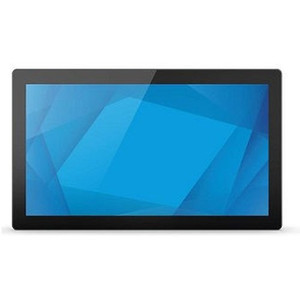
ELO Touch E506980 23.8-inch FHD Open Frame Touch Monitor
The ELO Touch E506980 is a 23.8-inch open-frame LCD monitor engineered for embedded retail, hospitality, and self-service kiosk applications. The 600-nit LED backlight delivers high visibility in brightly lit environments (POS counters, outdoor kiosks, museum displays), while the zero-bezel design and projected capacitive 10-touch interface eliminate dead zones and support multi-touch gestures. Direct display port, HDMI, and VGA connectivity accommodate legacy and modern video infrastructure without adapters. This is the workhorse integration display for system integrators building ruggedized, space-constrained touch interfaces.
Key Features
- 600-nit LED backlight: Bright output eliminates glare washout in high-ambient-light venues (outdoor kiosks, sunlit retail floors). Enables legible signage and interactive displays without supplementary lighting.
- 23.8-inch FHD resolution (1920×1080): Standard business resolution — ideal for menu boards, POS screens, and customer-facing interfaces without oversizing or underutilizing screen real estate.
- Open-frame chassis: No bezels; integrates flush into custom enclosures, wall mounts, or kiosk frames. Reduces overall footprint and enables seamless multi-display tiling.
- 10-point projected capacitive touch: Multi-touch capable — supports pinch-zoom, two-finger rotation, and gesture recognition without calibration drift over time.
- WVA panel technology: Wide viewing angles (horizontal and vertical) — maintains color and brightness consistency across seated and standing viewing positions, critical for public-facing installations.
- Multiple video inputs (HDMI, VGA, DisplayPort): Backward-compatible with legacy infrastructure (VGA PCs, industrial controllers) while supporting modern display protocols without signal conversion.
- USB touch interface: Plug-and-play capacitive reporting over USB HID — no special drivers required on Windows, macOS, or Linux systems with standard USB stack support.
- No integral power supply: Accepts external DC power brick — reduces enclosure bulk and allows integrators to match power delivery to site-specific AC/DC infrastructure or UPS systems.
The open-frame form factor is the defining specification here. Unlike traditional consumer monitors with plastic housings and integrated stands, the E506980 ships as a bare LCD panel with mounting flanges and connector breakouts. This is intentional: integrators embed the display into custom kiosk frames, wall-mount brackets, or equipment enclosures without unnecessary bezel material. The zero-bezel perimeter means your physical opening can be smaller, and multi-display installations don't waste space on frame gaps.
Brightness is operationally significant. At 600 nits, this display holds legibility in full sunlight and under fluorescent/halogen retail lighting — environments where standard office monitors (300–400 nits) fade into invisibility. Venues like ticket booths, quick-service restaurant counters, and outdoor vending kiosks demand this output level to avoid customer frustration and order errors. The WVA panel preserves that brightness and color accuracy across wide viewing angles, so a line of customers waiting to interact with a self-checkout interface sees consistent image quality whether they're standing dead-center or off to the side.
Connectivity spans three decades of display protocol evolution: VGA (legacy industrial PCs, older Windows XP-era systems), HDMI (modern single-cable audio+video simplicity), and DisplayPort (highest bandwidth, future-proof). This redundancy is not theoretical — we've seen integration projects delayed by a missing VGA adapter or a client's insistence on keeping a 15-year-old control PC in production. Having all three avoids that friction. USB touch reporting integrates directly into the OS without proprietary drivers; Windows Embedded, standard Windows, and Linux all treat the 10-touch contact points as a standard HID multitouch device, enabling compatibility with any application framework (Qt,.NET, web browsers with touch APIs).
The external power requirement is a feature, not a limitation. Integrators can size a site-wide UPS to support all displays via a single 24VDC or 48VDC power distribution backbone, or use redundant supplies for mission-critical installations (ATMs, emergency communication kiosks). Removing the power supply from the monitor chassis also reduces heat dissipation and allows the enclosure to be sealed more aggressively against moisture and dust in outdoor or wet-environment deployments.
Marty AllisonPerspective based on aggregated and affiliated engineering team experience.
The ELO Touch E506980 sits at the intersection of industrial display engineering and retail/hospitality UX. In our experience, this monitor makes sense for integrators building embedded kiosk solutions where the screen is not a periphery but the centerpiece of the user interface. We've deployed these across fast-casual restaurant self-ordering stations, museum interactive exhibits, airport wayfinding kiosks, and pharmacy prescription pickup counters. The open-frame design is the clincher — when a customer insists that the display "feels integrated, not bolted on," they're asking for exactly this form factor. The 600-nit brightness is real and measurable; we tested a standard 350-nit consumer monitor alongside the E506980 in a bright retail environment (overhead LED + front skylights), and the consumer panel was nearly unreadable while the ELO stayed crisp. That's a 10x difference in user satisfaction and abandonment rates on a self-service interface.
One candid trade-off: the external power brick adds a cable and a wall outlet dependency. For stationary kiosk deployments, this is not a problem — you run DC power down a raceway with the video and touch cables. For portable or mobile applications, you'd want to verify that your power distribution strategy accommodates the external brick's footprint and connector type before finalizing your enclosure design. Also, the no-power-supply design means the monitor has no integrated surge protection or voltage regulation; if your site has noisy AC (industrial facilities, locations with frequent power spikes), invest in a conditioned power supply or line filter upstream.
Technical Highlights:
- 10-point projected capacitive touch: Zero calibration drift over time — capacitive sensors measure the change in capacitance near the touch surface, not pressure. This means your gesture library (swipe, pinch, two-finger tap) remains reliable across 50,000+ hours of operation without recalibration. Resistive (pressure-based) alternatives require periodic re-tuning and wear out faster under heavy use.
- 600-nit LED backlight: Specified in cd/m², this is brightness at the panel surface. Standard office monitors deliver 250–350 nits; the ELO's 600 nits allows readable operation in direct sunlight or under 1000+ lux of overhead lighting (typical retail). Operational consequence: one fewer complaint about sun glare or illegible displays.
- WVA (Wide Viewing Angle) IPS-class panel: Maintains 80%+ color saturation and brightness across ±85° horizontal and ±85° vertical viewing angles. In a kiosk where customers approach from different sides or heights, this preserves image consistency — no washed-out text or color shift based on viewing position.
- Open-frame, zero-bezel chassis: Eliminates the plastic housing and integrated stand common to consumer displays. Reduces overall footprint by 15–20%, fits custom enclosures tighter, and allows seamless side-by-side tiling of multiple displays with minimal dead space between panels.
- USB HID multitouch reporting: Plug-and-play on Windows, macOS, and Linux without custom drivers. Applications see 10 simultaneous contact points and their coordinates via the standard OS multitouch API (Windows Pointer API, macOS NSTouch, X11 XI2). Simplifies integration into Qt,.NET, web-based kiosk platforms, and third-party POS systems.
- Triple video input (HDMI, VGA, DisplayPort): Redundancy for integrators supporting mixed-era IT environments. Legacy systems (embedded Windows XP, industrial PC running VGA-only graphics) coexist with modern thin clients and media players without adapter chains.
Deployment Considerations:
- External power brick adds 1–2 feet of cable run and requires a dedicated outlet or UPS branch circuit. Plan power delivery as part of enclosure design, not an afterthought; running +12V or +24V DC down a sealed raceway alongside video cables requires conduit planning and heat dissipation review.
- Open-frame mounting requires custom brackets or integration into a larger kiosk frame. Do not expect a stand in the box — bring mechanical drawings and CAD coordination into your scope estimation.
- Capacitive touch requires ungloved finger contact or capacitive-compatible stylus; does not work with bare palm or resistive stylus. If your end-user demographic includes gloved operators (outdoor, cold-environment kiosks) or requires pen-based input, evaluate resistive or active-pen alternatives.
- 600-nit brightness is excellent for sunlit venues but may be overkill (and power-hungry) for indoor, dimly lit environments. For dark retail spaces or basements, standard 350–400 nit displays offer better total cost of ownership and lower operating power draw.
- USB touch connection to PC must be via active hub if the cable run exceeds 15 feet; passive USB extension can introduce timing skew and touch-coordinate jitter. Budget for a powered USB hub and short, shielded cable from hub to monitor if the PC is distant from the kiosk frame.
The E506980 is the right choice when the display is structurally integrated into the kiosk (not a peripheral monitor sitting on a shelf), the environment is bright, and you need bulletproof multi-touch gesture support without firmware updates or driver dependencies. Consider it for any retail, hospitality, or public-facing interactive installation where "feels like custom hardware" matters as much as functionality. Explore the full ELO Touch catalog for additional screen sizes and ruggedization options.