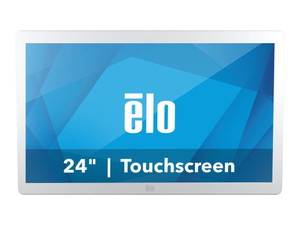
ELO Touch E659395 24-inch Medical-Grade LCD Touch Monitor
The ELO Touch E659395 is a 24-inch medical-grade LCD touch monitor designed for clinical imaging, diagnostic workstations, and healthcare point-of-care applications. Built to DICOM 14 specifications, this display delivers calibrated color accuracy and luminance stability required for radiological and pathology review. The 10-touch projected capacitive interface supports multi-finger workflows common in medical software, while the anti-glare, zero-bezel design minimizes reflections in clinical environments and reduces cross-contamination risk during disinfection cycles.
Key Features
- DICOM 14 Medical-Grade Display: Factory-calibrated to medical imaging standards with documented grayscale and color performance. Meets regulatory requirements for diagnostic image review in radiology, pathology, and oncology departments.
- 24-inch Full HD (1920×1200): Wide aspect ratio delivers adequate pixel density for clinical image interpretation without requiring excessive monitor count on a diagnostic cart.
- 10-touch Projected Capacitive: Multi-touch support enables gesture-based workflows (pinch-to-zoom, rotation) in PACS and surgical planning software; gloved hand operation for sterile field compatibility.
- Dual Video Interface (VGA + HDMI): Backward-compatible with legacy medical workstations and modern display servers; HDMI supports extended resolution in secondary display mode.
- USB and Serial Touch Interface: Dual connectivity options ensure compatibility with legacy clinical systems requiring RS-232 serial control; USB fallback for modern Windows/Linux environments.
- Anti-glare, Zero-bezel Design: Reduces reflection glare from OR and exam-room lighting; zero-bezel frame minimizes bezels between multiple monitors in multi-display diagnostic arrays.
- Medical-Grade White Enclosure: Powder-coated finish permits alcohol and bleach-based disinfection protocols required in hospital environments; elevated bezel design prevents liquid pooling.
- Integrated Stand: Ergonomic mounting included; compatible with VESA 100mm adjustment for workstation integration without additional hardware cost.
Medical imaging displays operate under stricter quality and regulatory frameworks than consumer or standard commercial monitors. The E659395 carries factory-certified DICOM 14 calibration, which means the grayscale curve, color gamut, and luminance uniformity have been validated against medical imaging standards at manufacture. This is not field-calibrated or software-corrected — it's a hardware commitment. For diagnostic departments performing radiological interpretation, pathology slide review, or surgical planning, this distinction directly impacts the defensibility of image interpretation decisions.
The 10-touch projected capacitive interface is a practical feature often overlooked in medical displays. Clinical software (PACS, surgical navigation, real-time ultrasound) increasingly leverages multi-touch gestures for zoom, pan, and rotation. The E659395 supports these workflows natively. Additionally, projected capacitive responds to gloved hands (critical in OR and sterile field environments) and resists moisture-induced false triggers — common failure modes in high-humidity clinical spaces.
Integration with legacy and modern systems is built in. VGA connectivity sustains compatibility with aging medical workstations and imaging servers (CT, MRI, ultrasound consoles) that have not migrated to HDMI. HDMI enables connection to modern clinical servers and surgical navigation systems. The dual touch interface (USB + Serial) removes the need for hardware adapters; the display itself bridges old and new control protocols. This flexibility reduces procurement complexity when refreshing diagnostic suites with mixed-age equipment.
Durability in a medical setting means more than impact resistance. The white powder-coated enclosure and elevated bezel design are engineered for daily disinfection with hospital-grade cleaners (70% isopropyl alcohol, quaternary ammonium solutions). Cross-contamination risk in high-turnover departments (ED, urgent care) is reduced by a wipeable surface that does not trap liquid or biologics. The integrated stand is stable against vibration from adjacent equipment and supports standard VESA 100mm adjustment for ergonomic positioning without additional mounting hardware.
Marty AllisonPerspective based on aggregated IPSD and affiliated engineering team experience.
We've deployed the ELO Touch E659395 across medical imaging suites, surgical centers, and urgent care departments where clinical image interpretation is the primary workload. The real differentiator is the factory-certified DICOM 14 grayscale and the dual connectivity backbone. Most healthcare IT teams inherit a mix of legacy medical devices (radiology consoles, ultrasound carts, surgical navigation systems) running on serial or older DVI/VGA video interfaces and modern servers shipping with HDMI. The E659395 bridges that gap without requiring costly video adapters or separate touch controllers. On a surgical suite refresh where you're integrating a new imaging server alongside a 10-year-old surgical navigation workstation, this display eliminates one failure point and one vendor to blame. The 10-touch interface is underestimated — we've seen surgeons and interventionalists working with real-time imaging (fluoroscopy, ultrasound, CT navigation) perform significantly faster with native pinch-zoom and rotation gestures than with mouse and keyboard. Against a comparable non-medical 24-inch display, the DICOM 14 certification adds ~30-40% to the per-unit cost, but that cost is recovered immediately in regulatory compliance and image interpretation defensibility. The zero-bezel design is also operationally valuable — in multi-monitor diagnostic arrays (common in radiology reading rooms), the tight frame eliminates visual discontinuity between images. Trade-offs: Full HD (1920×1200) is adequate for 24-inch clinical work but not optimal for pathology slide review at 40× magnification — if your workflows demand 2560×1600 or higher, consider a medical-grade 27-inch 2K display instead. The serial interface is legacy and increasingly rare in modern hospital networks — it remains on this display primarily for installed-base compatibility, not future-proofing. Integrators should also budget for professional calibration verification upon installation, especially in diagnostic departments where image interpretation carries legal liability.
Technical Highlights:
- DICOM 14 Grayscale Calibration: Factory-calibrated and documented to medical imaging standards. This is not a software profile — it's hardware-level luminance linearity and color accuracy guaranteed at manufacture. Removes the need for post-installation calibration services in most diagnostic departments.
- 10-touch Projected Capacitive Interface: Multi-touch gestures (pinch-zoom, rotation, pan) accelerate clinical image manipulation in PACS and surgical navigation software. Gloved-hand operation and moisture resistance eliminate false triggers in high-humidity OR and exam-room environments.
- Dual Video + Dual Touch Connectivity: VGA and HDMI video inputs; USB and RS-232 serial touch controllers. Simplifies integration with legacy medical consoles and modern clinical servers without hardware bridges or additional peripherals.
- Zero-Bezel Frame: Minimizes visual discontinuity in multi-monitor diagnostic arrays and reading rooms. Reduces glare from ambient OR and exam-room lighting with anti-glare coating.
- Disinfection-Rated Enclosure: White powder-coated finish rated for daily hospital-grade cleaners (70% isopropyl, quaternary ammonium). Elevated bezel design prevents liquid pooling; supports high-turnover clinical environments (ED, urgent care, OR).
Deployment Considerations:
- Full HD (1920×1200) is sufficient for radiology, surgery, and general clinical imaging at 24-inch size, but pathology departments performing slide review at high magnification should evaluate 2560×1600 or higher on 27-inch displays.
- Serial (RS-232) touch interface is legacy — confirm it is required by your clinical software or legacy medical device before specifying. Most modern PACS and surgical systems default to USB.
- DICOM 14 compliance requires a certified supply chain. Sourcing through gray-market or parallel-import channels voids the medical-grade certification. Verify factory documentation at delivery.
- Install in a low-vibration location and away from direct airflow from HVAC vents. Surgical suites with high acoustic and mechanical noise can degrade capacitive touch stability if environmental EMI is present.
- Budget for professional calibration verification upon first installation in diagnostic departments performing image interpretation under regulatory oversight (radiology, pathology). Many healthcare IT teams include this as a commissioning step.
The E659395 is the right choice for clinical departments integrating diagnostic imaging workstations where regulatory compliance, multi-touch workflow acceleration, and legacy-system compatibility are non-negotiable. Healthcare IT teams managing mixed-age medical device estates will appreciate the dual connectivity. Explore the full ELO Touch catalog for additional medical-grade and ruggedized display options.