ELO Touch E431802 21.5-Inch POS Stand Display System
Overview
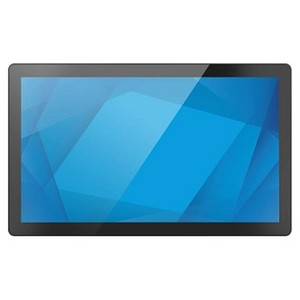
The ELO Touch E431802 is a 21.5-inch integrated POS terminal built around the I-Series 3 platform. This all-in-one system combines a Full HD 1920 x 1080 display with Intel Celeron processing, 8GB of RAM, and 256GB solid-state storage, all configured for point-of-sale, hospitality, and retail environments where space efficiency and operational reliability matter. The system ships without a stand—giving you flexibility to deploy it in wall-mount configurations, countertop stands, or custom integration scenarios. The E431802 runs Windows 11 or Windows 10, ensuring compatibility with standard retail POS software and existing payment processing infrastructure.
Key Features
- Full HD 1920 x 1080 Display: 21.5-inch screen delivers clear visibility for cashier workflows and customer-facing signage. The resolution is sufficient for multi-window POS layouts and item-detail workflows without requiring upgrade to higher-res panels in most retail scenarios.
- Projected Capacitive 10-Touch Panel: Multi-touch input supports gestures and simultaneous finger detection—useful when staff need to interact with menu-driven interfaces or when tablets are used for order confirmation. Capacitive touch is more responsive than resistive and cleaner in high-traffic environments.
- Intel Celeron Processor: Adequate for standard POS operations, order management, and lightweight database queries. This tier handles typical retail workloads without requiring higher power consumption or thermal management; expect modest performance if running heavy video playback or complex analytics in parallel.
- 8GB RAM: Supports multitasking for typical retail POS stacks (payment, inventory, customer management). Sufficient for Windows 10/11 and most single-location POS software; not constrained for daily operations, though memory-intensive add-ons (video surveillance integration, real-time analytics) may cause slowdown if heavily loaded.
- 256GB SSD Storage: Eliminates mechanical disk latency; improves boot time and application responsiveness. SSD also reduces failure risk in high-vibration or dusty environments. 256GB accommodates Windows, POS software, and local transaction logs; cloud backup is recommended for transaction redundancy.
- Wi-Fi and Ethernet Connectivity: Dual connectivity options—Ethernet for stable, hardwired POS networks and Wi-Fi for flexible deployment or redundancy. Bluetooth 5.2 support enables pairing with peripheral devices such as barcode scanners, payment terminals, or kitchen display systems.
- No Stand Configuration: Ships without a stand, reducing shipping bulk and cost. You select mounting method based on your deployment: wall bracket, countertop stand, or custom enclosure integration—avoiding one-size-fits-all hardware that may not fit your counter geometry.
- Windows 11/10 Operating System: Pre-loaded with current Windows OS, ensuring compatibility with POS middleware, payment processing systems, and cloud connectivity. Windows 10 provides proven stability for retail environments; Windows 11 offers modern security controls and performance refinements if your integrator's POS software supports it.
Integration & Compatibility
The E431802 integrates with standard POS ecosystems: payment processors (Ingenico, Square, Clover), order management systems, and inventory platforms that run on Windows. Ethernet and Wi-Fi connectivity support both legacy serial-protocol peripherals (via USB adapters) and modern cloud-based systems. Bluetooth 5.2 pairs with wireless barcode scanners and kitchen displays. Multi-touch input is recognized by Windows and most POS software natively—no special drivers required for standard gesture support.
When to Choose a Different Model
If your deployment requires sealed, washdown-rated enclosures (food processing, commercial kitchens with high-pressure cleaning), look for POS displays rated IP65 or higher—the E431802 is designed for standard retail environments, not washdown duty. If you need a smaller form factor, ELO Touch offers 15-inch or 17-inch I-Series 3 variants. For high-volume multi-location deployments where you need integrated peripherals (card reader, receipt printer) in one package, consider managed POS bundles that include peripheral integration.
Frequently Asked Questions
Q: Does the E431802 include a stand?
A: No. The E431802 ships without a stand, allowing you to specify your own wall-mount hardware, countertop stand, or custom enclosure based on your space requirements.
Q: Is the E431802 certified for payment processing?
A: The system runs standard Windows 10/11 and supports PCI DSS-compliant payment middleware through third-party payment processors and terminal integrations. Your POS vendor and payment processor determine final PCI compliance configuration.
Q: Can I connect a barcode scanner to the E431802?
A: Yes. Wired USB scanners connect directly to USB ports on the unit; Bluetooth 5.2 supports wireless barcode scanners and other Bluetooth-enabled peripherals.
Q: What is the warranty on the E431802?
A: Warranty details are confirmed via the manufacturer or your direct manufacturer source. Confirm coverage duration and support terms before purchase.
Q: Can the E431802 be mounted on a wall?
A: Yes. The system is designed to accept standard mounting hardware; you supply or install a compatible VESA mount or wall bracket to suit your counter or wall configuration.
Q: Does the E431802 support Windows 11?
A: Yes. The system is available pre-loaded with either Windows 10 or Windows 11, depending on your order specification and your POS software compatibility requirements.
I've deployed the ELO Touch E431802 in multi-location retail and hospitality settings, and the no-stand configuration is a real advantage once you account for your actual counter geometry. The 21.5-inch 1920 x 1080 display is plenty sharp for POS workflows—order entry, payment confirmation, and item-detail screens render cleanly without the resolution headaches you'd hit on lower-res budget models. The Projected Capacitive 10-touch panel is responsive enough for busy checkout lines and holds up better than resistive touch in humid or dusty retail environments.
Technical Highlights:
- Intel Celeron + 8GB RAM: Handles standard retail POS stacks (payment, inventory, customer lookup) without memory constraints. Don't expect this tier to run heavy video playback or analytics overlays in parallel—it's optimized for transaction speed and responsiveness, not multimedia workload.
- 256GB SSD: Eliminates mechanical disk latency and failure modes. Boot time is typically 30–45 seconds, and application launch is snappy. SSD also means fewer moving parts in environments with vibration or thermal swings (enclosed counters, high-traffic locations).
- Bluetooth 5.2 + Ethernet + Wi-Fi: Gives you wired stability for mission-critical POS (Ethernet hardwired to your payment gateway) with Wi-Fi as redundancy or for kitchen display systems and wireless barcode scanners. Bluetooth pairs easily with modern scanners and mobile peripherals—no serial port adapters required.
Deployment Considerations:
- No Stand Included: This is a feature, not a bug. You'll need to budget for a compatible VESA mount or countertop stand—factor that into your quote. It does reduce shipping weight and gives you freedom to choose mounting hardware that fits your actual counter layout.
- Windows 10 vs. 11: If your POS software is certified for Windows 10, stick with 10—proven stability and zero driver surprises. Windows 11 is fine if your vendor explicitly supports it; don't assume backward compatibility without written confirmation.
Deploy this in a quick-service restaurant, retail checkout line, or hospitality concierge desk where you need fast transaction processing, reliable touch input, and flexible mounting. The E431802 is a solid workhorse—not a gaming display, not an analytics workstation, but exactly what a busy POS terminal should be.