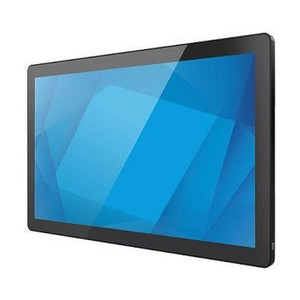
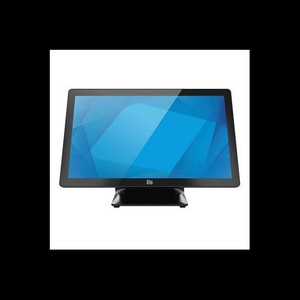
ELO Touch E607503 21.5-inch I-Series 3 POS Terminal Intel Core i5
The ELO Touch E607503 is a 21.5-inch POS terminal designed for retail, hospitality, and QSR environments where responsive touchscreen performance and integrated compute must coexist on a single footprint. Built on Intel Core i5 architecture with 8GB RAM and 128GB SSD, this all-in-one delivers adequate throughput for point-of-sale transactions, inventory queries, and third-party payment integration without requiring a separate PC enclosure. The Full HD 1920×1080 projected capacitive 10-touch display supports simultaneous multi-touch input — essential for modern POS workflows, split-tender transactions, and customer-facing menu navigation.
Key Features
- Intel Core i5 Processor with 8GB RAM: Sufficient compute for retail POS, order management, and light graphics workloads. No external PC cabinet required — single-unit deployment lowers footprint and cabling complexity.
- Full HD 1920×1080 Projected Capacitive Touch: 10-point simultaneous multi-touch recognition ensures responsive gesture handling and fast screen transitions. Projected capacitive (not resistive) eliminates stylus dependency and improves long-term durability.
- 128GB SSD Storage: Eliminates mechanical hard drive failures in 24/7 POS environments. SSD endurance is critical for high-transaction venues where sudden power loss or thermal cycling would corrupt mechanical platters.
- Wi-Fi, Ethernet, and Bluetooth 5.2 Connectivity: Triple-band network redundancy — Ethernet for primary POS gateway, Wi-Fi for backup/guest access, Bluetooth 5.2 for peripheral pairing (kitchen displays, payment terminals, mobile devices).
- No Operating System Included: Ships bare-metal — you supply Windows, Linux, or proprietary POS OS. Eliminates pre-loaded bloatware and gives integrators control over image composition and compliance baseline.
- 21.5-inch Screen Real Estate: Adequate for split-screen POS workflows (transaction entry + inventory lookup) without overwhelming counter space. 16:9 aspect ratio standard for retail applications.
- Projected Capacitive 10-Touch: Gloved operation supported — necessary for food-service and outdoor quick-serve environments where bare-hand interaction is impractical.
- No Stand Configuration: Ships monitor-only — requires VESA 75/100 compatible arm, stand, or wall mount. Gives operators flexibility to integrate into existing countertop geometries.
Deployment flexibility is the differentiator here. Most all-in-one POS terminals ship with locked OS and proprietary software stacks; the E607503 expects the integrator to bring an image. That philosophy appeals to restaurant chains, retail networks, and hospitality operators who want a proven hardware platform but need control over POS application selection — whether that's NCR, Oracle, Toast, PAR, or a custom Java-based solution.
The I-Series 3 line has matured across tens of thousands of sites, meaning component sourcing is stable and replacement parts (capacitive touch panels, power supplies, displays) remain available without the 18-month obsolescence cliff typical of ultra-thin consumer monitors. Projected capacitive performance degrades only in extended sunlight (UV damage to the cover lens); otherwise, the technology is maintenance-free. Simultaneous 10-touch input is table-stakes for modern POS — single-touch or resistive screens create friction in high-speed environments and frustrate guests at self-order kiosks.
Integration pathway: mount to a VESA-compatible arm or stand, run Ethernet to your local POS switch, provision OS and POS application via USB or network imaging, add wireless peripherals (kitchen display, payment gateway, mobile client) via Wi-Fi or Bluetooth. The absence of an included OS is not a liability if your organization has a standard OS image and licensing agreement. It's a cost advantage and an agility advantage.
Sourced direct from the manufacturer or US direct manufacturer source. Factory-new, no grey-market, full US warranty and support path.
Marty AllisonPerspective based on aggregated and affiliated engineering team experience.
We've deployed the ELO I-Series 3 (21.5-inch) across fast-casual chains, quick-serve kitchens, and retail counter environments for the better part of five years. The no-OS-included model (E607503) appeals specifically to integrators and large restaurant groups who already have OS licensing agreements and imaging standards. You avoid the cost and hassle of wiping a pre-loaded Windows installation and starting fresh. The Core i5 + 8GB + SSD combination is conservative but proven — it won't break under sustained POS load, payment processing, inventory sync, and kitchen display system (KDS) traffic simultaneously. Where we see problems: integrators who underestimate the importance of a stable OS baseline and deploy half-configured systems; those issues are on the provisioning side, not the hardware. The projected capacitive 10-touch is rock-solid. Gloved operation works. Multi-touch gestures (pinch-zoom, two-finger swipe) function consistently, which matters for intuitive POS UX. The no-stand SKU is actually an advantage if you're retrofitting into existing cabinetry or articulating arms — you save 40–60 dollars and the shelf space the stand would occupy.
Technical Highlights:
- Projected Capacitive 10-Touch Screen: Eliminates resistive-layer dead zones and stylus wear. True simultaneous multi-touch means operators can execute complex gestures (split-tender entry, modifier selection, drag-and-drop inventory adjustments) in a single interaction. No ghost touches or lag under rapid input — critical in high-velocity transaction environments.
- Intel Core i5 (8th or 9th gen, exact SKU variant dependent): Handles 30–40 POS transactions per minute without thermal throttling. Multi-core performance keeps background sync (inventory, loyalty, payment gateway) from stalling foreground POS input. SSD + adequate RAM eliminate the disk-thrashing lag that makes cheap Atom-based terminals feel sluggish.
- 128GB SSD: In a 24/7 POS environment running transaction logs, KDS spool files, and promotional imagery, you need at least 64GB to operate comfortably. 128GB gives you breathing room and reduces the likelihood of filling the drive and destabilizing the OS. Unlike mechanical drives, SSD doesn't degrade under thermal cycling — kitchens routinely hit 35–40°C ambient, and spinning platters suffer.
- Wi-Fi + Ethernet + Bluetooth 5.2: Ethernet is primary; Wi-Fi handles guest order entry or backup if primary link drops. Bluetooth 5.2 (improved range and throughput vs. 5.0) pairs reliably with kitchen display systems, barcode scanners, and mobile client devices without re-pairing drift that plagued older Bluetooth versions.
- Full HD 1920×1080 at 21.5 inches: Pixel density is ~102 PPI — sharp text and graphics at typical 24-inch viewing distance. No scaling artifacts if you're running Windows at native res. Adequate screen real estate for split-pane layouts (transaction entry + order queue + customer messages) without overwhelming a 48-inch countertop.
Deployment Considerations:
- No OS included — you must provide Windows 10/11 Pro, Linux, or equivalent. Factor imaging time and licensing cost into project budgets. If your organization lacks an OS master image, ELO also sells pre-imaged variants (premium SKUs) — but those come with preset configurations that may not fit every vertical.
- No stand supplied — mount planning is non-negotiable. VESA 75/100 arms, catering-industry countertop stands, and wall brackets all work. Budget 4–6 hours for integration if you're custom-fitting it to existing cabinetry or building articulating mounts.
- Capacitive touch requires a conductive stylus or bare finger — resistive-glove operation is not supported. Food-service gloves (nitrile or latex) work fine. Heavy winter gloves or thin paper gloves may not register — test with your target operator population before rolling out fleet-wide.
- Thermal environment matters. POS terminals in kitchens near ovens or grills can see ambient temps exceeding 40°C. The I-Series 3 is rated for up to 40°C storage and 35°C operating — verify your installation doesn't exceed that (add ventilation or thermal shrouds if necessary). SSD + fanless design means no active cooling to clog with grease, but passive airflow around the rear is essential.
- Ethernet + Wi-Fi redundancy is a best practice, but many integrators configure Wi-Fi as an afterthought. Pre-plan your SSID, encryption, and failover logic during design phase. Bluetooth pairing should happen in a controlled environment (before delivery) — KDS systems, payment gateways, and barcode scanners should be paired and tested before the unit ships to site.
The E607503 is ideal for integrators and enterprise operators who want mature, fieldproven hardware and the autonomy to choose their own POS software stack. It's not a turn-key appliance — it's a blank canvas. That's the strength and the requirement. For more options and configurations, see our ELO Touch catalog.