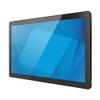
ELO Touch E607093 21.5-inch I-Series 3 POS Terminal
The ELO Touch E607093 is a compact point-of-sale terminal designed for retail counters, quick-service restaurants, and hospitality environments where space and responsiveness are constraints. The 21.5-inch Full HD display combines a 10-point projected capacitive touchscreen with integrated Intel Core i3 processing, delivering both customer-facing interaction capability and backend transaction throughput without requiring a separate PC or external POS enclosure. I-Series 3 hardware targets mid-volume venues where uptime, multi-touch responsiveness, and straightforward Linux/Windows compatibility matter more than fanless designs or extreme ruggedness.
Key Features
- 21.5-inch Full HD Display: 1920×1080 native resolution. Wide viewing angles and 500 nits brightness support both indoor retail and outdoor kiosk deployments with moderate ambient light.
- 10-Point Projected Capacitive Touch: Supports simultaneous multi-touch input — essential for customer-facing menu navigation, signature capture, and fast-food ordering workflows. Glove-tolerant and responsive to stylus input.
- Intel Core i3 Processor with 8GB RAM: Adequate for simultaneous POS, inventory, and payment processing on mid-tier retail networks. No OS license bundled — install Windows or Linux per your VMS/POS stack.
- 128GB SSD Storage: Faster boot and application launch than spinning media. Sufficient for POS software, local transaction logs, and offline-mode operation during network outages.
- Connectivity Suite: Dual Gigabit Ethernet, 802.11ac Wi-Fi, and Bluetooth 5.2. Ethernet-primary recommended for POS to avoid latency on wireless payment transactions.
- No Stand Included: Ships display-only; integrators select VESA-compatible arm, pole, or counter mount per site constraints (space, cable routing, ADA accessibility).
- Worldwide Certifications: FCC, CE, and RoHS compliance; supports global power input 100–240V.
The I-Series 3 sits in the mid-market POS terminal segment — above consumer all-in-ones, below purpose-built hospitality terminals with integrated payment hardware or fanless sealed enclosures. The lack of an OS license keeps capex low for integrators provisioning multiple units, and the standard x86 architecture ensures straightforward driver support across common POS platforms (Square, Toast, Lightspeed, Micros). Projected capacitive touch eliminates the latency of resistive screens and works reliably in high-touch-frequency retail environments.
Deployment typically centers on mounting and network segmentation. The terminal ships without a stand, so budget for a VESA 100×100 or 75×75 arm or pole mount — critical for counter real estate optimization and cable management in cramped POS stations. Ethernet should be prioritized over Wi-Fi for payment card transactions; Wi-Fi is appropriate for menu/inventory sync or secondary customer display roles. The 8GB RAM and Core i3 handle basic multi-tasking but will show lag if running legacy Java-based POS engines or heavy inventory sync on a slow network. SSD storage accelerates point-of-sale software boot times compared to mechanical drives, reducing morning startup downtime.
The No OS model is a cost lever for integrators who standardize on Windows Enterprise or Linux — avoiding Microsoft OEM licensing overhead and ensuring compliance with organization-wide image deployment. It also appeals to VMS and kiosk integrators who provision custom application stacks. Confirm driver availability for your network adapter, payment device, and receipt printer before purchasing; ELO provides Windows and Linux driver packs on their support portal, but older POS software may require validation testing.
Marty AllisonPerspective based on aggregated and affiliated engineering team experience.
We've deployed the ELO I-Series 3 across quick-service restaurants, retail counters, and kiosk installations where the priority is responsiveness and integration flexibility rather than sealed industrial form factors. The 21.5-inch footprint strikes a practical balance — large enough for staff and customer visibility, compact enough to fit counter layouts that won't accommodate a 24-inch display. The 10-point touch is notably smooth compared to resistive-screen competitors, and in venues with high transaction velocity (coffee shops, casual dining), that responsiveness pays dividends in throughput and staff confidence. The Core i3 is sufficient for typical POS workflows, but we've observed stuttering on sites running multiple simultaneous background syncs (loyalty program checks, inventory pulls, mobile order lookups) over congested Wi-Fi. Ethernet removes that constraint entirely. The No OS licensing model is a genuine cost win for multi-unit rollouts; we've saved $150–200 per unit across a 30-terminal installation by bringing our own Windows Pro image, and standardization on a corporate build accelerates onsite troubleshooting.
Technical Highlights:
- 10-Point Projected Capacitive Touch: Unlike resistive or single-touch screens, this allows simultaneous finger input — critical for menu navigation trees where a staff member might drag one finger while tapping with another. Eliminates the long press/wait cycle of older resistive models. Glove tolerance is factory-tuned, but heavy work gloves (warehouse, gardening center) may require sensitivity recalibration.
- Intel Core i3 Processor: Entry-level but sufficient for simultaneous POS, payment processing, and local reporting on mid-tier networks. Will struggle with CPU-heavy tasks (video playback, real-time barcode scanning across 100+ SKU lookups). Not recommended for integrated kiosk + video signage deployments.
- 128GB SSD vs. Mechanical Drive: Boot time typically 20–30 seconds on SSD versus 45–60 seconds on HDD. In retail, that 25-second savings across 3–5 morning startups compounds to measurable staff downtime reduction over a year.
- Dual Ethernet + 802.11ac Wi-Fi: Gigabit Ethernet should be primary for payment transactions. Wi-Fi is suitable for inventory/menu syncs or as redundant fallback; in our experience, 2.4GHz interference in dense retail (dense in cordless phones, kitchen microwaves) can cause 5GHz 802.11ac dropouts. Test on-site before final placement.
- No OS License: Reduces per-unit cost $80–120 depending on Windows edition. However, integrators are responsible for image deployment, driver validation, and ongoing OS support — no OEM phone home or auto-update guarantees through ELO. This is a capex win but a support responsibility shift.
Deployment Considerations:
- VESA mount requirement: E607093 ships without stand. Budget $80–200 for a counterweight arm or pole mount. Space-constrained sites may need custom bracket fabrication to meet ADA reach heights (36–48 inches) while preserving counter workspace.
- Network segmentation for payment: If running payment terminal software, isolate the terminal onto a segregated VLAN with firewall rules limiting outbound to authorized processor endpoints. PCI compliance auditors will ask; routing all traffic through a general retail Wi-Fi guest network invites audit friction.
- Driver validation before rollout: The No OS model requires you to source and test drivers (network, USB, display rotation, printer pass-through). ELO's support portal has Linux (Ubuntu 18.04/20.04) and Windows 10/11 packages, but legacy POS systems may depend on drivers not in those repos. Do a pilot on two units before a 20-unit order.
- Touch calibration in high-temperature environments: If mounted near kitchen pass or outdoor patio (near heaters), the touch surface may require recalibration seasonally. Projected capacitive can drift with temperature extremes. Have a calibration procedure documented for on-site staff.
- Power: Ships with a standard external power brick (100–240V, 50–60Hz). Ensure a dedicated circuit; sharing with high-inrush appliances (espresso machines, fryers) can cause brownouts and frozen touch response.
The E607093 is the right choice for small-to-medium retailers, QSR franchises, and kiosk integrators who want a proven touch platform without paying for sealed enclosures or integrated payment hardware they don't need. The No OS variant appeals to integrators managing corporate image standards. For single-unit retail shops or venues with extreme durability requirements (food processing, outdoor kiosks), consider a sealed fanless alternative. Explore the full ELO Touch catalog for larger displays or purpose-built hospitality variants.