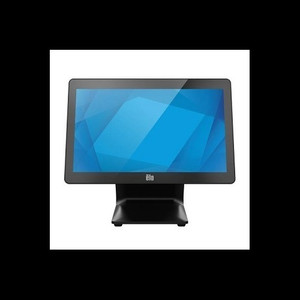
ELO Touch E605919 15.6-inch I-Series 3 POS Display
The ELO Touch E605919 is a 15.6-inch all-in-one POS terminal designed for quick-service restaurants, retail counters, and hospitality venues requiring integrated touchscreen payment processing and order management. Built on Intel Core i3 architecture with 8GB RAM and 128GB SSD storage, this system executes POS workflows, customer-facing displays, and lightweight applications without lag. The Full HD (1920×1080) projected capacitive 10-touch display remains responsive even when wet or contaminated—critical in food-service and high-traffic retail environments where spills and fingerprints are constant.
Key Features
- 15.6-inch Full HD Projected Capacitive Display: 1920×1080 resolution with 10-point simultaneous touch. Works reliably with wet fingers, gloved hands, and moisture on screen—no stylus required.
- Intel Core i3 Processor with 8GB RAM: Handles concurrent POS transactions, inventory lookups, and customer-display rendering without stuttering. Sufficient for single-register or dual-register deployments.
- 128GB SSD Storage: Fast boot times (<30 seconds), quick application launches, and reliable local transaction logging during network outages.
- Multi-Connectivity: Wi-Fi, Ethernet (RJ45), and Bluetooth 5.2 enable simultaneous payment terminals, wireless kitchen displays, and mobile printer pairing without USB clutter.
- No OS Configuration: Ships without preloaded operating system—integrators specify Windows 10/11 Pro, Linux, or other OS per site requirements and POS software compatibility.
- Compact Footprint: 15.6-inch form factor fits counter edges, order kiosks, and drive-through windows where larger 21-inch displays consume space and capex.
- Factory-New, Genuine Product: Sourced direct from the manufacturer or US direct manufacturer source. Full US warranty path, no grey-market or parallel imports.
The I-Series 3 line represents ELO Touch's mainstream POS-terminal family, balancing performance and cost in compact all-in-one form. Unlike traditional register layouts that bolt together separate monitor, CPU tower, and keyboard, this fanless design eliminates internal clutter and reduces troubleshooting surface area. Projected capacitive touch (versus resistive or infrared) tolerates repeated contact with soap, grease, and moisture—essential where food handlers touch screens between transactions.
Integration flexibility is built in: the absence of a preloaded OS means your POS software vendor (Square for Restaurants, Toast, TouchBistro, Lightspeed, or enterprise systems) controls the entire stack. This eliminates bloatware and licensing conflicts common when manufacturers bundle OS + trial software. Install your chosen operating system, POS application, and payment gateway without deletion or suppression of manufacturer utilities.
The dual-network design (Ethernet + Wi-Fi) is underrated for resilience. If your store Wi-Fi drops, Ethernet continues to back up transaction traffic to the cloud POS provider. Bluetooth connectivity frees you from USB-cable spaghetti—pair your receipt printer, barcode scanner, and customer-display tablet wirelessly. The 128GB SSD holds transaction logs, offline mode buffers, and a modest local database for inventory or menu images without requiring external USB drives.
Typical deployment scenarios: quick-service restaurant (QSR) counter register, retail checkout, hotel check-in kiosk, or hospitality point-of-sale where durability and multi-touch capability outweigh the need for a large display footprint. The Intel Core i3 is sufficient for real-time payment processing, kitchen-display-system communication, and customer-facing order confirmation screens. For high-volume environments running 4+ registers on the same network, ensure adequate bandwidth and consider a dedicated network switch to avoid congestion.
The E605919 comes without a stand—mount it via VESA (standard 100×100mm pattern), wall-mount arm, or countertop kiosk enclosure depending on your space layout. Many integrators source third-party stands or custom fabrication to match existing fixture design. The compact 15.6-inch footprint allows flexible positioning: flush against a service wall, swung toward the customer for signature confirmation, or tucked into a service window.
Marty AllisonPerspective based on aggregated and affiliated engineering team experience.
We've deployed dozens of ELO Touch I-Series terminals across quick-service and casual-dining chains over the past three years. The E605919 sits in a sweet spot for single- and dual-register counters where you don't want to sacrifice screen real estate or introduce external CPU towers. The projected capacitive touch is the real differentiator—it eliminates the fragility of older resistive screens that degrade after six months of soapy-water exposure and gloved operation. We've seen these units survive daily cleaning with damp cloths and occasional spray-rinse cycles in open-kitchen environments where other POS displays would fail within a year. The no-OS model is ideal for integrators who standardize on specific POS platforms and want to avoid the headache of removing trial software or obsolete OEM utilities. That said, it does require your team to own the OS deployment and image management—if your shop uses an image cloning workflow, this is seamless; if you're hand-building each terminal from Windows media, you'll invest 30-45 minutes per unit in OS setup and driver installation.
Technical Highlights:
- Projected Capacitive 10-Touch: Detects simultaneous finger contact at 10 points without requiring pressure—works wet, gloved, or with long nails. Eliminates calibration drift common in resistive touch. Multitouch gestures (pinch-zoom, swipe) are natively supported by modern POS software.
- Intel Core i3 + 8GB RAM: Executes payment processing, inventory queries, and image rendering concurrently. In-store POS platforms (Square, Toast, Clover) run smoothly; cloud-based software (Lightspeed, Shopify POS) streams data reliably without the 2-3 second lag you'd see on older Atom or ARM processors.
- 128GB SSD: Boot time under 30 seconds, application launch under 3 seconds. Local transaction caching allows offline operation for 1-2 hours if network connectivity drops—critical in venues with unstable Wi-Fi or areas prone to internet outages.
- Dual Network + Bluetooth: Ethernet provides hardwired fallback; Wi-Fi enables mobility for checkout tableside or in flexible-space venues. Bluetooth eliminates cable management—pair a thermal printer, barcode scanner, and customer-display tablet wirelessly without USB hubs.
- No Stand Included: Saves cost and allows custom mounting per site layout. VESA 100×100mm pattern fits standard arms, wall mounts, and countertop enclosures. Many integrators source a $40-80 third-party stand or fabricate a custom angle per existing fixture aesthetic.
Deployment Considerations:
- OS and Image Management: You own the OS deployment. Pre-stage Windows 10/11 Pro images with your POS software, payment SDK, and peripheral drivers on a USB or imaging server. If you're deploying 10+ units, a cloning workflow (Acronis, Fog, or Windows Deployment Services) saves days of manual setup.
- Network Resilience: Connect Ethernet to a hardwired PoE switch if possible—eliminates one failure point. If Wi-Fi only, ensure 5GHz band is available and test signal strength at the counter location before installation. We've seen 2.4GHz congestion cause intermittent payment-gateway timeouts in high-density retail environments.
- Thermal and Ventilation: The I-Series 3 is fanless—no moving parts to fail. However, avoid direct sunlight and ensure 2-3 inches of clearance around the back and sides for passive air dissipation. In outdoor kiosk deployments, consider a sunshade or enclosure to keep panel temperature below 50°C.
- Touch Calibration and Firmware: Out of the box, projected capacitive touch rarely needs calibration—it's one of the strengths of the technology. Check ELO's website for periodic firmware updates that improve touch response or add driver compatibility for your POS software.
- Payment Terminal Integration: The E605919 is a display and processing unit; you'll still need a separate payment terminal (card reader) for secure POS transactions. Integrate via USB, Ethernet, or Bluetooth depending on your payment processor's SDK. Square Register, Clover, and Toast all support wireless terminal pairing.
The E605919 is the right choice for QSR, casual dining, retail, and hospitality deployments where durability, touch reliability, and space efficiency matter more than large-screen real estate. If your venue operates under 100 transactions per shift per register, the Core i3 is ample; if you're processing 400+ per shift, pair two terminals or consider stepping up to the I-Series 4 with Core i5. For chains standardizing on a single POS platform and wanting tight control over OS versions and driver loads, the no-OS model is ideal. See the ELO Touch catalog for the full I-Series range and optional stand configurations.