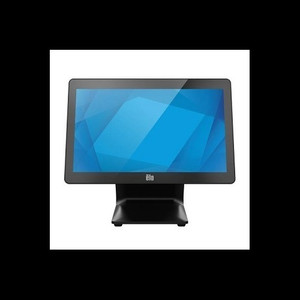
ELO Touch E706031 15.6-Inch Intel Core i5 Touchscreen POS Computer
Overview
The ELO Touch E706031 is a 15.6-inch projected capacitive touchscreen computer built on Intel Core i5 architecture. This is a no-OS configuration, meaning you provision your choice of operating system and application stack — a significant advantage if you already standardize on a specific Windows or Linux environment across your retail or warehouse automation deployment. The unit ships with 8GB RAM and 128GB SSD, sufficient for point-of-sale, inventory management, and light edge analytics workloads without requiring separate storage enclosures.
Key Features
- Full HD 1920 × 1080 Display: Standard density for retail terminals and warehouse workstations at arm's reach; at 15.6 inches, sufficient screen real estate for dual-pane transaction interfaces (order entry + customer display) without bezels eating into usable area.
- Intel Core i5 Processor: Handles concurrent POS transactions, database queries, and barcode scanning without thermal throttling under typical 8-hour shifts; overkill for simple card readers, proportionate for multi-register clusters or real-time inventory sync.
- 8GB RAM, 128GB SSD: Supports 20–30 concurrent browser tabs or legacy retail applications; SSD boot time under 30 seconds, reducing register startup delays if power cycles occur. Not suitable for heavy video ingest or local machine-learning model training.
- Projected Capacitive 10-Touch: Responds to finger or capacitive stylus; gloved operation requires a stylus (not included). Multi-touch gestures work with touch-enabled applications, but standard Windows POS software often ignores them — verify application compatibility before deployment.
- Zero-Bezel, Antiglare Panel: Bezeless design maximizes viewable area on compact counters; antiglare coating cuts reflections from overhead retail lighting, reducing operator eye strain during 8-hour shifts but may slightly reduce peak brightness outdoors or under direct sunlight.
- Wi-Fi, Ethernet, Bluetooth 5.2: Dual network paths (Wi-Fi + wired Ethernet) provide redundancy — if Wi-Fi drops, transactions fail over to Ethernet without intervention. Bluetooth 5.2 enables wireless barcode scanners and card readers, cutting cable clutter at the register. Range is 100+ meters line-of-sight in open space, typically 20–30 meters through walls in retail environments.
- Included Stand: Fixed base mounting; not articulating or height-adjustable. Confirm stand orientation matches your counter layout before order.
- No Operating System: You select and license the OS — Windows 10/11, Windows Embedded POSReady, or Linux (Ubuntu, Debian). This avoids pre-loaded bloatware and licensing conflicts in shared IT environments; adds 2–4 hours of setup if your integration team is unfamiliar with the model's BIOS or driver availability.
Integration & Compatibility
Standard RJ-45 Ethernet and Wi-Fi 6 drivers are publicly available from Intel; ELO publishes touchscreen calibration and multi-touch driver packages for Windows. Bluetooth pairing with standard HID barcode scanners and card readers is plug-and-play after initial pairing. USB 3.0 and USB 2.0 ports support legacy payment terminals and receipt printers without additional adapters. Verify your POS software (Square, Toast, Lightspeed, SAP, custom in-house) publishes drivers or web-based interfaces — browser-based systems require no local drivers, while legacy Windows desktop software may require compatibility testing.
When to Choose a Different Model
If you require a pre-loaded OS, consider ELO's alternative configurations in the I-Series 3 line that ship with Windows Embedded or Windows 10. If you need smaller form factor (under 10 inches) or larger displays (21+ inches), consult the ELO Touch catalog for tablet or large-format variants. If gloved operation is mandatory (cold storage, outdoor kiosks), this model's capacitive touch will frustrate operators — resistive or IR touch is more reliable in those conditions.
Frequently Asked Questions
Q: Does the E706031 require a separate power supply?
A: No specification for power consumption or connector type is provided in available evidence. Contact ELO directly or your distributor for input voltage, connector type (barrel, terminal block), and maximum power draw.
Q: Is Bluetooth 5.2 backward compatible with older barcode scanners?
A: Bluetooth 5.2 is fully backward compatible with Bluetooth 4.2, 4.0, and earlier devices. Pairing and data transfer will work, though you'll operate at the older device's maximum range and speed. Test with your specific barcode scanner before deployment.
Q: Can I upgrade the RAM or SSD after purchase?
A: No disassembly or upgrade documentation is provided in evidence. Contact ELO or consult the physical service manual (shipped with the unit) to determine whether RAM and SSD are user-replaceable or require professional service.
Q: Does the stand allow any height or angle adjustment?
A: The included stand is fixed-position (non-articulating). If you require adjustable height or tilt, you'll need an aftermarket VESA mount or third-party stand adapter.
Q: What is the warranty coverage?
A: Warranty specifics are not detailed in available evidence. Factory-new units are sourced direct from the manufacturer with a US warranty path; contact ELO or your sales contact for term length, coverage scope, and any extended service plans.
Q: Which operating systems are officially supported?
A: ELO does not publish a specific OS compatibility list in the available evidence. Windows 10, Windows 11, and Windows Embedded are industry standard for this class of hardware; Linux support depends on driver availability from ELO and community sources. Confirm driver and support status with ELO before standardizing on non-Windows.
The E706031 is a solid mainstream touchscreen terminal for retail and warehouse operations where you control the OS stack. That no-OS design matters: you avoid licensing bloat and can standardize on your existing image. The projected capacitive 10-touch response is snappy for transaction speed, but the lack of glove support and the fixed stand are real friction points if your deployment involves cold-storage zones or highly customized counter geometry.
Technical Highlights:
- Intel Core i5 + 8GB RAM: Handles 20–30 concurrent browser tabs or legacy retail applications without stalling. Sufficient for real-time inventory sync and multi-register clusters; not a bottleneck for POS unless you're running unoptimized database queries.
- Dual Network (Wi-Fi + Ethernet): Built-in redundancy means one network path can fail and transactions continue. Bluetooth 5.2 cuts cable clutter for barcode scanners and card readers; verify your scanner's power class before relying on Bluetooth alone for high-frequency scanning (some USB-powered scanners drain the 5.2 stack).
- Zero-Bezel Antiglare Panel: Maximizes viewable area on tight counters and cuts overhead lighting glare — real productivity gain for 8-hour operator shifts. Full HD 1920 × 1080 is standard density; acceptable for POS transaction screens but tight for dual-pane layouts (order entry + menu) without scaling.
Deployment Considerations:
- No OS means you own driver sourcing and OS image creation — not a burden if you already manage Windows Embedded or Linux across a retail chain, but a gotcha if you expect "unbox and deploy" simplicity.
- Capacitive touch fails with gloves; if your environment includes even occasional cold-storage or outdoor inventory work, resistive touch or hybrid (capacitive + resistive) models are more forgiving.
- Fixed stand is a constraint. Confirm your counter or VESA mount system before shipping; aftermarket arms are cheap but add procurement lead time.
Deploy the E706031 in climate-controlled retail, quick-service restaurants, and warehouse consolidation stations where OS standardization and form factor efficiency matter more than touch versatility. Skip it if you need gloved operation, pre-loaded OS, or adjustable mounting out of the box.