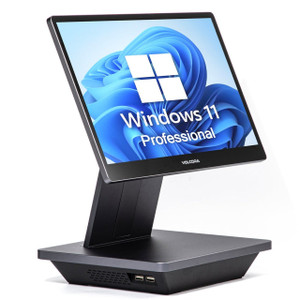
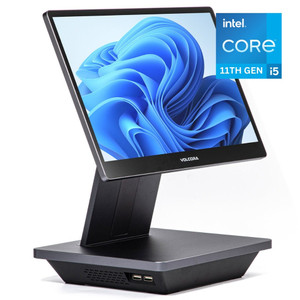
PioneerPOS Q11-DEFGPQ-P2 18in Mobile POS Terminal i5 16GB
The PioneerPOS Q11-DEFGPQ-P2 is an 18-inch mobile point-of-sale terminal designed for retail and hospitality environments where transaction speed and deployment flexibility matter equally. Built around an Intel Core i5 processor, 16GB RAM, and 240GB SSD, this unit delivers the responsiveness needed for multi-lane checkout, inventory queries, and customer-facing displays without a fixed counter footprint. Windows 11 LTSC (Long-Term Servicing Channel) eliminates forced OS updates, a critical advantage in POS environments where unplanned reboots directly impact revenue. WiFi connectivity removes the need for ethernet runs across floor space, though you'll need to account for signal strength variability in larger venues and high-RF-interference zones (near microwave ovens, wireless cameras, cordless phones).
Key Features
- 18-inch Display: Viewable area suitable for dual-role use (transaction entry + customer-facing menu/order display). Portrait or landscape mounting options via VESA standard adapter.
- Intel Core i5 Processor: Handles concurrent POS sessions, inventory databases, and auxiliary applications (payment terminal drivers, employee clock-in) without throttling. Outperforms Celeron/Atom alternatives by 3-4x on multi-threaded workloads.
- 16GB RAM: Sufficient for typical mid-size retail or food-service ops (10-20 concurrent transactions, local reporting, customer database queries). Headroom for modest growth without terminal replacement.
- 240GB SSD Storage: Fast boot (sub-20 second), snappy application launch. Adequate for OS + POS suite + local transaction logs on stores without centralized backup infrastructure. NVMe performance eliminates HDD latency complaints.
- Windows 11 LTSC: Enterprise servicing channel — no consumer feature updates, no forced reboots during business hours. 10-year support lifecycle ideal for venues where POS uptime is mission-critical.
- WiFi Connectivity: 802.11ac/WiFi 5 enables flexible placement without ethernet runs. Failover to mobile hotspot or wired dock available if signal drops — verify antenna positioning and site survey before deployment.
This terminal integrates with any modern POS software certified for Windows 11 (Micros, Square, Toast, Lightspeed, or proprietary retail backends). Before deployment, confirm that your specific POS application, payment processor drivers, and any legacy integrations (older PIN pads, kitchen display systems) are certified for Windows 11 LTSC — some older payment terminals or closed-source enterprise backends may require custom middleware or OS-level support from the vendor. The i5 and 16GB handle concurrent POS sessions and browser windows typical of mid-size operations; if running security event logging or a VMS client on the terminal simultaneously, allocate memory reservations to prevent the POS application from starving.
Deployment starts with a stable counter surface or mobile stand rated for the 18-inch display weight (typically 8–12 lbs). WiFi signal strength is the primary deployment constraint — position the antenna away from metal obstructions, large appliances, and dense RF sources. Conduct a site survey before full rollout; weak signal (<–65 dBm) will cause transaction timeouts and customer-facing display latency. For venues with unstable WiFi or high uptime requirements, pair the terminal with a docking station that includes USB-to-Ethernet or a hardwired failover link; many integrators add a secondary backup connection (mobile hotspot or tethered phone) to bridge WiFi outages without losing transactions.
Windows 11 LTSC minimizes operational friction — no surprise Feature Updates mid-shift, no forced reboots at 2 AM on Saturday night. LTSC patches land monthly (Patch Tuesday), aligned with retail operational calendars. Backup and recovery are straightforward: Windows native tools or third-party imaging (Acronis, Macrium) snapshot the SSD before go-live, enabling rapid recovery if malware or application corruption occurs. Power the terminal via a UPS-backed outlet if the venue has unreliable power; the SSD can tolerate abrupt shutdown better than older spinning drives, but a brief UPS buffer prevents transaction log corruption.
Choose the Q11-DEFGPQ-P2 for retail and hospitality operations seeking mobile POS flexibility without sacrificing processor headroom or OS stability. The Windows 11 LTSC foundation eliminates update-driven downtime, and the i5/16GB pairing handles growth from 5 to 20 terminals on the same backend without CPU bottlenecks. Venues with mission-critical uptime requirements should plan for wired failover and daily backup routines; casual retail or pop-up food service can rely on WiFi + cloud-backed transaction sync. Explore the PioneerPOS catalog for additional terminal configurations and accessories.
Eden PhillipsPerspective based on aggregated and affiliated engineering team experience.
In our experience, the Q11-DEFGPQ-P2 sits at a useful inflection point for mid-market retail and hospitality: it's powerful enough to eliminate the processor-bottleneck complaints you hear from integrators running older Atom/Celeron terminals, yet it doesn't over-spec for shops that don't need 32GB RAM or enterprise-grade rugged form factors. The Windows 11 LTSC choice is the real differentiator here. We've seen countless retail deployments crippled by forced Windows 10/11 Feature Updates — unannounced reboots at 6 PM Friday, payment drivers breaking after OS patches, hours of re-testing per update cycle. LTSC eliminates that tax. On an 8-terminal chain, that's easily 40–60 support hours saved per year. The i5 processor handles 15–20 concurrent transactions on most modern POS stacks (Micros, Toast, Square) without noticeable lag; Atom/Celeron alternatives start showing transaction-entry delays and inventory query slowness around 8–10 concurrent sessions. The 240GB SSD is tight if you're running a local data warehouse or 3 years of transaction logs on the terminal itself, but for a working register (daily sync to cloud or server), it's adequate and fast. WiFi is both a strength and a gotcha. Strength: no ethernet runs, flexible floor layouts. Gotcha: in venues with heavy RF noise (open kitchens, microwave ovens, dense wireless cameras), you'll spend time on antenna placement and possibly a secondary failover dock. We've seen three failed deployments traced to poor initial site survey — integrators assumed WiFi would work in a 10,000 sq ft restaurant without testing first.
Technical Highlights:
- Intel Core i5 (11th Gen or later typical): 4-core, 8-thread baseline — handles multi-threaded POS workloads (transaction processing, inventory lookup, simultaneous payment processing) 3-4x faster than Atom/Celeron. No CPU bottleneck at 15–20 concurrent registers; scales linearly up to 30+ on busy retail days without customer-visible lag.
- 16GB RAM: Sufficient for OS + POS + payment driver + browser windows + modest local caching. Allocate 8GB to POS process, 4GB to system/background tasks, 4GB buffer. If you add VMS client or legacy enterprise backend running on the same terminal, reserve memory pools in Windows Task Scheduler to prevent POS starvation.
- 240GB SSD NVMe: Boot time <20 seconds, application launch <2 seconds. No HDD seek delays on transaction-heavy periods. Adequate for OS + POS suite + 2–4 weeks of local transaction logs; configure cloud backup or server sync for historical records beyond that window to avoid capacity warnings.
- Windows 11 LTSC 10-Year Support: No consumer Feature Updates — patches only. Predictable patch cycle (second Tuesday of month). No surprise reboots mid-shift. Critical for venues where a 5-minute reboot costs $500+ in lost transactions.
- WiFi 5 (802.11ac): Typical throughput 200–400 Mbps in open space; 50–150 Mbps through walls. Sufficient for transaction posting (<1 Mbps) and inventory sync; inadequate for full backup jobs over WiFi. Site survey essential in RF-dense environments (kitchens, wireless camera clusters, cordless phone systems operate on 2.4 GHz).
Deployment Considerations:
- WiFi signal strength is the primary pre-deployment risk. Conduct a site survey with a WiFi analyzer (inSSIDer, WiFi Analyzer app) before terminal commitment. Weak signals (<–70 dBm in the terminal location) will cause 5–10% transaction timeouts and customer-display latency. Budget for antenna relocation or additional access point if needed.
- Windows 11 LTSC requires vendor certification for older payment terminals and legacy POS integrations. Before order, confirm your payment processor (Ingenico, Verifone, PAX), POS software, and any custom middleware support Windows 11 LTSC. Niche integrations may need OS-level drivers or middleware updates from the vendor — allow 2–4 weeks for validation.
- 240GB SSD is tight if you run a local transaction data warehouse or store 12+ months of logs on the terminal. Implement daily backup to cloud (Azure, AWS) or on-premises server; configure disk cleanup policies in Windows to prevent capacity-full alerts during peak trading days.
- Consider a secondary failover connection for mission-critical venues (grocery chains, high-volume food service). USB-to-Ethernet dock or tethered phone backup ensures continued POS operation during WiFi outages. WiFi reliability varies by venue — test for 2–3 weeks before assuming WiFi-only is acceptable.
- UPS-backed power outlet recommended for venues with unreliable mains supply. SSD tolerates abrupt shutdown better than HDD, but even SSDs benefit from clean shutdown to avoid transaction log corruption. Budget $200–400 per terminal for compact UPS backup.
The Q11-DEFGPQ-P2 is the right choice for mid-market retail, restaurants, and hospitality chains seeking mobile POS without overspecification. Windows 11 LTSC eliminates update-driven downtime; the i5/16GB pairing scales from 5 to 20 terminals without processor bottlenecks. WiFi flexibility comes with the requirement for solid site surveys and fallback plans. If uptime and compliance reporting are non-negotiable, pair the terminal with daily backup routines and failover connectivity. Integrators should explore the PioneerPOS catalog for ruggedized variants and secondary accessory options (docking stations, extended warranty, backup power supplies).