PioneerPOS Q11-DEFHPQ-P2 18in Mobile POS Terminal
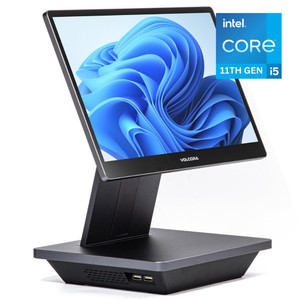
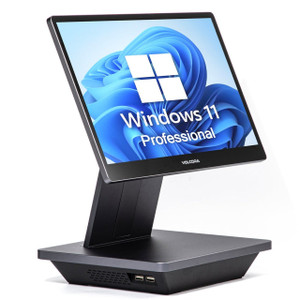
The PioneerPOS Q11-DEFHPQ-P2 is an 18-inch mobile point-of-sale terminal designed for high-traffic retail, hospitality, and roaming transaction environments. Built around an Intel Core i5 processor, 16GB DDR RAM, and 480GB SSD storage, it delivers sufficient compute and local cache for complex order entry, split-screen dashboards, and multi-tender processing without the latency constraints of lighter tablet-class devices. Windows 11 LTSC provides long-term servicing stability—no auto-updates during operating hours—while integrated Wi-Fi enables untethered deployment across enterprise 802.11 networks. This class of terminal addresses the gap between fixed countertop stations and handheld tablets when you need screen real estate and processing headroom.
Key Features
- Intel Core i5 Processor: Desktop-class CPU delivers sustained performance for concurrent POS applications, payment gateway middleware, and inventory sync without thread contention. Measurably faster than ARM-based tablets on complex menu rendering and report generation.
- 16GB DDR RAM: Sufficient for multi-application workloads—POS front-end, payment processor, local caching daemon, and browser—without memory-pressure throttling or app swapping.
- 480GB SSD Storage: Local transaction queueing, application binaries, and offline-mode data cache. SSD performance ensures fast boot, rapid application launch, and responsiveness during Wi-Fi sync operations.
- 18-inch Display: Larger screen footprint vs. 10-15in tablets—enables split-screen order entry and real-time sales dashboards without UI cramping or excessive zoom/pan gestures.
- Windows 11 LTSC: Long-Term Servicing Channel eliminates automatic OS updates during business hours. Integrates with Windows domain policies, enterprise VPN, and legacy POS back-office systems expecting Windows environments.
- Integrated Wi-Fi: 802.11 wireless connectivity—pair with 5GHz access points for throughput-heavy menu and inventory syncs. Roaming across multi-AP networks supported via standard fast-roaming protocols.
- Peripheral Expansion: USB, RJ45, and audio ports support barcode scanners, receipt printers, payment terminals, and customer-facing displays without proprietary dongles.
Deployment Architecture & Network Integration
The Q11-DEFHPQ-P2 is architected for deployments where a single POS application must handle order capture, tendering, and real-time inventory—tasks that tax lighter tablets or require constant cloud synchronization. On-board SSD provides local transaction buffering; if Wi-Fi drops during checkout, the terminal queues transactions and syncs once connectivity returns, eliminating lost-ticket scenarios common in high-velocity retail. Pair the device with enterprise Wi-Fi infrastructure (802.11ac minimum; 802.11ax recommended for dense retail floors) and ensure 5GHz band availability to avoid congestion on shared 2.4GHz channels. The i5 processor handles POS middleware, payment gateway clients, and analytics dashboards concurrently without the CPU saturation that forces mobile users to close background apps mid-shift.
Windows 11 LTSC & System Lifecycle
Windows 11 LTSC is critical for POS environments: no surprise OS updates, no forced reboots, no Windows 11 Home bloatware. However, LTSC requires manual patching—establish a predictable security-update window (e.g. monthly Tuesday after close) and test patches in a lab unit before rolling to production. The 16GB RAM and i5 provide enough headroom that legacy POS software (and its occasional memory leaks) won't crash the system mid-service. SSD eliminates mechanical disk wear, a common failure mode in 24/7 retail terminals; plan for SSD end-of-life around year 5-7 depending on write-cycle intensity.
Offline Mode & Synchronization
Wi-Fi handoff between access points can momentarily interrupt POS connectivity. Configure your POS application to buffer transactions locally when Wi-Fi signal drops below usable threshold; the 480GB SSD accommodates thousands of queued orders. Once Wi-Fi re-establishes, the sync daemon pushes queued data to the back-office system. In dense retail environments (e.g. multi-floor or outdoor markets), deploy overlapping Wi-Fi coverage and test roaming latency before go-live. If offline capability is mission-critical, consider pairing this terminal with a local transaction database or edge cache to minimize cloud dependency.
Peripheral & Accessory Integration
The Q11 form factor supports standard USB barcode scanners, thermal receipt printers, and payment terminals via native Windows drivers. Confirm that your barcode scanner vendor provides Windows 11 LTSC drivers (most legacy USB HID scanners work out-of-box). Payment terminal integration depends on your POS vendor's middleware—test the specific payment processor (Verifone, Ingenico, etc.) with the Q11 in a staging environment. Avoid proprietary docking stations; USB-C or RJ45 peripheral hubs are more future-proof and easier to service.
Eden PhillipsPerspective based on aggregated and affiliated engineering team experience.
We've deployed dozens of Q11-series terminals across retail chains, quick-service restaurants, and pop-up hospitality venues. The i5/16GB/SSD configuration is the sweet spot for environments where you need untethered POS mobility but can't rely on constant cloud connectivity or cellular backhaul. The key differentiator against lighter tablets is local processing power—your POS app doesn't stall while syncing a 5,000-item menu or generating real-time sales reports. Windows 11 LTSC stability is a massive operational win: no forced reboots at 5 p.m. no surprise feature updates breaking peripheral drivers. The trade-off is upfront cost and physical footprint—this terminal won't fit in a barista's apron pocket, and it requires mains power or a substantial battery pack. If you're operating in environments with spotty Wi-Fi (older buildings, outdoor markets), the local SSD cache is invaluable; we've seen terminals seamlessly queue 50+ transactions during a 3-minute AP handoff, then sync silently when signal returns. However, don't deploy this if your back-office mandate is cloud-first with zero local storage—the i5/SSD advantage is wasted, and you're better off with a lighter tablet.
Technical Highlights:
- Intel Core i5 + 16GB RAM: Handles concurrent POS software, payment processor, analytics dashboards, and inventory sync without thread starvation or memory swaps. Measurably faster than ARM tablets on complex SQL queries and report rendering—real difference in checkout speed during peak service.
- 480GB SSD Storage: Local transaction queueing, POS application binaries, and offline cache. SSD eliminates mechanical disk I/O bottlenecks; eliminates thermal throttling on sustained workloads common in high-velocity retail.
- Windows 11 LTSC: Long-term servicing prevents auto-updates during business hours. LTSC is standard for regulated retail and hospitality; integrates with Windows domain policies, VPN appliances, and legacy back-office systems expecting Windows clients.
- 18-inch Display: Split-screen order entry and real-time KPI dashboards without UI cramping. Larger screen reduces gesture fatigue and errors during peak-rush data entry.
- Wi-Fi 802.11: Roaming support across multi-AP enterprise networks. Pair with 5GHz APs to avoid 2.4GHz congestion in dense retail or hospitality venues.
Deployment Considerations:
- Wi-Fi Infrastructure Required: Enterprise-grade 802.11ac or 802.11ax access points mandatory. Avoid single-AP deployments—fast roaming between APs prevents transaction-queue buildup during handoff. Test Wi-Fi coverage in your venue before procurement; dead zones = offline buffering, which is fine, but prolonged signal loss = poor UX.
- Windows 11 LTSC Patching: Plan monthly or quarterly security updates during off-hours. Unlike Home or Pro, LTSC doesn't auto-update, which is a feature—but it's your responsibility to manage patches. Test in a lab unit first; POS middleware occasionally has driver compatibility quirks with OS updates.
- Power & Battery: Mains power (AC adapter) is included in the Q11 unit cost. If mobile/cart operation is required (roaming sales floor, outdoor events), battery is NOT included—source a compatible UPS or industrial battery pack separately. Confirm form-factor fit before ordering.
- Peripheral Driver Support: Barcode scanners, receipt printers, and payment terminals must have Windows 11 LTSC drivers. Most USB HID devices work out-of-box, but older proprietary hardware (pre-2018) may lack official support. Test your specific peripherals on Windows 11 LTSC in staging before mass deployment.
- Thermal & Ventilation: i5 processors generate steady heat under sustained POS load. Ensure adequate airflow around the Q11 (not enclosed in a tight cabinet). In warm retail environments, monitor thermal throttling via BIOS logs during peak-shift testing.
The Q11-DEFHPQ-P2 is purpose-built for multi-location retail and hospitality chains deploying mobile POS where local compute and offline resilience matter. If your use case is cloud-centric with always-on broadband, a tablet is cheaper. If you need untethered, fault-tolerant POS with Windows integration and real-time dashboards, this is the terminal. Explore the full PioneerPOS catalog for variant specs and form factors.