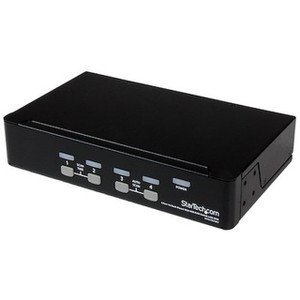
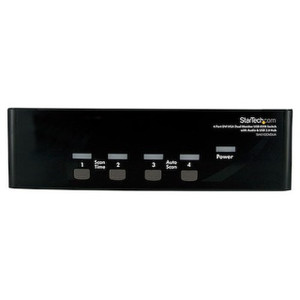
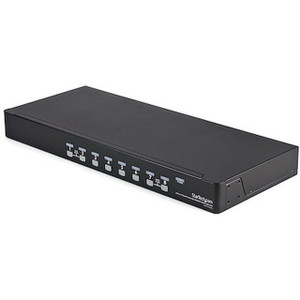
StarTech SV831DUSBU 8-Port VGA USB KVM Switch
Overview
The StarTech SV831DUSBU is an 8-port KVM switch designed for IT administrators, control room operators, and lab engineers who need to manage multiple VGA-connected computers from a single USB keyboard, mouse, and monitor. Supporting resolutions up to 1920x1440 at 60Hz and offering three switching methods — push button, hotkey, and on-screen display — this unit handles the kind of multi-server, multi-workstation environment where desk real estate and administrative overhead both matter. If you're consolidating access to eight VGA-output systems without sacrificing image fidelity, the SV831DUSBU is worth a close look.
Key Features
- 8 KVM Ports with VGA Host Connectivity: Connect up to eight VGA-equipped computers simultaneously. Each port supports the full resolution range, so you're not trading image quality on port 7 versus port 1 — all eight channels deliver the same 1920x1440 maximum output.
- 1920x1440 Maximum Analog Resolution at 60Hz: This exceeds standard 1080p and comfortably covers most enterprise LCD displays running at 4:3 or 5:4 aspect ratios. Engineers working with CAD workstations or instrument displays — which often use non-widescreen native resolutions — will find the 1920x1440 ceiling genuinely useful rather than just a spec-sheet number.
- Three Switching Methods — Push Button, Hotkey, and OSD: Push-button switching handles quick physical access; hotkey sequences let you cycle through ports without leaving the keyboard; the on-screen display gives you a named-port menu for larger deployments where remembering port-to-machine assignments by number is impractical. Having all three available means the unit adapts to your workflow rather than forcing one.
- Cascade to 64 Computers: By chaining multiple SV831DUSBU units together, you can extend management coverage to a maximum of 64 computers from the same single console. That's a meaningful expansion path for growing server rooms or lab environments that need to add machines without replacing the KVM infrastructure.
- USB Console Interface: The keyboard and mouse console connects via USB, which means compatibility with modern peripherals without needing PS/2 adapters. USB HID devices — including most thin-profile keyboards and compact mice — connect directly.
- Wide-Voltage AC Input (100–240V): The integrated power supply accepts universal AC input from 100 to 240V at 0.6A, outputting 12V DC at 1.5A internally. That makes this unit deployable in both North American and international environments without a step-down transformer.
- 18W Power Consumption: At 18 watts under operation, the SV831DUSBU draws modestly enough to fit comfortably in a power-managed rack or under-desk installation without requiring a dedicated high-amperage circuit.
- 1U Rack-Friendly Form Factor: At 17.2 in. long × 7.1 in. wide × 1.8 in. tall and 4.9 lb., the unit is sized for 1U rack installations or flat-surface placement beneath a monitor. The slim profile keeps it from consuming disproportionate rack space relative to what it manages.
- Operating Temperature Range 5°C to 40°C: Suited to climate-controlled server rooms and office environments. This is not an industrial or outdoor-rated unit — deploy it inside conditioned spaces. Storage temperature spans -20°C to 60°C, so shipping and transit in most climates won't cause damage.
- 80% RH Humidity Tolerance: Non-condensing humidity up to 80% RH keeps the unit operational in moderately humid machine rooms without special enclosures, as long as condensation is not a factor.
- 3-Year Warranty: StarTech covers the SV831DUSBU with a 3-year manufacturer warranty, which is above average for KVM switches in this class and reflects the expected service life in a commercial deployment.
Integration and Compatibility
The SV831DUSBU is built around the VGA interface standard, which means it pairs with any host computer that has a VGA video output and a USB port for keyboard and mouse emulation. The USB console interface accepts standard HID-class peripherals — no proprietary drivers required for basic switching operation. The cascade capability requires additional SV831DUSBU units or compatible StarTech KVM switches at the downstream tier; verify compatibility with StarTech's cascade documentation before mixing switch models in a tiered installation. The unit does not support DisplayPort, HDMI, or DVI outputs — if any of your connected computers have migrated to digital-only video, you'll need a VGA adapter on those hosts or a different KVM model altogether. Audio switching support is not confirmed in the available evidence, so treat this as a video and USB-peripheral switch only until you verify audio passthrough specifications.
Frequently Asked Questions
Q: How many computers can the SV831DUSBU control directly, and can that number be expanded?
A: The SV831DUSBU supports 8 computers directly connected to its ports. By cascading multiple units together, you can manage up to 64 computers from a single console.
Q: What video interface does the SV831DUSBU use on the host side?
A: The host connector type is VGA (analog). The SV831DUSBU does not support HDMI, DisplayPort, or DVI — all connected computers must have a VGA video output available.
Q: What is the maximum resolution supported by the SV831DUSBU?
A: The maximum supported analog resolution is 1920x1440 at 60Hz. This exceeds standard 1080p and is well suited to enterprise displays running at 4:3 or 5:4 native ratios.
Q: What switching methods does the SV831DUSBU offer?
A: Three methods are available: front-panel push buttons for direct physical port selection, hotkey sequences via the keyboard for hands-free cycling, and an on-screen display (OSD) menu for named-port selection across all eight channels.
Q: What is the warranty on the SV831DUSBU?
A: StarTech covers the SV831DUSBU with a 3-year manufacturer warranty.
Q: Does the SV831DUSBU require an external power supply?
A: Yes — the unit includes an integrated power supply that accepts 100–240V AC input at 0.6A and outputs 12V DC at 1.5A. It draws 18 watts during operation and requires a standard AC outlet.
The spec that stands out most to me on the SV831DUSBU is the 1920x1440 maximum resolution — not because it's flashy, but because it's the right ceiling for environments still running 4:3 and 5:4 enterprise displays, which are more common than people admit in lab, industrial control, and legacy server room deployments. Most 1080p-capped KVM switches force you to run those panels at a non-native resolution, which degrades text sharpness on a display you're already squinting at for long shifts.
Technical Highlights:
- Cascade to 64 Computers: Chaining multiple SV831DUSBU units gives you a max of 64 managed computers from one console — meaningful for server rooms that expect to grow without pulling new KVM infrastructure.
- Universal AC Input (100–240V): The onboard PSU accepts full international voltage range at 0.6A, so international deployments and mixed-voltage facilities don't need step-down transformers. Output is a stable 12V DC at 1.5A.
- Three Switching Methods: Push button, hotkey, and OSD aren't redundant — they serve different operators. A technician doing rapid triage across servers will use hotkeys; a NOC operator navigating by server name will reach for the OSD. Having all three in one unit keeps you from compromising workflow.
Deployment Considerations:
- The 1.8-inch height places this firmly in 1U territory — confirm your rack or console drawer has clearance before ordering. At 17.2 inches deep, it fits standard 19-inch rack shelves without overhang.
- VGA-only host interface is the hard constraint here. If even one or two of your target machines have moved to digital-only video outputs, you'll need active VGA adapters on those hosts — passive HDMI-to-VGA cables won't work reliably at 1920x1440.
The SV831DUSBU is the right call for a climate-controlled server room or test lab running 8 or fewer VGA-output machines today, with the option to cascade when the rack fills up — particularly in environments where operators need named OSD navigation rather than memorizing port numbers.