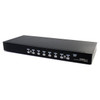
StarTech SV831DUSBAU 8-Port USB VGA KVM Switch with Audio
Overview
The StarTech SV831DUSBAU is a rack-mountable 8-port KVM switch designed for IT environments where a single operator needs consolidated keyboard, video, mouse, and audio control over up to eight USB-connected computers from one VGA console. At 1U tall and 21.3 inches wide, it drops cleanly into a standard equipment rack without burning additional rack space. Port selection is handled through push-button switching, hotkey sequences, or an on-screen display (OSD) — giving operators flexibility depending on how fast they need to cycle between systems. If your environment is growing, the SV831DUSBAU supports cascade configurations up to 64 computers, so you're not locked into an eight-machine ceiling from day one.
For teams managing a mix of servers, workstations, or legacy VGA-output systems from a shared console, the SV831DUSBAU addresses the core problem: desk clutter, cable sprawl, and the overhead of walking between machines. This is a practical fit for small-to-mid data centers, IT server rooms, broadcast environments, and security operations centers running VGA-output hardware.
Key Features
- 8 USB PC Ports: Connect up to eight computers simultaneously via USB, each with a dedicated KVM port — no need for software agents or drivers on each machine. The OS-independent design means it works across Windows, Linux, macOS, and embedded systems without configuration overhead.
- 1920 x 1440 @ 60 Hz Maximum Resolution: Supports resolutions up to 1920x1440 at 60Hz over VGA — higher than standard 1080p, which matters when operators are working with detailed system dashboards or high-resolution console UIs where pixel density affects readability.
- Three Switching Methods (Push Button, Hotkey, OSD): Push-button switching is immediate for users who prefer physical control. Hotkey sequences let experienced operators switch without leaving the keyboard. The OSD provides a menu-driven interface for labeling ports and navigating systems by name — useful when managing eight machines with similar hardware profiles.
- Cascade to 64 Computers: By chaining additional compatible KVM units, the SV831DUSBAU expands from 8 to up to 64 managed computers under a single console. This means the switch can anchor a larger rack-managed infrastructure without requiring a full replacement as the environment scales.
- Integrated Audio Support (3.5 mm Mini-Jack): Console audio is routed through 3.5 mm mini-jack connections on both the console and host sides — so audio follows the active computer without requiring separate audio switching hardware. Useful in environments where voice prompts, system alerts, or multimedia applications need to be audible at the operator console.
- VGA Console Interface: The console-side VGA output connects to a standard VGA monitor. While VGA is an analog interface with distance and signal degradation considerations, it remains the standard for a large installed base of rack-mount servers and legacy workstations where DisplayPort or HDMI is not available.
- 48W Power Consumption: The switch draws 48 watts during operation — size your UPS and PDU allocation accordingly in a rack environment where power budgets are tracked per outlet.
- Operating Temperature 5°C to 40°C: Rated for standard indoor environments. If your server room runs particularly warm (above 40°C ambient), verify rack cooling before installation — this is not rated for high-temperature industrial enclosures.
- 1U Rack Form Factor (1.8 in H × 21.3 in W × 7.1 in D): Standard 1U rack mount means it integrates into existing 19-inch rack infrastructure without custom hardware. At 5.7 lbs, it's light enough for single-person installation.
- OS Independent: No driver installation required on connected hosts. The switch presents itself as a standard USB HID device to each connected computer, which simplifies deployment on locked-down or headless servers where installing software is restricted.
Integration and Compatibility
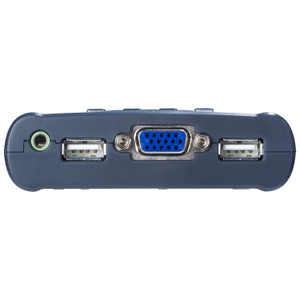
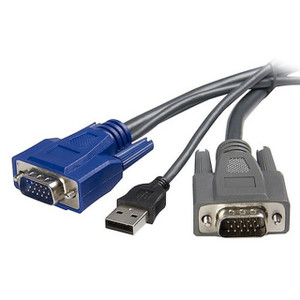
The SV831DUSBAU connects to host computers via USB for keyboard and mouse, with VGA for video and 3.5 mm mini-jack for audio on each port. The console side uses the same interface types — USB 2.0, VGA, and 3.5 mm — meaning any standard USB keyboard and mouse pair alongside a VGA monitor and 3.5 mm speakers or headset will work without adapters. Because the switch is OS independent, it's compatible with Windows Server editions, Linux distributions, and other operating systems without per-host driver installation. Cascade capability requires compatible StarTech KVM units on downstream ports; verify model compatibility before purchasing cascade switches to ensure the 64-computer maximum is achievable in your specific configuration. If your KVM switch environment is growing, plan cascade topology carefully — each cascade tier adds latency and complexity to OSD navigation. For server room management infrastructure, pair this switch with a dedicated rack management accessory solution for full console access coverage.
Frequently Asked Questions
Q: How many computers can the SV831DUSBAU control directly, and can that number be expanded?
A: The SV831DUSBAU directly controls up to 8 computers. By cascading compatible KVM switches, you can expand control to a maximum of 64 computers from a single console.
Q: What video resolution does the SV831DUSBAU support?
A: It supports analog VGA resolutions up to 1920x1440 at 60Hz — above standard 1080p, which provides headroom for high-resolution console displays.
Q: Does the SV831DUSBAU require drivers or software on each connected computer?
A: No. The switch is OS independent and presents as a standard USB HID device to each host. No driver installation is required, making it compatible with locked-down servers and a wide range of operating systems.
Q: Does the SV831DUSBAU support audio switching?
A: Yes. It includes 3.5 mm mini-jack audio support on both the host and console sides, so audio follows the active computer automatically without separate switching hardware.
Q: What are the switching methods available on the SV831DUSBAU?
A: Three methods are supported: front-panel push buttons for direct switching, hotkey sequences for keyboard-driven control, and an on-screen display (OSD) for menu-based navigation and port labeling.
Q: What is the warranty on the SV831DUSBAU?
A: The SV831DUSBAU carries a 3-year manufacturer warranty.
The SV831DUSBAU is one of those switches that earns its rack space by doing exactly what it says without drama. The cascade-to-64 capability is the spec worth flagging here — most operators buy this for 8 ports and never think about it, but when the server room doubles in size eighteen months later, that cascade path means you're not ripping out your console infrastructure and starting over. At 48W draw, it's light enough on the power budget to share a PDU circuit with other 1U management hardware.
Technical Highlights:
- 1920x1440 @ 60Hz VGA: Exceeds the 1080p ceiling that some older KVM hardware imposes — operators running high-density system dashboards or multi-window server consoles will notice the difference in pixel real estate.
- OSD Port Labeling: When you're managing 8 machines that all look identical in the OSD, the ability to label each port by hostname or function prevents the wrong-server-wrong-command incident that every sysadmin has had at least once.
- OS-Independent USB HID: No agent software to deploy, no compatibility matrix to manage. Plug in, the host sees a keyboard and mouse, done. This matters most in mixed Linux/Windows environments or on servers where software installs require change management approval.
Deployment Considerations:
- VGA is the constraint here — if any of your eight connected systems have moved to DisplayPort or HDMI-only outputs, you'll need active adapters on the host side, which can introduce signal quality variables. Plan your cable run lengths carefully; VGA signal integrity degrades over distance in ways that digital interfaces do not.
- Operating temperature ceiling is 40°C ambient — standard for most cooled server rooms, but verify your rack ambient before installation if cooling is marginal. The 5.7 lb unit weight makes single-technician installation straightforward in most rack configurations.
This switch fits best in a managed IT server room or security operations center running eight or fewer VGA-output servers under active operator oversight — particularly where audio monitoring at the console is a requirement and the team wants the flexibility to scale to 64 machines without replacing the console infrastructure.