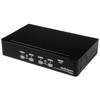
StarTech SV431DUSBU 4-Port VGA USB KVM Switch
Overview
The StarTech SV431DUSBU is a 4-port KVM switch that consolidates up to four VGA-output computers onto a single keyboard, mouse, and monitor — a straightforward solution for control rooms, server rooms, and technician workstations where desk space and cable runs need to stay manageable. Supporting resolutions up to 1920x1440 at 60Hz, it handles standard VGA deployments without requiring you to step down to a lower-resolution display. Port switching is available via front-panel push button, keyboard hotkeys, or an on-screen display (OSD) menu, so operators can choose the method that fits their workflow. At 5.4W total power consumption, it draws less than most USB hubs and runs off a 9V DC adapter.
Key Features
- Four KVM ports, one console: Four independent VGA host connections share a single monitor, USB keyboard, and USB mouse — eliminating three extra keyboards and monitors from the workspace. The KVM switch category is the right place to compare alternatives if you need more ports or a different video standard.
- 1920x1440 @ 60Hz maximum resolution: That ceiling exceeds standard 1080p, meaning most VGA monitors in commercial and industrial environments will run at their native resolution without any downscaling artifacts. If your hosts output at 1280x1024 or 1600x1200 — common in legacy SCADA and security console hardware — you will not hit a resolution bottleneck.
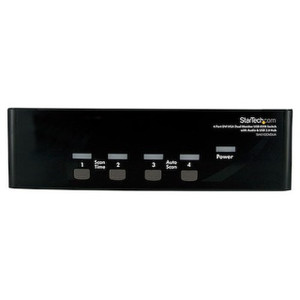
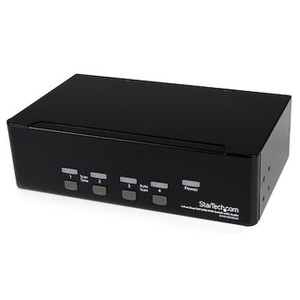
- Three switching methods (push button, hotkey, OSD): Front-panel push buttons handle single-key port jumps; hotkey sequences let operators switch without leaving the keyboard; the OSD provides a named-port menu overlay on the monitor for environments where multiple operators need context on which machine is active. All three are supported simultaneously — you configure the preference per session.
- USB 2.0 console interface: Two USB 2.0 Type-A ports on the console side handle keyboard and mouse. USB 2.0 is sufficient for all standard HID peripherals and eliminates PS/2 adapter requirements — relevant when sourcing replacement keyboards or mice for an existing console.
- 100–240V AC input with universal adapter: The internal power supply accepts 100–240V AC at 0.2A, outputting 9V DC at 0.6A. Universal input means no voltage converters needed for international deployments or mixed-voltage facilities.
- 5.4W total power draw: At 5.4W, this unit adds negligible load to a UPS or PDU. For consolidated workstations already running tight on UPS capacity, this matters more than it sounds.
- Single green LED power indicator: Minimal status signaling — one green LED confirms power. Port-selection status is handled by the OSD rather than a bank of LEDs, which keeps the front panel clean in dim control room environments.
- Optional rack-mount support: The SV431DUSBU supports optional rack mounting, making it suitable for 1U integration into equipment racks when desk placement is not practical. The unit measures 8.7 x 5.1 x 1.7 inches and weighs approximately 2.1 lbs (957g) — compact enough for a standard shelf or rack tray.
- Operating temperature 5°C to 40°C: Rated for standard indoor environments. This is a commercial-grade thermal envelope — suitable for climate-controlled server rooms, control rooms, and office equipment closets. It is not designed for unheated warehouses or outdoor enclosures.
Integration and Compatibility
The SV431DUSBU uses VGA on both the console and host sides — four VGA host connectors plus one VGA console output. This makes it a direct fit for legacy security console setups, industrial HMI stations, and server room KVM deployments where VGA remains the common denominator. The USB console interface connects standard USB keyboards and mice without drivers on most modern operating systems. For environments running rackmount KVM infrastructure, optional rack-mount hardware brings this unit into a standard 1U slot. The single-user, four-port design is intentional — this is not a multi-user KVM; only one operator can control one host at a time. If your deployment requires simultaneous multi-user access to the same pool of servers, this architecture does not support that use case. For server management applications needing IP-based remote access, a KVM over IP solution would be the appropriate alternative. Maximum single-user operation with full OSD control is the intended model here.
Frequently Asked Questions
Q: What video standard does the SV431DUSBU support on the host and console side?
A: The SV431DUSBU uses VGA (analog) on both the host connectors (4 ports) and the console output (1 port). It does not support HDMI, DisplayPort, or DVI.
Q: What is the maximum resolution supported by the SV431DUSBU?
A: The maximum supported analog resolution is 1920x1440 at 60Hz. Standard resolutions including 1080p (1920x1080), 1600x1200, and 1280x1024 are all within range.
Q: How do I switch between connected computers?
A: Three methods are available: front-panel push buttons, keyboard hotkey sequences, and an on-screen display (OSD) menu. All three methods are supported simultaneously.
Q: Does the SV431DUSBU require external power?
A: Yes. It operates from an external adapter supplying 9V DC at 0.6A. The unit accepts 100–240V AC input, so it works on both North American and international power without a converter.
Q: What is the warranty on the SV431DUSBU?
A: The SV431DUSBU carries a 3-year manufacturer warranty.
Q: Can the SV431DUSBU be rack-mounted?
A: Rack mounting is supported as an optional configuration. The unit is not shipped with rack-mount hardware included as standard — it requires optional mounting accessories. Dimensions are 8.7 x 5.1 x 1.7 inches.
The SV431DUSBU comes up frequently in security console and industrial control room builds where four or fewer VGA-connected systems need to share a single operator station. The 1920x1440 maximum resolution is the spec worth flagging — it actually exceeds the native resolution of most VGA monitors still in service, so you will not hit a display ceiling with this unit in a typical legacy console environment.
Technical Highlights:
- Triple switching modes: Push button, hotkey, and OSD are all active simultaneously. In practice, operators tend to use hotkeys for speed and OSD when they need port-label confirmation — having both available without reconfiguration is a workflow advantage in multi-machine environments.
- 5.4W power consumption: Total draw is 5.4W from a 9V DC / 0.6A adapter with 100–240V AC input. This is essentially noise on a UPS load calculation — relevant when you are managing a tight UPS budget across a dense console rack.
- Operating temperature ceiling of 40°C: Rated for 5°C to 40°C — that is a standard climate-controlled range. Do not deploy this in an unventilated enclosure or an unheated utility room that swings above 40°C in summer. It is built for conditioned indoor spaces.
Deployment Considerations:
- This is a single-user, single-monitor design — only one operator session at a time, one connected display. Plan your console layout around that constraint before ordering. If you need two operators to independently access different hosts from the same KVM pool, you need a different architecture.
- VGA-only on both sides means no digital video path. If any of your four host machines are new builds with only HDMI or DisplayPort outputs, you will need active VGA adapters — and analog signal quality will vary by adapter quality and cable run length.
The SV431DUSBU is a practical fit for security DVR/NVR console rooms, legacy SCADA operator stations, and IT equipment rooms where four VGA-output machines share one dedicated operator workstation and IP-based remote access is not a requirement.