

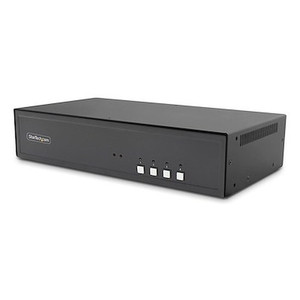
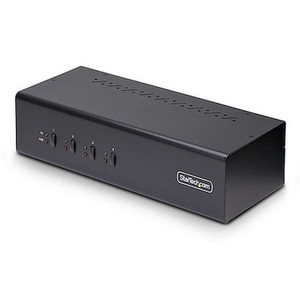
StarTech Secure 4-PORT Dual-monitor KVM Switch DVI - CK4-D204C
Usually Ships in 2-3 Weeks
Free shipping over $499
$1,397.99

Manufacturer-verified compatible cameras, recorders, mounts, accessories, and licenses for this product. Adjust quantities and add the entire bundle to your cart in one click.
Questions about this product? Free pre-sales support from a senior specialist — product questions, compatibility checks, BOM quotes, price confirmation — typically answered within one business day. Need camera placement or system design work? Engineering time is $175 per hour (qty 1 = 1 hour). Hardware buyers get up to one hour ($175) credited back on their order.
The StarTech SV431DDVDUA is a 4-port KVM switch designed for operators who need simultaneous control of four computers across two monitors — one DVI, one VGA — from a single keyboard, mouse, and display set. This is the right hardware for control rooms, broadcast suites, trading desks, or any multi-source environment where switching between systems needs to be instant and the display chain must stay stable across connections. The dual-head output means you are not just toggling input — you are preserving an extended or mirrored desktop across both video outputs simultaneously as you switch between connected computers.
At 2.8 lb and 8.7 x 6.4 x 2.4 inches, the SV431DDVDUA sits comfortably on a desk or can be rack-mounted with an optional bracket if your operation runs in a structured AV or IT rack environment. Power draws from a universal 100–240V AC adapter with a 12V DC 1.5A output, so it operates cleanly on any standard circuit worldwide — relevant for international deployments or mixed-voltage facilities.
For those evaluating StarTech KVM and connectivity solutions, the SV431DDVDUA occupies the mid-range of their desktop KVM line — four ports, dual-head output, mixed analog and digital video support.
The SV431DDVDUA connects to computers via DVI and VGA video cables plus USB for HID (keyboard/mouse). Each of the four ports requires a DVI cable for digital video, a VGA cable for the analog output, and a USB cable for peripheral control — plan your cable runs accordingly, particularly if computers are more than a meter from the switch. For control room or broadcast environments requiring longer cable runs, check signal integrity at distance before finalizing the installation; passive KVM cables over 5 meters can introduce signal degradation on VGA.
This switch does not include audio switching based on the available specifications, and it does not support DisplayPort or HDMI natively — if your monitors or computers use those interfaces, you will need active adapters, and resolution or refresh rate limitations may apply. For environments standardized on DisplayPort or HDMI, consider whether a different KVM model better matches your display interface before purchasing.
If you are building out a full multi-workstation environment, pair this switch with a quality KVM cable kit to ensure consistent signal quality at each port. For larger operations requiring centralized management, also review network switching and management solutions to complement your KVM infrastructure.
Q: What is the maximum resolution supported by the SV431DDVDUA on the DVI output?
A: The DVI output on the SV431DDVDUA supports up to 1920x1200 using single-link DVI. Resolutions requiring dual-link DVI (such as 2560x1600) are not supported on this unit.
Q: Does the SV431DDVDUA support HDMI or DisplayPort monitors?
A: No. The SV431DDVDUA provides one DVI and one VGA output. Connecting HDMI or DisplayPort monitors requires active adapter cables, and resolution or compatibility outcomes depend on the adapter used — this is not a native feature of the switch.
Q: Can the SV431DDVDUA be rack-mounted?
A: Rack mounting is supported via an optional bracket sold separately. The unit is not included with rack-mount hardware out of the box.
Q: What is the warranty on the SV431DDVDUA?
A: StarTech provides a 3-year manufacturer warranty on the SV431DDVDUA.
Q: How many USB peripheral ports does the SV431DDVDUA provide?
A: The switch includes 2 USB ports for connecting keyboard and mouse. These peripherals are shared across all four connected computers and switch simultaneously with the video outputs.
Q: What power supply does the SV431DDVDUA use, and is it compatible with international voltages?
A: The SV431DDVDUA ships with a universal AC adapter rated for 100–240V AC input at 0.8A, outputting 12V DC at 1.5A. It operates on international power without a separate voltage converter.

The SV431DDVDUA is one of the more practical mid-range desktop KVMs for dual-head mixed-interface environments. What stands out to me is the combination of DVI single-link at 1920x1200 and VGA at 1920x1440 on the same switch — most operators running legacy and modern displays side by side do not need to compromise to a single interface. Four ports covers the majority of shared-workstation control room scenarios without overbuying into an 8- or 16-port managed unit.
Technical Highlights:
Deployment Considerations:
The SV431DDVDUA is best suited to NOC or control room workstations where operators share two monitors across four computers, all on DVI and VGA interfaces — a common configuration in broadcast master control, financial trading support desks, and network operations centers that have not yet migrated fully to DisplayPort-based displays.

Manufacturer-verified compatible cameras, recorders, mounts, accessories, and licenses for this product. Adjust quantities and add the entire bundle to your cart in one click.
Looking for more StarTech products? Shop the full StarTech catalog →
Support services and planning resources for commercial surveillance, access control, and infrastructure deployments.
Fixed scope • Fixed price