
Ubiquiti U6-PRO vs Ubiquiti U6-IW: Specification Comparison
Both the U6-PRO and U6-IW are Ubiquiti UniFi WiFi 6 (802.11ax) dual-band access points rated for 250+ concurrent clients, drawing PoE+ at 13W, and sharing identical operating temperature ranges. The meaningful differences lie in physical form factor—ceiling/wall pendant versus in-wall gang-box mount—aggregate throughput ceiling, port configuration, enclosure construction, and whether the deployment requires an integrated downstream switch. This comparison examines the three dimensions that most directly drive the buying decision for these two APs.

In This Guide
Which AP delivers higher aggregate throughput and broader coverage?
The U6-PRO is specified at 5.3 Gbps aggregate (5 GHz: 4.8 Gbps + 2.4 GHz: 573.5 Mbps) and carries a stated coverage area of 140 m² (approximately 1,500 ft²). The U6-IW lists a 5 GHz max data rate of 4.8 Gbps and a 2.4 GHz rate of 573.5 Mbps, but no aggregate figure or coverage area is provided in the supplied specifications. On the 5 GHz band alone both units share the same 4.8 Gbps ceiling; the U6-PRO's higher aggregate of 5.3 Gbps reflects the combined dual-band figure stated in its datasheet. Channel bandwidth support is identical across both models: HT 20/40, VHT 20/40/80/160, and HE 20/40/80/160 MHz. No antenna gain or spatial-stream count is present in the provided specs for either unit, so radio-level efficiency comparisons beyond the stated data rates cannot be made.
Which unit supports downstream wired devices or a local switch?
The U6-IW includes an integrated 4-port Gigabit Ethernet switch with one PoE+ output port in addition to its single data-in GbE uplink. This allows a wired endpoint—an IP phone, a secondary AP, or a PoE camera—to be connected directly at the wall plate without a separate switch. The power budget note states 13W excluding PoE output, meaning the downstream PoE port draws from the upstream PoE budget and installers must account for that load at the upstream injector or switch port.
The U6-PRO provides one GbE RJ45 port only—uplink to the infrastructure switch. It offers no downstream switched ports. For deployments where wired device drops are needed at each outlet, a separate switch or additional cabling runs would be required. The U6-IW's integrated 4-port switch is therefore a meaningful differentiator for hotel rooms, conference rooms, or classroom deployments where multiple wired and wireless endpoints coexist at a single location.
How do mounting style, enclosure, and environmental ratings compare?
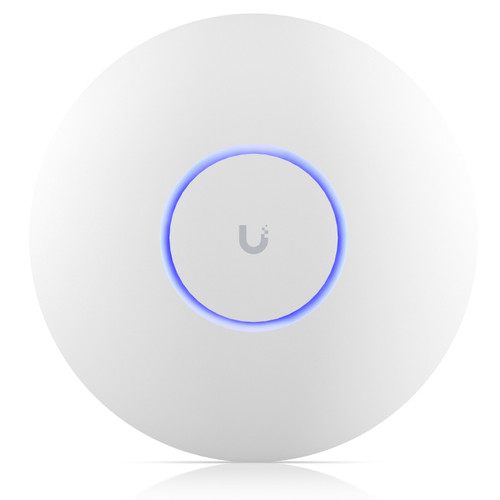
The U6-PRO is a ceiling/wall-pendant unit measuring ⌀197 × 35 mm and weighing 580 g. Its enclosure is polycarbonate with a stainless steel (SUS304) mount included in the box, and it carries an IP54 ingress protection rating. IP54 indicates protection against dust ingress sufficient to prevent harmful deposits and protection against water splashing from any direction, making it suitable for light-industrial, warehouse, and manufacturing environments where the spec calls out -30 to 60°C operation.
The U6-IW is designed for standard in-wall gang-box installation, measuring 139.7 × 96 × 31.2 mm and weighing 460 g. Its enclosure combines plastic and aluminum, with an aluminum mount. No IP rating is listed in the provided specifications for the U6-IW. The operating temperature range is identical to the U6-PRO at -30 to 60°C. Because the U6-IW recesses into the wall, it is architecturally less obtrusive in finished indoor spaces such as offices and hospitality rooms, but its lack of a stated IP rating means it should not be assumed suitable for wet or dusty environments without further verification from Ubiquiti documentation.
Which should you choose: the U6-PRO or the U6-IW?
Our take: The U6-PRO is the stronger choice when coverage area, environmental resilience, and ceiling/overhead mounting are the primary requirements. It carries a stated 5.3 Gbps aggregate versus the U6-IW's unlisted aggregate figure (5 GHz alone matches at 4.8 Gbps), covers a specified 140 m² (1,500 ft²), and holds an IP54 rating absent from the U6-IW's spec sheet—a meaningful difference for warehouse or light-industrial sites. Its 580 g polycarbonate body with stainless steel mount is purpose-built for overhead installation. The U6-IW is the stronger choice when the deployment is a structured indoor space—hotel room, classroom, or conference room—where in-wall aesthetics matter and wired device co-location is needed: its integrated 4-port GbE switch with PoE+ output eliminates a separate wall switch entirely. Both units are NDAA-compliant, PoE+ powered at 13W, WiFi 6 dual-band, and rated for 250+ concurrent clients, so the decision reduces to mounting style, downstream port needs, and IP rating requirements.
Side-by-Side Comparison
Spec-for-spec, from manufacturer data.
| Specification | Ubiquiti U6-PRO | Ubiquiti U6-IW |
|---|---|---|
| WiFi Standard | WiFi 6 (802.11ax) | WiFi 6 (802.11ax) |
| Aggregate Throughput | 5.3 Gbps | Not specified |
| 5 GHz Max Data Rate | 4.8 Gbps | 4.8 Gbps |
| 2.4 GHz Max Data Rate | 573.5 Mbps | 573.5 Mbps |
| Concurrent Clients | 250+ | 250+ |
| Coverage Area | 140 m² (1,500 ft²) | — |
| Form Factor | Ceiling/Wall Pendant | In-Wall Gang Box |
| Uplink Port | 1× GbE RJ45 | 1× GbE RJ45 |
| Downstream Switch Ports | — | 4× GbE (1× PoE+ out) |
| Power Input | PoE+ (802.3at) | PoE+ (802.3at) |
| Power Consumption | 13W max | 13W (excl. PoE output) |
| IP Rating | IP54 | — |
| Operating Temperature | -30 to 60°C | -30 to 60°C |
| Enclosure | Polycarbonate | Plastic, aluminum |
| Mount Material | Stainless steel (SUS304) | Aluminum |
| NDAA Compliant | Yes | Yes |
| Dimensions | ⌀197 × 35 mm | 139.7 × 96 × 31.2 mm |
| Weight | 580 g (1.3 lb) | 460 g (1 lb) |
Frequently Asked Questions
Which should you choose: the U6-PRO or the U6-IW?
The U6-PRO is the stronger choice when coverage area, environmental resilience, and ceiling/overhead mounting are the primary requirements. It carries a stated 5.3 Gbps aggregate versus the U6-IW's unlisted aggregate figure (5 GHz alone matches at 4.8 Gbps), covers a specified 140 m² (1,500 ft²), and holds an IP54 rating absent from the U6-IW's spec sheet—a meaningful difference for warehouse or light-industrial sites. Its 580 g polycarbonate body with stainless steel mount is purpose-built for overhead installation. The U6-IW is the stronger choice when the deployment is a structured indoor space—hotel room, classroom, or conference room—where in-wall aesthetics matter and wired device co-location is needed: its integrated 4-port GbE switch with PoE+ output eliminates a separate wall switch entirely. Both units are NDAA-compliant, PoE+ powered at 13W, WiFi 6 dual-band, and rated for 250+ concurrent clients, so the decision reduces to mounting style, downstream port needs, and IP rating requirements.
Is the U6-PRO or U6-IW better for larger open-plan deployments like warehouses or gymnasiums?
The U6-PRO is the specified choice for larger open spaces. It carries a stated coverage area of 140 m² (1,500 ft²) and an IP54 rating that tolerates dust and splash—conditions common in warehouses and gymnasiums. The U6-IW has no coverage area figure in the provided specs and no listed IP rating, and its in-wall form factor is designed for room-level, not open-plan, coverage.
Can the U6-IW replace both an access point and a wall switch in a hotel room or classroom?
Yes, based on the provided specifications. The U6-IW includes a 4-port Gigabit Ethernet switch with one PoE+ output port, allowing wired devices such as an IP phone, a TV, or a PoE endpoint to connect at the wall plate without a separate switch. The U6-PRO provides only a single GbE uplink port and cannot serve wired downstream devices directly.
Do both APs require the same PoE power source?
Yes. Both the U6-PRO and U6-IW are specified as PoE+ (IEEE 802.3at) powered with a maximum draw of 13W. Note that the U6-IW's 13W budget is stated excluding PoE output—if the downstream PoE port is actively powering a device, the upstream switch port must supply additional power beyond the 13W AP budget. The U6-PRO has no downstream PoE output and its 13W figure covers the device itself.
More Wireless Access Point Comparisons
Get a Second Opinion on Your Camera Choice
Share your site layout, coverage goals, and budget. Our team will validate the camera selection, flag anything we would change, and recommend products that match the use case.