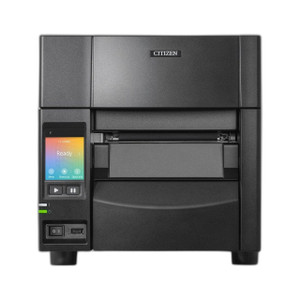
Citizen CL-S700III-EPUS-P Thermal Label Printer with Ethernet, WiFi, and Peeler
Overview
The Citizen CL-S700III-EPUS-P is a 203 DPI thermal label printer engineered for shipping, warehouse, and logistics environments where you need reliable on-demand label output without consumable ink cartridges. This model combines Ethernet, WiFi (802.11b/g/n via ES04 dongle), and USB connectivity to integrate into mixed IT infrastructure—drop it into your WMS or shipping software ecosystem without proprietary hardware requirements. The integrated peeler removes the manual step of hand-stripping labels, reducing operator fatigue and improving throughput in high-volume fulfillment centers.
Compatibility
The CL-S700III-EPUS-P works with any thermal label stock sized up to 4 inches wide. It connects via standard USB (included), standard Gigabit Ethernet (RJ-45), and 802.11b/g/n WiFi through the included ES04 wireless adapter. The short-range dongle (OPT-807) is included and extends reliable connectivity in warehouses with interference or distance constraints. Most WMS platforms (SAP, Oracle, Manhattan, JDA, NetSuite) and shipping software (ShipStation, Endicia, EasyPost) support CUPS or Windows printer drivers for the CL-S700 series without custom coding.
Installation Notes
Position the printer within arm's reach of your pack station or ship desk—the peeler mechanism requires a 6-inch clearance in front for label ejection and removal. Mount the WiFi dongle away from metal shelving to avoid signal attenuation. Roll media into the thermal head with the print side facing down; the printer will auto-sense label width up to 4 inches. No calibration is required at startup—just connect power (24VDC external PSU, included) and assign a network IP via DHCP or static config through the web UI (accessible at the printer's hostname or IP address on your network).
What's in the Box
- 1x Citizen CL-S700III thermal printer unit with integrated peeler
- 1x ES04 wireless adapter (802.11b/g/n)
- 1x OPT-807 short-range wireless dongle
- 1x USB cable (A-to-B, standard length)
- 1x 24VDC external power supply with regional cord
- 1x mounting bracket and hardware