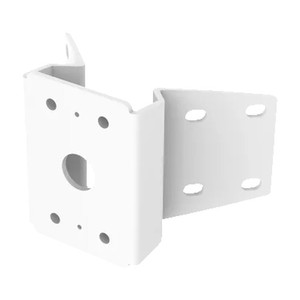
Axis 5017-641 T91A64 Corner Bracket, White
The Axis 5017-641 is a purpose-built corner mounting bracket designed to position Axis network cameras at building edges and intersections where sightline geometry matters most. Unlike standard wall or ceiling mounts, a corner bracket anchors the camera body at a 90-degree angle, allowing you to cover two adjacent walls or a wall-and-ceiling junction with a single unit. This matters because corner placement eliminates blind spots that perpendicular walls otherwise create, and it does so without requiring a second camera license or network port.
Key Features
- Corner-optimized geometry: Positions cameras at building corners to cover adjacent sightlines in a single deployment—reducing camera count and infrastructure cost in retail, office, and industrial layouts where multiple aisles or entry points converge.
- Weather-resistant construction: The bracket is built to withstand rain, wind, and UV exposure without degradation or rust, making it suitable for outdoor perimeter monitoring. It won't corrode in humid or salt-spray environments, so you can deploy it on loading docks, warehouse eaves, and exterior building corners without additional protective enclosures.
- White finish: Blends with standard building materials—walls, trim, fascia—so the bracket itself remains visually neutral. This reduces visual clutter in retail and office environments where dark or metallic mounts can distract from aesthetics.
- Broad camera compatibility: Supports Axis P55-series and Q60-series PTZ dome cameras, as well as Axis pendant kits (P33, P33-VE, 225, and 216/P3301 models). This compatibility span means the 5017-641 can anchor both fixed and pan-tilt-zoom units, giving integrators flexibility across project scopes.
- Stable mechanical interface: The bracket's rigid structure ensures cameras remain fixed in position despite wind load or vibration from nearby equipment. Critical for clear video in high-traffic areas where camera drift or shake would compromise forensic detail.
- Minimal footprint: Corner mounting uses existing building edges, eliminating the need for wall-penetrating arms or cantilevered poles that consume floor or landing space.
Integration & Compatibility
The 5017-641 integrates with the Axis product ecosystem without requiring additional adapters or transition pieces. Its mechanical interface is standardized across the camera families it supports, so installation follows predictable steps: anchor the bracket to the corner structure, align the camera housing, and secure with the provided fasteners. Works with standard masonry anchors, concrete fasteners, or metal stud connections depending on your corner substrate—aluminum, steel, brick, or composite surfaces all accept the bracket without modification.
For network video recorders and video management systems, the bracket itself is transparent—it's purely mechanical. Your camera will stream to the NVR or VMS exactly as it would on a pendant or wall mount. The benefit is purely geometric: better coverage per camera, not additional processing or licensing overhead.
When to Choose a Different Accessory
If your deployment requires a camera to mount flush against a flat wall (not at a corner), a standard pendant or wall bracket will be more cost-effective and simpler to install. If you need to position a camera 10+ feet above a corner—such as on a warehouse wall well above door height—consider a pole-mounted extension arm instead, which gives you height adjustment without corner geometry constraints. The 5017-641 assumes the corner itself is your anchor point; if your corner is recessed, obstructed, or requires offset placement, a separate extension bracket may be necessary.
Frequently Asked Questions
Q: Does the 5017-641 work with all Axis cameras?
A: No. The bracket is specifically designed for Axis P55-series and Q60-series PTZ domes, plus Axis pendant kits (P33, P33-VE, 225, 216/P3301). Check your camera model against the compatibility list in the product datasheet before ordering. Other form factors (bullet cameras, turrets, compact boxes) may not fit the mechanical interface.
Q: Can I use the 5017-641 indoors?
A: Yes. The weather-resistant rating means it performs reliably outdoors, but there's no restriction on indoor use. Corner mounting works equally well inside a warehouse or office to cover aisles, hallways, or entry zones.
Q: What fasteners come with the bracket?
A: The bracket includes mounting hardware, but the specific anchors depend on your corner substrate (masonry, metal, wood). Consult the installation guide to determine whether you need lag bolts, concrete anchors, or stud fasteners. Most integrators source substrate-specific fasteners locally to match building code and material requirements.
Q: Does corner mounting reduce the camera's field of view or zoom range?
A: No. The bracket is purely mechanical—it positions the camera but doesn't limit its lens, zoom, or pan-tilt range. Your PTZ camera retains its full 32x optical zoom and 360-degree pan regardless of corner placement.
Q: How does the white finish hold up to dirt and weather?
A: The bracket is weather-resistant, meaning it won't rust or degrade from rain and UV. However, like any white finish, it may accumulate dust, pollen, or bird droppings over time. Plan for occasional cleaning using mild soap and water to maintain appearance.
Q: Is installation straightforward for a single integrator, or do I need specialized tools?
A: Installation requires standard tools (drill, socket wrench, level) and knowledge of your corner substrate. A single technician can typically complete mounting in 30–60 minutes once the corner location is prepared and fasteners are sourced. No power or network configuration is needed—it's purely structural.
Ted PerryPerspective based on aggregated IP Security Depot and affiliated engineering team experience.
The Axis 5017-641 is an accessory I reach for when a customer layout has a critical coverage gap at an interior or exterior corner—and they want to avoid a second camera. Corner geometry matters more than most integrators acknowledge. A standard wall mount at a hallway corner covers maybe 100–120 degrees; a corner bracket covers two adjacent walls, often 160–180 degrees of total sightline. That's a real efficiency gain, particularly in warehouse aisles, retail check-in areas, or building corners where two security zones meet.
Deployment Considerations:
- Substrate matters: The 5017-641's weather-resistant construction doesn't replace proper fastening. If you're mounting to brick, concrete, or metal studs, source anchors rated for your substrate and local wind load requirements. A corner mount on an exterior wall takes wind pressure from two sides—don't skimp on fastener specs.
- PTZ reach: If you pair this with a Q60-series PTZ, remember that a corner mount limits some pan angles (the bracket itself occupies the corner space). You won't get full 360-degree pan into the corner junction—plan your zoom and tilt strategy accordingly.
- Height placement: Corner brackets work best when the corner itself is your mounting plane. If your corner is recessed or if you need the camera 15+ feet up, you may need an extension arm in addition to the bracket, which adds cost and complexity.
Real-world fit: warehouse perimeter where two exterior walls meet, or a retail stockroom where a back corner needs coverage without a second camera port. Less ideal if your corner has significant overhang, obstruction, or if you need the bracket to offset significantly from the actual corner edge.