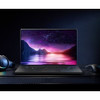
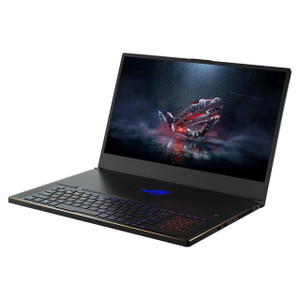
ASUS GU604VZ-CS94 ROG Zephyrus M16 Gaming Laptop
Overview
The ASUS GU604VZ-CS94 is the ROG Zephyrus M16 configured with a 13th-generation Intel Core i9 processor, NVIDIA GeForce RTX 4080 discrete GPU, and a 16-inch Mini LED display running at 2560×1600 (WQXGA) resolution with a 240Hz refresh rate. Introduced in 2023 in a clamshell form factor, this is a high-compute portable workstation marketed at gaming and demanding professional workloads — the kind of machine a field security integrator, VMS operator, or video analytics developer would reach for when a desktop is not an option. At 9.50 lb and 18.00 × 13.00 × 3.50 inches, it is not an ultrabook; the weight reflects the thermal headroom required to sustain i9 and RTX 4080 performance under sustained load.
Key Features
- 13th-Gen Intel Core i9 CPU: Intel's 13th-generation i9 brings high core counts and boosted single-thread performance, which matters for real-time VMS decoding, video analytics inference, and large-dataset processing tasks that don't parallelize well across GPU cores. If your workload involves running Milestone XProtect, Genetec Security Center, or similar VMS clients alongside other applications simultaneously, the i9 headroom means fewer dropped frames during heavy decode cycles.
- NVIDIA GeForce RTX 4080 GPU: The RTX 4080 carries substantial CUDA core counts and dedicated Tensor cores, making it relevant not just for rendering but for GPU-accelerated video analytics, AI inference at the edge, and deep learning model testing. Developers working on edge AI pipelines or running local inference on surveillance models can run meaningful workloads without cloud dependency.
- 16-inch Mini LED Display at 240Hz, 2560×1600: The WQXGA (2560×1600) resolution on a 16:10 panel gives more vertical screen real estate than a standard 16:9 1440p display — useful when reviewing camera grids, timelines, or forensic footage where you want to see more rows simultaneously. The 240Hz refresh rate and 3ms rise/fall response time mean motion is rendered cleanly; less relevant for static VMS dashboards, but critical for any real-time monitoring use case where fast-moving subjects need to be tracked visually.
- Mini LED Panel with 100% DCI-P3 Color Gamut: Mini LED backlighting delivers substantially higher contrast and local dimming precision compared to standard IPS panels. Combined with 100% DCI-P3 coverage, this display renders accurate color — relevant if you are doing camera calibration work, reviewing color-sensitive forensic footage, or producing video content. The anti-glare coating reduces specular reflections in lit office environments.
- Windows 11 Home Pre-installed: Ships with Windows 11 Home, which covers the majority of VMS client software, integrator tools, and development environments. Note that enterprise VMS deployments or domain-joined environments may prefer Windows 11 Pro for Group Policy and remote management capabilities — verify your VMS vendor's OS requirements before ordering if Pro is a hard requirement.
- Off Black Clamshell Form Factor at 9.50 lb: The clamshell design with an off-black finish is straightforward to deploy on a desk or transport in a bag, though at 9.50 lb (18.00 × 13.00 × 3.50 in) this is a heavy-duty machine. Budget for a quality carrying case rated for this size and weight class if field deployment is part of the plan.
- Non-Touch Display: The display is not touch-enabled. For integrators who rely on touch-based VMS interfaces or tablet-mode workflows, this is a firm limitation to note — the GU604VZ-CS94 is a traditional keyboard-and-trackpad machine.
Integration and Compatibility
The GU604VZ-CS94 runs Windows 11 Home, which is broadly compatible with the major VMS platforms including Milestone XProtect, Genetec Security Center, Avigilon Control Center, Hanwha Wisenet WAVE, and most ONVIF-compliant camera management tools. The RTX 4080 GPU supports NVENC/NVDEC hardware acceleration, which most modern VMS platforms can leverage for H.265 and H.264 multi-stream decoding — reducing CPU load when managing large camera counts. Verify that your specific VMS version lists Windows 11 support and RTX 40-series GPU compatibility in its release notes before deploying in a production environment. No proprietary connectivity constraints are noted in the available evidence; standard USB, HDMI, and network connectivity should be confirmed against the manufacturer's full specification sheet for your specific deployment requirements.
Frequently Asked Questions
Q: What processor and GPU does the GU604VZ-CS94 include?
A: The GU604VZ-CS94 ships with a 13th-generation Intel Core i9 processor and an NVIDIA GeForce RTX 4080 discrete GPU.
Q: What is the display resolution and refresh rate on the GU604VZ-CS94?
A: The display is 16 inches (40.6 cm) with a WQXGA resolution of 2560×1600 pixels, a 240Hz maximum refresh rate, and a 3ms rise/fall response time. Panel type is Mini LED with a 16:10 native aspect ratio.
Q: Does the GU604VZ-CS94 have a touchscreen?
A: No. The GU604VZ-CS94 has a non-touch anti-glare display.
Q: What operating system does the GU604VZ-CS94 ship with?
A: It ships with Windows 11 Home. Organizations requiring Windows 11 Pro for domain join or Group Policy management should verify upgrade options with their IT department before purchasing.
Q: How heavy is the GU604VZ-CS94 and what are its dimensions?
A: The GU604VZ-CS94 weighs 9.50 lb and measures 18.00 × 13.00 × 3.50 inches (L × W × H). It is a full-size performance laptop — not designed for ultralight travel.
Q: Is the GU604VZ-CS94 suitable for running VMS software like Milestone or Genetec?
A: The hardware configuration — 13th-Gen i9, RTX 4080, and Windows 11 Home — meets or exceeds the recommended system requirements for most enterprise VMS clients. The RTX 4080 supports GPU-accelerated H.265/H.264 decoding (NVDEC), which reduces CPU load during multi-stream playback. Confirm Windows 11 Home compatibility with your specific VMS version before deployment.
The GU604VZ-CS94 is one of the few portable machines I'd actually recommend for a serious VMS operator or security systems integrator who needs to run high-channel-count decode workloads away from a fixed workstation. The 240Hz Mini LED display at 2560×1600 with 100% DCI-P3 is not a gimmick here — it gives you accurate color rendering for forensic review and enough pixel density on a 16-inch panel to meaningfully display a multi-camera grid without squinting.
Technical Highlights:
- RTX 4080 + NVDEC: Hardware-accelerated H.265 and H.264 decoding offloads multi-stream VMS playback from the CPU — critical when you're pulling down 20+ camera streams simultaneously and need the i9 free for analytics processing.
- 2560×1600 WQXGA at 16:10: The extra vertical height versus a 16:9 panel is genuinely useful for timeline scrubbing and camera-grid layouts in VMS clients — you get roughly 11% more vertical screen real estate than a comparable 16:9 2560×1440 display.
- 3ms Rise/Fall Response Time at 240Hz: For live monitoring of fast-moving subjects (vehicle tracking, perimeter intrusion), the display keeps up without motion smear that would make visual confirmation harder in real-time watch scenarios.
Deployment Considerations:
- At 9.50 lb and 18.00 × 13.00 in, this machine requires a purpose-built carrying solution for field work — standard laptop bags rated to 15 or 16 inches may not fit the 18-inch footprint. Measure your bag before assuming it fits.
- Windows 11 Home lacks native BitLocker administration and Group Policy — if your organization requires full-disk encryption managed through a domain controller, you'll need to upgrade to Pro or source the Pro SKU directly.
This machine is a strong fit for a security operations center (SOC) analyst running a local VMS client with GPU-accelerated decode, or a field integrator who needs to commission and test high-channel IP camera systems on-site without dragging a desktop to the job. It is not the right pick for travel-light roles or anyone who needs touch-based VMS interaction.