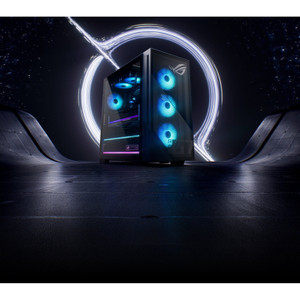
ASUS G700TF-DS774 Tower Desktop — Intel Core Ultra 7 265F, RTX 5070, 1TB Gen4 SSD
The ASUS G700TF-DS774 is a high-performance tower desktop built around Intel's Core Ultra 7 265F processor and an NVIDIA GeForce RTX 5070 discrete GPU — a configuration that handles GPU-accelerated workloads, multi-stream video decoding, and AI-inferencing tasks that mid-range workstations routinely choke on. At 40.39 lb in a 9.45 × 20.05 × 18.88-inch chassis, this is a desk-side machine, not a rack-mount unit — sized for the power user or analyst station that needs real graphics muscle without a tower workstation price tag.
Key Features
- Intel Core Ultra 7 265F — 20-Core, 5.3 GHz Boost: The 265F is Intel's Arrow Lake desktop part with 8 Performance cores (up to 5.2 GHz turbo) and 12 Efficient cores (up to 4.6 GHz turbo) sharing a 30 MB Smart Cache. The 20-thread count means heavy multi-tasking — running a video management system alongside live analytics, database queries, and remote sessions — distributes cleanly without starving any workload. Base power is 65 W with up to 182 W turbo headroom, so the platform scales aggressively under burst load rather than throttling prematurely.
- Intel AI Boost NPU (Intel Core Ultra Series 2): The on-die Neural Processing Unit offloads AI inference tasks from both the CPU and GPU — relevant for local AI analytics, noise suppression, or background processing that would otherwise steal GPU cycles. For a surveillance workstation or NVR companion running edge AI plugins, this is a meaningful architectural advantage over standard desktop silicon.
- NVIDIA GeForce RTX 5070 Discrete GPU: The RTX 5070 brings next-generation GPU architecture with hardware ray tracing and CUDA cores purpose-built for parallel compute. For video workflows, this means accelerated H.265/H.264 decode, real-time rendering, and the ability to drive multiple high-resolution displays simultaneously. Security operations centers and video wall controllers running demanding multi-monitor layouts will find the GPU headroom here considerably more capable than integrated-graphics alternatives.
- 1TB M.2 2280 PCIe Gen4 NVMe SSD: PCIe Gen4 delivers sequential read/write speeds roughly double that of Gen3 — the difference between a system that feels snappy under heavy I/O and one that stalls. For video recording servers or workstations ingesting large footage archives, fast local storage reduces the bottleneck between capture and write. The M.2 2280 form factor also keeps the drive bay open for a secondary drive if you need to expand capacity later.
- 16 GB System RAM: 16 GB is the practical floor for a GPU-accelerated workstation running modern operating systems alongside resource-heavy applications. Sufficient for most single-operator analyst or configuration workstation roles; if the deployment involves running multiple concurrent VMS streams or virtual machines, evaluate whether expansion is warranted for that specific workload.
- Windows 11 Home — Ready Out of Box: Ships with Windows 11 Home pre-installed, which means zero OS provisioning time for standard deployments. Note that enterprise features — Bitlocker management, domain join via Group Policy, and Remote Desktop host — require a Pro or Enterprise license. Verify your organization's licensing requirements before deploying in a managed domain environment.
- PCIe and Ethernet Connectivity: The G700TF-DS774 exposes PCIe expansion and wired Ethernet — the two interfaces that matter most for integrating peripheral capture cards, additional network adapters, or dedicated storage controllers. Wired Ethernet keeps latency predictable for network-dependent applications, avoiding the jitter that wireless introduces in time-sensitive data paths.
- Substantial Chassis — 40.39 lb, 9.45 × 20.05 × 18.88 in: At nearly 41 lb, this is a full-size tower. Plan desk or floor placement accordingly — it is not rack-mountable without a third-party shelf, and it will not fit in a standard 19-inch equipment enclosure without modification. The physical footprint is L × W × H: 9.45 × 20.05 × 18.88 in, which aligns with a standard mid-to-full tower envelope.
Integration & Compatibility
The G700TF-DS774 runs Windows 11 Home and exposes standard PCIe lanes and Gigabit Ethernet, making it compatible with the broad ecosystem of VMS platforms that publish Windows-native clients — Milestone XProtect, Genetec Security Center, Avigilon Control Center, and similar. GPU-accelerated decode support depends on the specific VMS version and codec configuration; verify RTX 5070 compatibility with your VMS vendor's published hardware acceleration requirements before specifying this unit as a dedicated decoding workstation.
The PCIe interface supports expansion cards including capture cards, additional NIC adapters, and PCIe-attached storage — useful if the deployment requires dedicated video ingest hardware or a separate network segment for camera traffic. The M.2 2280 slot uses PCIe Gen4, so any secondary M.2 drive should also be Gen4 to avoid downgrading the bus to Gen3 speeds.
For deployments pairing this unit with PoE network switches and IP cameras, the onboard Ethernet handles management traffic; add a second NIC via PCIe if you need to isolate camera-network and operator-network segments on separate physical interfaces.
Frequently Asked Questions
Q: What processor does the ASUS G700TF-DS774 use, and how many cores does it have?
A: The G700TF-DS774 ships with an Intel Core Ultra 7 265F (Arrow Lake, Series 2) — a 20-core, 20-thread processor with 8 Performance cores boosting to 5.2 GHz and 12 Efficient cores boosting to 4.6 GHz. Max turbo across all cores is 5.3 GHz.
Q: What GPU is included, and is it suitable for multi-monitor video wall use?
A: The system includes an NVIDIA GeForce RTX 5070. The RTX 5070 supports multi-display output and hardware-accelerated video decode; specific multi-monitor configurations depend on the display outputs available on the GPU's I/O bracket. Verify your resolution and display count requirements against the RTX 5070's output specifications.
Q: Is the G700TF-DS774 rack-mountable?
A: No — this is a standard tower chassis (9.45 × 20.05 × 18.88 in, 40.39 lb). It is not designed for 19-inch rack installation without a third-party rail or shelf solution. Plan for desk or floor placement.
Q: Can the RAM or storage be upgraded after purchase?
A: The product ships with 16 GB RAM and a 1TB PCIe Gen4 M.2 2280 SSD. Whether additional slots are populated or available for upgrade depends on the motherboard configuration inside the chassis — consult the ASUS G700TF series documentation for memory and storage expansion specifics before committing to a capacity requirement.
Q: Does the G700TF-DS774 ship with an operating system?
A: Yes — Windows 11 Home is pre-installed. Enterprise features such as domain join, Group Policy management, and Remote Desktop host functionality require a Windows 11 Pro or Enterprise upgrade license.
Q: What is the NPU (Neural Processing Unit) used for in this system?
A: The Intel AI Boost NPU is integrated into the Core Ultra 7 265F die. It handles AI inference tasks locally — offloading workloads from the CPU and GPU. Practical applications include AI-accelerated analytics plugins, local inferencing for edge AI security software, and Windows Studio Effects processing without taxing the main compute resources.
The G700TF-DS774 is one of the more interesting analyst station configs I have seen come through the channel lately — specifically because of the 265F's 182 W turbo power envelope paired with the RTX 5070. That combination means the machine can sustain heavy burst compute (GPU-accelerated decode, AI inferencing, multi-stream rendering) without the thermal throttling you see on compact form-factor units pushing similar specs.
Technical Highlights:
- 20-Core Intel Core Ultra 7 265F at 5.3 GHz peak: Eight Performance cores at 5.2 GHz handle latency-sensitive tasks; twelve Efficient cores at 4.6 GHz absorb background workloads — the architecture is genuinely better for mixed concurrent workloads than a single-frequency monolithic core count.
- 30 MB Smart Cache: A large L3 cache matters when the workload cycles through large data structures repeatedly — video frame buffers, analytics model weights, database index pages. Reducing cache misses keeps the CPU busy rather than waiting on memory bus latency.
- PCIe Gen4 NVMe SSD (M.2 2280, 1TB): Gen4 roughly doubles the sequential throughput ceiling versus Gen3. For workstations writing continuous footage or importing large media archives, this difference is measurable in real operations — not just benchmarks.
Deployment Considerations:
- At 40.39 lb, the G700TF-DS774 requires planned desk or floor placement. Factor in airflow clearance — full-tower chassis at 182 W turbo TDP will exhaust significant heat and need unobstructed intake and exhaust paths.
- Windows 11 Home ships pre-installed, but enterprise domain environments almost universally require Pro or Enterprise licensing. Budget for the OS upgrade license if this system is being deployed into a managed Active Directory or Intune environment.
This unit is well-matched for a high-throughput security operations workstation — specifically where an analyst is running a GPU-accelerated VMS client, local AI forensic tools, and multiple 4K display outputs simultaneously. It is overspecified for a basic configuration terminal and underspecified as a headless server — the sweet spot is the power-user analyst or integrator commissioning station where every core and the RTX 5070's compute lanes are actually in use.