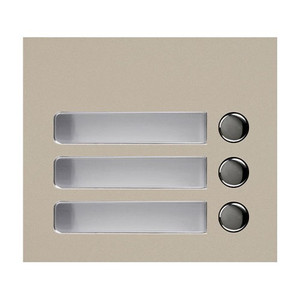
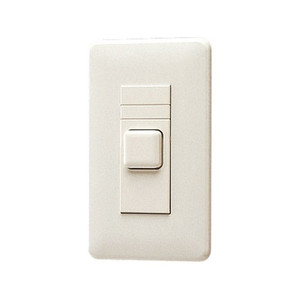
Aiphone GF-4P 4-Call Button Panel
The Aiphone GF-4P is a four-call button panel engineered for integration within Aiphone intercom systems, specifically the GT series modular entrance architecture. Built from zinc die-cast material, it delivers reliable call initiation across multi-tenant residential, commercial, and access control deployments where tenant or building-entry communication is required. The GF-4P serves as the physical call interface—the button users press to reach a specific destination station or guard post.
Key Features
- Four Independent Call Buttons: Each button routes to a separate destination within the GT ecosystem, allowing visitors to select their target tenant or entry point without navigating a menu. Tactile response confirms button press registration.
- Zinc Die-Cast Housing: Corrosion-resistant material extends panel lifespan in both indoor lobbies and covered outdoor entry vestibules, reducing replacement cycles in high-traffic environments.
- R1/R2 Audio Bus Integration: Connects directly to the GT series audio backbone using standard two-wire audio bus connections. This is the same wiring topology used across all GT entrance and tenant stations, simplifying installation and reducing cable inventory.
- Modular GT Ecosystem Compatibility: The GF-4P pairs with GT audio modules (GT-VBC/GT-BC), tenant displays (GT-1C/GT-1M), and guard stations (GT-MKB-N). This modular design means you can scale a single system to support up to 125 total tenants per controller without replacing the panel itself.
- Standard Entrance Configuration: Works as a primary call interface for lobby entry points, building vestibules, or gated access areas where visitors must announce themselves to gain entry or reach a destination.
- Low Installation Footprint: Compact button layout fits standard electrical boxes and mounting brackets, minimizing modifications to existing architectural surfaces.
Integration & Compatibility
The GF-4P integrates directly with the GT series modular entrance systems via standard R1/R2 audio bus connections. Installation requires wiring to the GT system backbone—typically a two-wire audio bus connected to a central audio station (GT-1A) or matrix audio module. The panel supports configurations where multiple entrance points (lobbies, service entries, loading docks) each have their own GF-4P, all routed to a single guard station or tenant management system.
Because the GF-4P is a call button panel rather than an audio or video processor, it does not encode, compress, or process media. It is a passive interface element that initiates call routing within the GT control architecture. Compatibility with audio modules, video modules, and downstream tenant displays depends on the complete system configuration—consult the GT series installation guide or a qualified integrator when designing a multi-entrance setup.
The panel's four-button configuration is fixed; for facilities requiring more call destinations, multiple GF-4P panels can be installed side-by-side, or a larger modular entrance frame (if available in the GT line) may be more practical.
Frequently Asked Questions
Q: Can I use the GF-4P as a standalone device without the rest of the GT system?
A: No. The GF-4P requires integration with a complete GT series audio and control architecture. It is a call-button interface only and has no independent power supply, audio processing, or connectivity—it depends entirely on the GT system controller and audio modules to function.
Q: How many tenants can the entire system support if I install multiple GF-4P panels?
A: Up to 125 total tenants per system controller, regardless of the number of GF-4P entrance panels. If you exceed 125 tenant stations, you will need a second controller and system.
Q: Is the GF-4P powered by the same audio bus as the wiring?
A: The GF-4P operates over the R1/R2 audio bus—it is a passive button interface with no separate power supply required. Power delivery is managed by the GT audio modules and central controller.
Q: Can I relabel or customize the four buttons for different tenants?
A: The buttons themselves have no labels printed on them by default. Labeling is typically done on-site using adhesive labels or engraving adjacent to or below the button locations. Button routing (which button connects to which tenant) is configured within the GT system software or control panel, not on the physical button itself.
Q: What if one of the four buttons fails—do I have to replace the entire panel?
A: Button repair or replacement is a field service matter. Consult Aiphone technical support or your integrator for repair options. Replacement of the entire panel may be more cost-effective than individual button repair, depending on the design and availability of replacement components.
Q: Does the GF-4P work with video entry systems?
A: The GF-4P is an audio-bus call button panel. If your GT system includes video modules (GT-VBC), the video is processed separately from the button call routing. The button initiates a call; the video module handles video streaming to the called destination. They work together as part of the complete system, but the GF-4P itself does not process or transmit video.
Ted PerryPerspective based on aggregated IP Security Depot and affiliated engineering team experience.
The Aiphone GF-4P is a straightforward intercom call-button interface—nothing fancy, but it occupies a specific role in the GT ecosystem that you need to understand before specifying it. It's a passive R1/R2 audio bus device, which means it has zero independent intelligence. No power supply, no processor, no failover logic. It's a four-position selector that tells the GT control backbone which audio path to activate. That's it. For integrators, that simplicity is either a blessing or a gotcha, depending on how you've designed the system architecture.
Technical Highlights:
- Zinc Die-Cast Housing: Corrosion resistance extends lifecycle in lobby and vestibule environments where salt air, humidity, or temperature cycling can degrade aluminum or painted steel. Real-world benefit: fewer field callbacks for corroded button contacts.
- Four Fixed Call Buttons: Routing is pre-assigned or configured in the GT system controller. No field reprogramming of the panel itself—all logic lives in the central audio module. If a button needs to reach a different tenant later, the change happens in software, not on the panel hardware.
- R1/R2 Audio Bus Integration: Two-wire audio bus connection reduces installation labor compared to multi-conductor control wiring. But it also means the GF-4P has zero redundancy and cannot function if the audio bus is broken or the controller is offline.
Deployment Considerations:
- Passive Interface Only: Do not mistake the GF-4P for a standalone device. It requires a complete GT system (audio module, control logic, and power source) to operate. If you need a simpler solution, consider whether a standalone PoE intercom camera might better suit the application.
- Scaling Beyond 125 Tenants: The GF-4P itself supports up to 125 total tenants per controller. Beyond that, you need a second system controller and separate audio bus—a significant architectural decision that impacts cabling, power, and management complexity.
- Labeling and Maintenance: The buttons are unlabeled by factory. Labeling must be done on-site using adhesive stock or engraving. Button failure requires service intervention; there are no field-replaceable button modules. Plan for that in your lifecycle cost.
The GF-4P makes sense in a multi-tenant building or gated facility where you have already committed to a GT series control platform and need reliable, corrosion-resistant call initiation at multiple entry points. It is not a retrofit solution for standalone intercoms or non-GT systems. If you're evaluating intercom options for a small building or single-entry access point, a networked intercom camera or video intercom system may deliver more flexibility at lower total cost than a full GT installation.