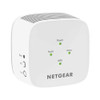
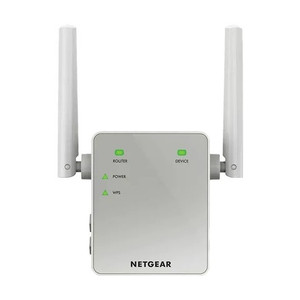
NETGEAR EX3110-100NAS AC750 WiFi Range Extender
The NETGEAR EX3110-100NAS is an AC750 WiFi range extender designed to eliminate dead zones in surveillance networks and general facility deployments. Operating across 802.11ac and 802.11b/g/n standards on both 2.4 GHz and 5 GHz bands, it extends connectivity to wireless IP cameras, NVRs, tablets, and laptops in locations where running ethernet backhaul is impractical—retail floors, warehouse perimeters, outdoor covered areas, and multi-building campuses. The dual-band architecture allows you to reserve the 5 GHz band for high-bandwidth surveillance traffic while maintaining backward compatibility with legacy 2.4 GHz devices.
Key Features
- AC750 Data Rate: 750 Mbps aggregate (433 Mbps 5 GHz + 300 Mbps 2.4 GHz). Sufficient for simultaneous multi-camera streaming and client traffic on moderately congested networks.
- Dual-Band Coverage: 802.11ac (5 GHz) and 802.11b/g/n (2.4 GHz). Bridges modern surveillance equipment and legacy wireless devices on the same backhaul.
- Coverage Radius: Extends WiFi 50–100 feet in open space, less through walls and obstructions. Plan placement to overlap with existing AP coverage zone.
- Transparent Repeater Mode: Passes traffic from client devices to the host WiFi network without requiring per-device configuration. IP cameras and NVRs connect automatically once in range.
- 11V AC Power: Standard wall-outlet powered. No PoE injection; supply your own power adapter to the mounted location.
- LED Status Indicators: Real-time connection strength and WiFi signal visualization. Confirms stable uplink before assuming coverage is live.
- Compact Form Factor: Desktop or wall-mount design. Fits in sheltered indoor/outdoor locations (eaves, entryways, utility closets) without major infrastructure modification.
- No WiFi 6/7 Native Support: Backward-compatible only—will not boost 802.11ax (WiFi 6) or 802.11be (WiFi 7) devices at their native rates. Verify client device compatibility before large-scale rollout.
Deployment Context & Network Integration
The EX3110-100NAS solves a specific problem: extending WiFi to a single IP camera or small group of wireless devices when adding a hardwired PoE line or building a mesh network isn't justified economically. On retail floors with wireless door sensors or a checkout-area camera, on parking-lot perimeters where a cellular backup isn't an option, or in multi-tenant buildings where you cannot control the host WiFi infrastructure, a dual-band extender bridges the gap without introducing a second SSID or requiring client roaming logic. Pair it with a PoE-powered 4G/LTE gateway if the extended WiFi segment loses the wired backhaul—the extender continues serving local clients even if the uplink drops temporarily.
From a network architecture standpoint, the EX3110-100NAS operates as a transparent repeater: it receives the host WiFi broadcast, amplifies it, and rebroadcasts on the same SSID and security key. This means your IP cameras and NVRs see no difference—they connect to the extended network as if it were the original router. However, this also means the extender consumes half the available bandwidth for its own uplink traffic (typical repeater penalty). On congested 2.4 GHz bands with many client devices, this overhead becomes visible; the 5 GHz band is faster and less congested, so prioritize 5 GHz cameras and NVRs if your hardware supports it.
Installation placement is critical. The extender must sit within reliable WiFi range of your existing router or access point—typically 30–50 feet line-of-sight, up to 100 feet in open space. Walls, metal framing, and microwave ovens degrade signal; test signal strength with a phone before finalizing extender location. Mount on a shelf, bookcase, or wall outlet at head height or higher; avoid basements, enclosed cabinets, or floor-level placement, which cut effective range by 30–50%. Allow 10–15 seconds after power-up for the extender to scan for and lock onto your WiFi network; the LED indicators will stabilize once uplink is established. If the extender struggles to connect to your router, move it closer temporarily to confirm function, then relocate to the target dead zone once connection is stable.
Environmental exposure is limited. The EX3110-100NAS is not rated for direct rain, dust, or high-humidity outdoor environments. Use only in covered areas—eaves, sheltered entryways, building overhangs, or weatherproof enclosures. If you need WiFi extension in fully outdoor locations, consider a hardwired PoE access point instead; the cost difference is modest, and reliability gains are substantial. For temporary deployments (events, seasonal sites), the extender's portability is valuable; for permanent installations, evaluate whether the operational overhead of a repeater justifies the capex savings versus a mesh node or wired AP.
Compatibility & Limitations
The EX3110-100NAS is backward-compatible with any 802.11ac, 802.11b, 802.11g, or 802.11n device. Modern dual-band IP cameras and NVRs from Axis, Hikvision, Dahua, and others will connect reliably on the 5 GHz band if they support it, or fall back to 2.4 GHz if not. Legacy single-band 2.4 GHz devices (older WiFi access points, some analog-era wireless bridges) also connect without issue. However, the extender does not natively support WiFi 6 (802.11ax) or WiFi 7 (802.11be) clients. If your surveillance system includes newer WiFi 6 cameras or routers, the EX3110-100NAS will connect them, but they will operate at AC750 speeds (802.11ac fallback), not at their native WiFi 6 throughput. Verify your future equipment roadmap before committing to this unit; if WiFi 6 expansion is planned, invest in a WiFi 6 extender or mesh system instead.
Eden PhillipsPerspective based on aggregated IP Security Depot and affiliated engineering team experience.
We've deployed the NETGEAR EX3110-100NAS in retail surveillance networks, parking-lot perimeters, and multi-building campuses where running new ethernet runs wasn't feasible or cost-justified. It's a workhorse repeater—not fancy, but genuinely useful when you need to add one or two wireless cameras to a dead zone without rearchitecting your network. The dual-band architecture is the real advantage here: you can push your NVR or high-bitrate surveillance camera onto the cleaner 5 GHz band while keeping backward compatibility with older 2.4 GHz access points and client devices. On a typical warehouse floor, we've seen 50–80 feet of reliable extension, which covers most retail dead zones and outdoor overhang areas. The AC750 aggregate rate is modest by WiFi 6 standards, but for 1–4 simultaneous cameras (assuming 3–5 Mbps per stream), it's entirely adequate. The real trade-off is repeater overhead: the extender eats half its bandwidth re-upstreaming to the router. On heavily congested 2.4 GHz networks, this becomes visible—bitrate stutters, occasional disconnects under load. If you're extending more than 3–4 devices or running backup cellular failover alongside WiFi, test the extender's throughput in your specific RF environment before committing to production. Placement is everything. We've seen integrators put the unit in a closet or behind a filing cabinet and wonder why range collapsed; the golden rule is line-of-sight to your router, at head height or above, and clear of metal ductwork and microwave ovens. Spend 20 minutes walking the dead zone with a phone to confirm signal strength before final placement. Finally, this is not an outdoor camera extender unless you enclose it in a weatherproof box—direct sun and rain will kill it. For permanent outdoor WiFi extension, hardwired access points are more reliable and not significantly more expensive.
Technical Highlights:
- AC750 Data Rate (433 Mbps 5 GHz + 300 Mbps 2.4 GHz): Sufficient for 2–4 simultaneous 4-6 Mbps IP camera streams plus standard client traffic. Dual-band load-balancing keeps high-bitrate surveillance on the faster 5 GHz segment, avoiding congestion with legacy 2.4 GHz devices.
- 802.11ac / b/g/n Backward Compatibility: Connects to any legacy WiFi router or modern dual-band AP without negotiation or setup per client. Transparent repeater mode eliminates per-camera configuration overhead.
- Dual-Band Repeater Architecture: Receives and amplifies both 2.4 GHz and 5 GHz simultaneously. Useful for mixed-era deployments (old access points + new cameras), but expect ~50% throughput penalty on each band due to shared uplink.
- Typical Range 50–100 feet (open space, less through walls): Actual coverage depends heavily on RF environment, wall material, and source AP power. Test in-situ before final placement; assume 40–60 feet in typical commercial buildings with drywall and metal studs.
- LED Status Indicators: Real-time uplink strength and connection stability visible without entering setup menu. Confirms extender is locked onto host AP before you assume coverage is live.
- 11V AC Powered (non-PoE): Requires standard wall outlet or dedicated power adapter. Not suitable for ceiling-mount or pole-mount without running separate AC power line. Plan for outlet accessibility or use a low-voltage power extension if mounting in a remote area.
Deployment Considerations:
- Repeater Throughput Penalty: This unit consumes ~50% of available bandwidth re-upstreaming to your router. On a 433 Mbps 5 GHz link, expect ~200–250 Mbps actual client throughput. If you're extending 5+ high-bitrate cameras or bandwidth-heavy non-surveillance clients, a hardwired mesh node or access point is more efficient.
- No WiFi 6 (802.11ax) Native Support: Newer WiFi 6 cameras will connect, but at AC750 speeds, not WiFi 6 rates. If your surveillance roadmap includes WiFi 6 gear, invest in a WiFi 6 extender or mesh system instead; the capex gap is narrow, and future-proofing is worth it.
- Environmental Exposure Limited to Covered Areas: Not rated for direct rain, dust, or high-humidity outdoor use. Eaves, sheltered entryways, and weatherproof enclosures only. Direct sun and moisture ingress will shorten lifespan.
- Placement Criticality: Line-of-sight to host router at head height or above. Avoid metal ductwork, microwave ovens, and enclosed closets. Spend 15–20 minutes site-surveying with a phone; a poor placement can cut effective range by 50%.
- 2.4 GHz Congestion Risk on Busy Networks: WiFi 6 routers and modern access points prefer 5 GHz for surveillance and high-throughput devices. If your 2.4 GHz band is saturated (cordless phones, older access points, many IoT devices), the extender's 2.4 GHz segment will feel slow. Prioritize 5 GHz cameras if available.
- No Mesh Self-Healing or Roaming: Unlike mesh systems, the extender does not hand off clients or optimize band-steering. Cameras and devices sticky to one uplink; if that AP drops, clients must manually reconnect or wait for automatic failover (seconds to minutes).
The NETGEAR EX3110-100NAS is best suited for small-to-medium surveillance extensions where cost efficiency matters and network complexity should be minimal: a single wireless camera in a retail back-office, a perimeter camera in a covered overhang, or a mobile tablet that needs WiFi in a warehouse dead zone. It's not the right choice for large-scale wireless deployments, fully outdoor permanent installations, or networks migrating to WiFi 6+. See the NETGEAR catalog for full-coverage mesh and access-point alternatives.