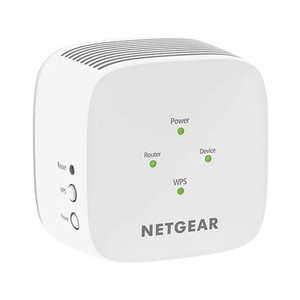
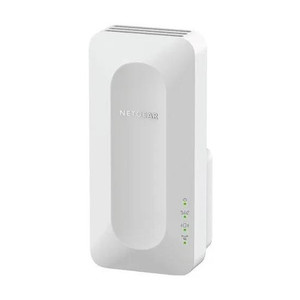
NETGEAR EX6120-100NAS AC1200 Dual-Band WiFi Range Extender
The NETGEAR EX6120-100NAS is an AC1200 WiFi 5 range extender designed to bridge coverage gaps between primary access points and remote surveillance cameras, IoT endpoints, and mobile devices in warehouse, retail, and industrial facilities. The integrated Gigabit Ethernet port provides a hardwired connection option for IP cameras or edge recording devices that require both wireless redundancy and wired performance assurance. Deploy this extender when site distances or structural obstacles prevent reliable direct AP coverage to critical surveillance or networking endpoints, and cable runs are cost-prohibitive or logistically difficult.
Key Features
- AC1200 WiFi 5 Standard: 802.11ac dual-band (2.4 GHz + 5 GHz). Extends existing 802.11ac networks without requiring mesh-specific AP firmware or proprietary routers.
- Gigabit Ethernet Port: 1x RJ45 Gigabit Ethernet port. Enables wired fallback for IP cameras, NVRs, or edge recorders that benefit from both wireless link redundancy and direct hardwired connectivity.
- Dual-Band Concurrent Operation: Simultaneously extends 2.4 GHz and 5 GHz bands. Allows slower IoT/sensor devices on 2.4 GHz while keeping surveillance traffic on the less-congested 5 GHz band.
- Standard 802.11ac Compatibility: No proprietary firmware or specialized drivers. Works with any 802.11ac router, enterprise AP, or third-party WiFi infrastructure.
- Compact Wall-Mount Design: Plug-in form factor with included AC adapter. Mounts on open shelving or wall surface; no separate power infrastructure required.
- Simple Setup: WPS pairing button and web-based configuration. No mesh management portal or cloud dependency for basic range extension.
The EX6120-100NAS bridges the middle ground between enterprise mesh systems and simple passive range extenders. In surveillance deployments, the Ethernet port eliminates the need to choose between wireless coverage and hardwired reliability—a camera dome or outdoor turret can remain wired to the extender while the extender itself extends coverage wirelessly to an AP in a building core. This hybrid architecture reduces cabling cost and installation labor on sprawling warehouse or retail sites where running new runs of Cat6 to every far corner is economically unjustifiable.
WiFi 5 (802.11ac) delivers sufficient throughput for multi-camera streaming in most commercial surveillance contexts. A single 1080p IP camera streams 2–4 Mbps; even accounting for overhead and concurrent IoT traffic, AC1200 (theoretical 1.2 Gbps aggregate) handles 6–8 camera streams per band without noticeable latency. The dual-band design ensures cameras on 5 GHz get lower-interference pathways while guest or legacy devices use 2.4 GHz.
Placement strategy directly impacts performance. Position the extender roughly midway between the primary AP and the target camera location, avoiding metal shelving, dense concrete, or steel rack enclosures that absorb RF energy. Test coverage with a mobile device or dedicated WiFi scanner before finalizing mount height and position. Once placed, the extender transparently bridges traffic—no VPN, no captive portal, no per-device configuration required on camera side. Standard ONVIF-compliant cameras, NVRs, and edge recorders see the extended SSID as a normal WiFi network.
The Ethernet port operates independently of the wireless repeater function. You can hardwire a camera or recording device directly to the port while simultaneously extending the WiFi network. This flexibility is valuable on retrofit projects where adding wireless to legacy wired camera locations is cheaper than running new fiber or Cat6 backbone infrastructure. The port auto-negotiates speed (10 / 100 / 1000 Mbps); use Cat5e or better for full Gigabit performance.
Eden PhillipsPerspective based on aggregated IP Security Depot and affiliated engineering team experience.
We've deployed the EX6120-100NAS across a range of commercial sites—distribution centers, retail chains, and light-industrial facilities—where WiFi infrastructure exists but coverage is spotty or where hardwiring cameras site-wide is logistically unrealistic. The real value proposition isn't speed; it's flexibility. Unlike pure mesh systems that require proprietary management layers and cloud enrollment, the EX6120 acts as a transparent bridge. Throw it on a shelf 200 feet from the primary AP, hardwire a PTZ camera or edge recorder to its Ethernet port, and you're done. No licensing, no controller, no learning curve. On retrofit projects especially—retrofitting WiFi into warehouses with existing analog infrastructure—this simplicity matters. The downside is that it's a range extender, not a mesh node. It halves the effective throughput on the 5 GHz band (since it's receiving and transmitting on the same frequency), so don't overload it. We've seen integration teams spec this unit assuming it can handle 20+ simultaneous streams on 5 GHz; reality caps out around 6–8 without retransmit congestion. For camera-primary use cases on smaller sites, that's fine. For dense AP deployments where you need to aggregate bandwidth, spec a true mesh AP instead.
Technical Highlights:
- 802.11ac Dual-Band (1200 Mbps aggregate): 300 Mbps on 2.4 GHz, 867 Mbps on 5 GHz. Sufficient for 6–8 concurrent 1080p camera streams per band before saturation; 4K or multi-stream deployments should use dedicated AP hardware rather than rely on extender capacity.
- Gigabit Ethernet Port: Auto-negotiating RJ45 (10/100/1000). Removes the false choice between wireless coverage and wired fallback on surveillance devices; deploy a camera wired to the port while the extender itself bridges WiFi to the primary AP.
- WiFi 5 (802.11ac), not WiFi 6: No OFDMA, no 1024-QAM. Mature, widely supported standard with lower latency variance than early WiFi 6 implementations. Integrates seamlessly with existing 802.11ac APs and cameras without driver headaches.
- No Mesh Controller Required: Standalone unit with WPS and web UI. No cloud enrollment, no proprietary management software, no monthly subscription. Sets up in 5 minutes on-site without IT escalation.
- AC Power Only: Wall outlet adapter (included). No PoE injection; cannot power downstream devices. If you need to power a remote camera via the Ethernet port, pair this with a PoE injector or run separate 24V/PoE cabling to the camera location.
Deployment Considerations:
- Placement is critical — position the extender halfway between primary AP and target device. Metal shelving, concrete bearing walls, and water-filled storage tanks significantly attenuate RF at 5 GHz; test signal with a spectrum analyzer or WiFi scanner before final installation.
- The Ethernet port is bonded to the extender's repeater function, not isolated. If you hardwire a high-bandwidth device (e.g., 4K camera, edge server) to the port, simultaneous wireless extension to other devices may experience latency spikes. Prioritize wired devices and treat wireless as failover.
- Throughput halving on 5 GHz is expected extender behavior — the unit receives and retransmits on the same channel. Don't spec this for high-density camera environments where every Mbps counts; use dedicated AP hardware instead.
- Standard 802.11ac roaming applies — clients must manually or automatically switch between primary AP and extender SSID. No seamless fast roaming (802.11r/k/v) unless primary AP explicitly supports it. Wired devices connected to the Ethernet port never roam, so plan accordingly.
- Power consumption is minimal (~11W); safe for standard 15A wall circuits. No UPS integration, so add backup battery (e.g., compact UPS or battery gateway) if surveillance continuity is mission-critical and mains dropout risk is high.
The EX6120-100NAS is the right fit for small-to-medium surveillance deployments (8–15 cameras) where coverage gaps exist but full WiFi 6 mesh infrastructure is overkill, or where budget constrains investment in enterprise-grade access points. It's also ideal for hybrid sites where some cameras remain wired to the unit's Ethernet port while others connect wirelessly to an extended SSID. Spec this when you need a simple, vendor-neutral bridge — not when you need a managed, scalable WiFi backbone. For larger projects or high-density camera clusters, evaluate dedicated mesh APs or enterprise WiFi controllers instead. See the full NETGEAR catalog for enterprise-grade networking equipment.