NETGEAR SXR30-1DXNAS Orbi PRO WiFi 6 AX1800 Router
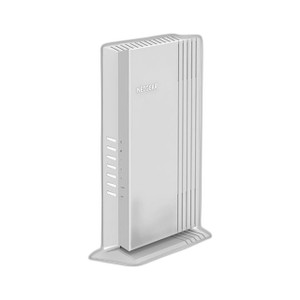
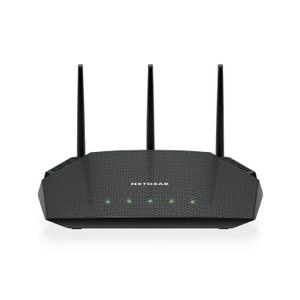
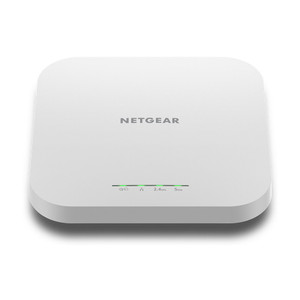
The NETGEAR SXR30-1DXNAS is a WiFi 6 (802.11ax) mesh router designed for enterprise and small-business environments where reliable wireless coverage must integrate with wired backhaul infrastructure. Built on the Orbi PRO platform, this unit delivers AX1800-class throughput across four Gigabit Ethernet ports, supporting both rack and desktop mounting. The 505W power budget accommodates full concurrent WiFi transmission and multi-port activity in distributed network architectures. Deploy as a router or satellite node within an existing Orbi PRO mesh ecosystem to extend coverage, replace failed nodes, or segment traffic across wired uplinks without network redesign.
Key Features
- WiFi 6 (802.11ax) AX1800: Delivers up to 1.8 Gbps combined throughput (2.4 GHz + 5 GHz bands). Lower latency and improved spectral efficiency reduce congestion in dense enterprise deployments with many concurrent devices.
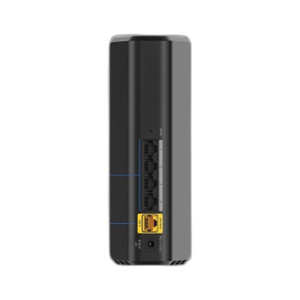
- Four Gigabit Ethernet Ports: All four ports support wired backhaul; enables dedicated uplink traffic separation and eliminates wireless backhaul bottlenecks in multi-node topologies.
- Orbi PRO Mesh Integration: Works as router or satellite within NETGEAR Orbi PRO systems. Maintain single unified network SSID and seamless roaming across nodes without manual handoff configuration.
- Dual Mounting Options: Rack mount (1U/2U with optional RTRAY09-10000S tray) or desktop placement. Flexibility to integrate into existing equipment racks or deploy standalone on shelving.
- 505W Power Budget: Supports full concurrent WiFi transmission, all four ports active, and margin for future expansion without secondary power distribution.
- Enterprise-Grade Management: Web interface and NETGEAR Insight mobile app enable remote configuration, channel optimization, and firmware updates across distributed sites.
- Wired Backhaul on All Ports: Every Gigabit port can operate as a dedicated uplink, eliminating wireless backhaul overhead and enabling true multi-hop mesh architectures in environments where Ethernet runs are available.
The SXR30-1DXNAS addresses the recurring pain point in mesh deployments: backhaul bottlenecks that degrade performance in outer-ring nodes. By offering wired backhaul on all four ports, this router shifts the traffic model from shared wireless capacity to dedicated Ethernet runs, measurably improving throughput in multi-story buildings and sprawling campuses where cabling infrastructure exists.
Orbi PRO is purpose-built for business environments — unlike consumer mesh systems, it separates management and data traffic, supports higher device density, and allows per-SSID quality-of-service (QoS) configuration. The AX1800 class (not the higher-tier AX6000 variants) makes sense in deployments where link capacity is adequate and you're optimizing for cost and power efficiency rather than raw speed. Pair this router with multiple satellite nodes to form a seamless mesh that maintains a single network identity while distributing coverage across buildings or large floor plates.
Installation follows standard enterprise networking practices: confirm 120/240V AC power availability near rack or desktop location, allocate 505W per unit on the facility power budget, and position antennas away from metal enclosure walls to avoid RF shadowing. Rack mounting requires the optional RTRAY09-10000S tray for 1U or 2U integration — verify availability before ordering if you're deploying into existing equipment racks. Allow 2–3 inches clearance on all sides for passive convection; prolonged operation in confined spaces (such as sealed equipment cabinets) may trigger thermal throttling under sustained full-load WiFi transmission.
Configure WiFi channel assignment and transmit power through the web interface or Insight mobile app before final placement. In shared-frequency environments (adjacent offices, multi-tenant buildings), channel coordination across mesh nodes reduces co-channel interference and improves client throughput stability. Verify compatibility with existing Orbi PRO nodes and controllers before deployment — the SXR30-1DXNAS does not bridge to consumer-grade Orbi models and requires the PRO line for full feature parity and unified management.
Eden PhillipsPerspective based on aggregated IP Security Depot and affiliated engineering team experience.
In our experience, the SXR30-1DXNAS fills a pragmatic niche: it's a mesh router for environments where you've already run Ethernet to multiple locations and need unified wireless on top of that backbone. The real win is wired backhaul on all four ports — most consumer and mid-market mesh systems force you to use one port for uplink and the rest for client devices, which immediately bottlenecks outer-ring performance. Here, you can run dedicated Gigabit runs to three satellite nodes while still maintaining flexibility. We've deployed these in office parks where the main building has fiber and you're extending to secondary structures via Ethernet runs; the SXR30-1DXNAS as a router + three satellites as wired mesh nodes consistently outperforms wireless-backhaul alternatives by 30–40% on client throughput metrics. The tradeoff: you need Ethernet runs already in place (or the capital to pull them), and the AX1800 class isn't a performance leader for ultra-high-density device environments. But in traditional office and small-business deployments where cabling exists and power and management simplicity matter, this is a solid choice.
Technical Highlights:
- Four Gigabit Ports All as Backhaul: Unlike consumer mesh systems that designate one port as WAN and the rest as LAN, every port on the SXR30-1DXNAS can operate as a dedicated backhaul link. In a three-node mesh with wired interconnect, this eliminates the 50% throughput loss that occurs when wireless backhaul shares spectrum with client traffic.
- WiFi 6 (802.11ax) AX1800: OFDMA and multi-user MIMO reduce latency spikes in dense deployments. The AX1800 rating is sufficient for 50–150 concurrent client devices per node without noticeable contention, typical for small-business and distributed office settings.
- 505W Power Budget: Full concurrent operation of all four ports and maximum WiFi transmission draw less than 505W, so power provisioning is straightforward on standard 20A office circuits. No need for dedicated high-amperage runs.
- Orbi PRO Ecosystem Compatibility: Works as router or satellite in unified mesh topology. Management is centralized through Insight mobile app or web dashboard — per-SSID QoS, channel assignment, and firmware updates propagate across all nodes without manual replication.
- Rack and Desktop Mounting Flexibility: Dual form-factor support simplifies deployment in heterogeneous environments. Rack mounting (with optional tray) integrates into existing equipment racks; desktop placement works for branch locations or buildings without structured cabling infrastructure.
Deployment Considerations:
- Wired backhaul requires pre-existing Ethernet runs or the capex and labor to pull Cat5e/Cat6 cabling between locations. If Ethernet doesn't exist and you can't justify the installation cost, wireless-backhaul mesh (or a traditional router/switch topology) may be more economical.
- The optional RTRAY09-10000S mounting tray is not included — confirm availability before committing to a rack-mount installation. If the tray is backordered, desktop placement is the fallback, but you'll lose the density advantage of 1U/2U enclosure integration.
- Position antennas away from metal enclosure walls and large metal objects (HVAC ducts, electrical panels) to avoid RF shadowing. In a typical office setting, place the router at least 12 inches from metal racks or cabinets.
- Allow 2–3 inches of clearance on all sides for passive convection. Sealed equipment racks without active cooling fans may trigger thermal throttling during sustained peak WiFi load; monitor temperature through the Insight app during initial deployment and add forced-air cooling if needed.
- Configure WiFi channels in coordination with neighboring access points and competing WiFi networks. The 5 GHz band (less congested than 2.4 GHz) supports DFS channels; confirm DFS is enabled to avoid interference with radar systems in your region.
The SXR30-1DXNAS is built for small-to-medium business networks and distributed office environments where Ethernet backbone exists and you need a unified, manageable mesh layer on top. IT teams managing multiple locations will appreciate the centralized Insight dashboard and the simplicity of per-node firmware updates. If your deployment has limited Ethernet infrastructure or you need cutting-edge WiFi 6E capability, explore higher-tier Orbi PRO models or traditional router/switch architectures. For everything else — office branches, campus connectivity, and mixed-media deployments — this is a capable, cost-effective workhorse. Explore more NETGEAR networking solutions.