ATEN VC881 4K HDMI/DVI to HDMI Converter with Audio De-Embedder
Overview
The ATEN VC881 is a compact signal converter that accepts HDMI or DVI sources and outputs a clean HDMI signal — with the added capability to strip and route audio independently from the video path. It supports up to 3840×2160@30Hz from HDMI sources and up to 1920×1200 from DVI, making it a practical bridge when you need to integrate legacy DVI-output workstations or graphics cards into a modern HDMI display chain without losing audio flexibility. If you've ever dealt with a DVI source connected to an HDMI display where audio simply vanishes, the VC881 solves that problem at the hardware level rather than requiring a software workaround or separate audio extractor.
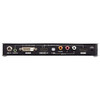
Three operating modes — HDMI to HDMI, DVI to HDMI, and ARC (Audio Return Channel) — are selectable via a front-panel push button, so you can adapt the unit on the fly without touching software or rebooting connected gear. This makes the VC881 particularly useful in presentation suites, control rooms, and AV integration scenarios where the source device changes depending on the session.
Key Features
- 4K@30Hz HDMI Pass-Through: Handles 3840×2160 at 30Hz from HDMI sources — adequate for static signage, boardroom displays, and non-gaming presentation content. If you need 4K@60Hz, this is not the correct unit; plan accordingly.
- DVI to HDMI Bridging at 1920×1200: DVI input tops out at 1920×1200, which covers legacy workstations, older graphics cards, and medical imaging terminals running at WUXGA. The 1.8m maximum DVI cable run is short — route DVI sources close to the unit or use a signal booster upstream.
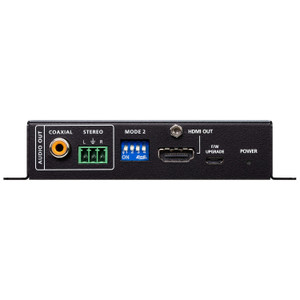
- Audio De-Embedding with Channel Control: The side-mounted Audio Out Channel switch lets you select AUTO, CH 5.1, or CH 2 — so you can force stereo output to a two-channel amplifier even when the source is sending 5.1, preventing compatibility errors with simpler audio systems downstream.
- HDMI Audio Out ON/OFF Switch: A dedicated side switch lets you mute the HDMI audio output independently. Useful when the display handles audio internally and you want to route clean audio only to an external system without signal bleed.
- ARC (Audio Return Channel) Mode: The third operating mode enables ARC, allowing a downstream display to send audio back upstream — relevant in boardroom AV racks where a single HDMI cable needs to carry audio in both directions to a connected AV receiver or amplifier.
- 3.5mm Stereo Audio Input: A 3.5mm jack (green) accepts analog stereo audio input, giving you a path to inject audio from a non-HDMI source — useful when a PC's headphone output needs to ride alongside a DVI video signal.
- Firmware Upgrade via 3.5mm Jack: Firmware updates are delivered through a dedicated 3.5mm jack rather than USB or network, meaning no driver installation and no network exposure during the upgrade process. Simple and field-serviceable.
Integration and Compatibility
The VC881 sits inline between any HDMI or DVI source and an HDMI display or HDMI distribution amplifier. Maximum cable distances are 3m on the HDMI side and 1.8m on the DVI side — these are hard limits from the spec sheet, not guidelines. In rack-mount deployments, plan your cable management so the source device is within those distances, or place a compatible repeater upstream. The unit's side switches and front push button mean no software, no IP address, and no management overhead — it does one job and it's configurable in seconds. For AV signal management applications, this kind of zero-configuration hardware is often preferable to software-defined routing when the infrastructure is fixed. The VC881 is part of the broader ATEN AV and KVM product line, which spans presentation switchers, matrix switches, and signal extenders for enterprise and commercial AV environments. If your deployment also requires signal extension beyond 3m, pair the VC881 with a compatible HDMI extender to push the signal further over HDBaseT or fiber. For AV-over-IP infrastructure planning, a signal distribution planning guide can help you map cable runs and switch selection before committing to hardware. Operating humidity is rated at 0–80% RH non-condensing, making it suitable for standard indoor environments including server rooms and AV equipment closets — not for high-humidity industrial spaces.
Frequently Asked Questions
Q: What is the maximum resolution supported by the ATEN VC881?
A: In HDMI mode, the VC881 supports up to 3840×2160 at 30Hz. In DVI mode, the maximum resolution is 1920×1200. Note that 4K@60Hz is not supported.
Q: Can the VC881 accept both HDMI and DVI sources simultaneously?
A: No. The VC881 has a single active mode at a time — HDMI to HDMI, DVI to HDMI, or ARC — selected via the front-panel push button. It does not mix or switch between two live sources simultaneously.
Q: What are the maximum cable lengths for HDMI and DVI inputs?
A: The VC881 supports HDMI input cable runs up to 3 meters and DVI input cable runs up to 1.8 meters. Longer runs will require an upstream signal repeater or extender.
Q: How do I upgrade the firmware on the VC881?
A: Firmware upgrades are performed through the dedicated 3.5mm firmware upgrade jack. No USB connection or network access is required.
Q: What audio output channel formats does the VC881 support?
A: The VC881 provides three audio channel options selectable via side switch: AUTO (pass-through), CH 5.1 (five-channel surround), and CH 2 (stereo). This allows you to force stereo output even when the source transmits 5.1.
Q: Does the VC881 support ARC (Audio Return Channel)?
A: Yes. ARC is one of the three selectable operating modes on the VC881, allowing a downstream HDMI display to send audio back upstream to an AV receiver or amplifier over the same HDMI cable.
The VC881's ARC mode is the spec that gets overlooked most often during pre-sales, and it's frequently the one that matters most in boardroom and huddle-room installs where a single HDMI run has to carry audio in both directions to a wall-mounted display and a rack-mounted amplifier. Worth confirming early whether your display supports ARC before spec'ing this unit into the signal chain.
Technical Highlights:
- 4K@30Hz HDMI Input: 3840×2160 at 30Hz covers static signage and presentation workloads cleanly. The 30Hz ceiling is a real constraint for video-heavy content — flag this with the client before install.
- Dual Audio Channel Switching: The side-mounted AUTO/CH 5.1/CH 2 switch lets you force a specific output format in hardware, which matters when downstream amplifiers reject 5.1 signals from a source that can't be reconfigured.
- DVI Bridging at 1.8m Max: The 1.8-meter DVI cable limit is tight. In rack environments, the source device needs to be physically close — factor this into your rack layout before cabling.
Deployment Considerations:
- The firmware upgrade path uses a 3.5mm jack rather than USB or Ethernet — keep the upgrade cable with the unit and document the process in your site notes, since it's non-standard and easy to forget in a service call.
- The 3m HDMI input limit means the VC881 belongs in-rack or immediately adjacent to the source, not at the display end of a long cable run. If the display is the endpoint, place an extender before the VC881, not after.
The VC881 is the right call for fixed boardroom or training-room installs where a legacy DVI workstation needs to feed a modern HDMI display chain and the audio routing has to be configurable without touching software — particularly in managed AV environments where the IT team controls the room but the AV team owns the rack.