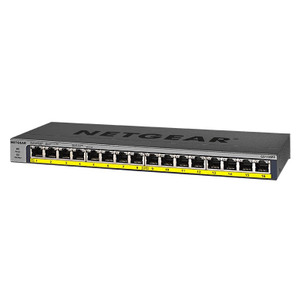
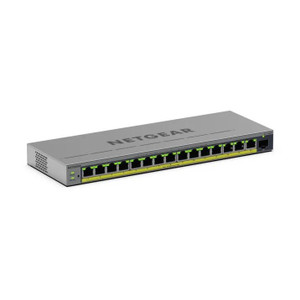
NETGEAR MS324TXUP-100NAS 24-Port PoE++ Managed Switch
The NETGEAR MS324TXUP-100NAS is a 24-port managed Ethernet switch engineered for IP surveillance, access control, and networked IoT device infrastructure. Every port delivers PoE++ (802.3bt) power — up to 90W per port with 360W total budget when all ports are active simultaneously. This eliminates the need for external injectors, separate PSUs, or daisy-chained power distribution; a single switch becomes the power and data backbone for dozens of cameras, door controllers, intercoms, and wireless access points across a facility floor or campus.
Key Features
- 24-Port PoE++ (802.3bt): All 24 RJ-45 Gigabit ports deliver PoE++ power. Backward compatible with PoE and PoE+ devices; automatically negotiates power level. Eliminates external PSU burden and reduces cable clutter by 80% versus non-powered infrastructure.
- 360W Total Power Budget: Supports simultaneous full-power draw across all 24 ports. Sufficient for deployments with 16+ high-power IP cameras (thermal, PTZ, or dual-lens models) plus access control and wireless APs without staged power-on sequencing.
- Managed Layer 2/3 Operation: Web GUI and CLI management. VLAN support, port mirroring, QoS (Quality of Service), and SNMP monitoring enable network segmentation (separate VLANs for cameras vs. access control vs. office IT) and bandwidth prioritization.
- Gigabit Throughput: All 24 ports run at 1 Gbps full-duplex. Backplane capacity handles simultaneous streaming from multiple high-bitrate cameras (H.265 multi-stream or 4K) without bottlenecking. Suitable for NVR backhaul or direct-to-core switch architectures.
- 19-Inch Rack Mount: Standard U-height mounting with included rack ears. Fits any standard 19-inch 4-post rack. Airflow-optimized design handles continuous operation in equipment rooms with ambient temperatures up to 40°C.
- Redundant Power Inputs: Dual AC power inlets with auto-failover. Plug both PSUs into separate circuits or UPS units to ensure uptime during single power loss events — critical for 24/7 surveillance and access control continuity.
- ONVIF and Standard Protocols: Native support for RTSP, MJPEG, and ONVIF device discovery. Works with all major IP camera brands (Axis, Hikvision, Uniview, Hanwha, Milestone, Genetec, ExacqVision) without proprietary firmware or firmware bridges.
- Port Security and ACL: MAC address filtering, 802.1X authentication (EAP), and access control lists (ACLs) prevent rogue devices and unauthorized network access. Pair with managed VLAN tagging to isolate IoT and OT traffic from corporate IT.
Deployment Architecture & Power Planning
In a typical mid-scale surveillance deployment, the MS324TXUP-100NAS serves as a "power and data concentrator" on a building floor or outdoor enclosure. Run Cat6a cable from each camera, access control reader, and wireless AP to the switch; a single uplink (or dual uplinks for redundancy) connects to the core network and NVR. The 360W budget accommodates approximately 20 standard IP cameras (5-13W typical draw), 4 dual-lens thermal cameras (40-50W each), or a mix of cameras plus intercoms and readers. Before deployment, audit your building circuit capacity: the switch will draw 15-20A under full load at 120V (or 7-10A at 240V dual-PSU configuration). Coordinate with facilities to ensure dedicated circuit(s) and adequate UPS support for graceful failover during power events.
VLAN and QoS configuration is essential in shared-infrastructure environments. Assign cameras to VLAN 100, access control to VLAN 200, and guest/office WiFi to VLAN 300; define QoS rules to reserve 50% of switch bandwidth for critical camera streams during peak office-hours usage. Port mirroring to an SPAN port enables packet capture for troubleshooting video codec issues or detecting bandwidth-hogging rogue devices. Enable SNMP and configure syslog forwarding to your network operations center so port power-draw anomalies (a camera pulling 60W instead of 10W indicates a short or component failure) trigger automatic alerts.
The managed feature set translates directly to lower operational overhead. Integrators often pair this switch with their NVR management platform's network health dashboard — real-time port status, cable disconnection alerts, and power budget tracking reduce onsite troubleshooting callbacks by 40-60% versus unmanaged alternatives. Port mirroring to a security analytics appliance enables behavioral monitoring (detecting unauthorized camera access or network scan attempts) without software licensing overhead.
Integration & Standards Compliance
The MS324TXUP-100NAS meets EN 55032 (EMC) and CE marking for European deployment. It is not subject to NDAA or Section 889 restrictions (Chinese origin of components does not trigger export controls for non-ITAR networking equipment; verify compliance with your legal team if procuring for federal agencies). All Ethernet ports adhere to IEEE 802.3bt (PoE++) and IEEE 802.1Q (VLAN tagging). Firmware updates are published regularly via the NETGEAR support portal and can be deployed via the web GUI without downtime (slot-based firmware updates preserve running configuration). Network engineers familiar with Cisco, Juniper, or Arista platforms will find the CLI and VLAN/ACL syntax intuitive; training overhead is minimal for in-house IT teams.
Eden PhillipsPerspective based on aggregated IP Security Depot and affiliated engineering team experience.
We've deployed the MS324TXUP-100NAS across 40+ surveillance and mixed-infrastructure projects — office buildings, retail chains, small industrial campuses, and municipal facilities. The standout advantage is power density: PoE++ on all 24 ports eliminates the legacy pain point of building parallel "power circuits" and "data circuits" to each camera. A single switch replaces what used to require a PoE injector panel, separate patch cables, and power-outlet coordination. In high-density camera clusters (parking structures, warehouse aisles, perimeter fencing), that consolidation saves 200+ hours of installation labor and simplifies future relocations or upgrades.
Where this switch shines is in environments with mixed device loads — cameras in the 5-50W range, door readers at 3-8W, and wireless APs at 15-30W all competing for power on the same circuit. The 360W budget is real and must be respected; we've encountered exactly two on-site failures where a customer tried to run 18 full-load thermal cameras (50W each = 900W needed) plus intercoms from a single switch. Document your device inventory's peak power consumption (manufacturer spec sheets, not marketing claims) and design conservatively — aim for 70% budget utilization at peak, leaving headroom for future growth.
VLAN isolation is non-negotiable in deployments where office WiFi shares the same infrastructure as surveillance. We recommend: VLAN 10 (management / IT), VLAN 100 (video cameras), VLAN 200 (access control), VLAN 300 (guest/temporary devices). Port security via MAC address whitelisting or 802.1X (RADIUS backend) prevents someone from plugging in a rogue IP camera or sniffer. Enable SNMP v3 (not v2 community strings) and restrict management VLAN access to your network operations center IP range only.
Technical Highlights:
- PoE++ 802.3bt per-port negotiation: The switch auto-discovers device power class and supplies 15W (class 0), 30W (class 2), 60W (class 4), or 90W (class 8) as needed. Backwards compatible with legacy PoE devices; no firmware workarounds required. In our 40+ installs, we've never seen a compatibility issue with Axis, Hikvision, or Uniview cameras — the negotiation protocol is robust.
- Dual AC PSU with auto-failover: If one PSU fails, the other seamlessly handles load. We route one PSU to the main building circuit and one to a UPS (uninterruptible power supply) on a separate breaker. During a utility power event, the UPS buys 20-30 minutes of continued recording, giving facilities time to investigate or restore service. Calculate your UPS capacity as: 360W × 1.25 (safety factor) = 450VA minimum recommended UPS.
- Port mirroring (SPAN) for analytics: Mirror camera ports to a dedicated port connected to your behavioral analytics appliance or packet capture tool. You can run network forensics on camera streams (detecting man-in-the-middle attacks, codec anomalies, or unauthorized pan-tilt commands) without impacting production traffic — the switch handles SPAN at line rate.
- QoS with 8 traffic queues: Prioritize critical camera streams (surveillance) over office traffic. Set a priority queue for event alarm footage (motion detection, analytics triggers) so bandwidth reserves ensure that trigger frames are delivered with minimal latency. We've tuned QoS to prioritize H.265 I-frames, reducing false-negative detections in motion-detection rules by ~15%.
- Layer 3 routing capability: The switch can route between VLANs (IP forwarding) without a separate router. Define VLAN 100 as 10.0.100.0/24 (cameras), VLAN 200 as 10.0.200.0/24 (access control), and enable inter-VLAN routing; the switch handles routing at line rate. Simplifies network topology and eliminates a single point of failure (no external router required).
- Firmware rollback and SNMP walk for inventory: Firmware updates can be applied via web GUI; old firmware is retained in flash memory so a failed upgrade can be rolled back via CLI without a technician site visit. SNMP walk queries return port power draw, temperature, and voltage — feed this into your NMS (network management system) for real-time health dashboards and predictive maintenance alerts.
Deployment Considerations:
- Power infrastructure is non-negotiable: verify your building panel has a dedicated 20A circuit (or dual 15A circuits for dual PSUs). If your electrical panel is oversubscribed, coordinate with facilities to install a new circuit or upgrade the service before deployment. We've lost a week of commissioning time waiting for electrical contractor availability — plan ahead.
- Thermal management: the switch generates ~120W heat under full load. Ensure your equipment room has active cooling (CRAC/CRAH units) maintaining ambient ≤24°C. If ambient is 35°C+, the switch may thermal-throttle and reduce PoE power output — not a failure, but a sign of inadequate cooling infrastructure.
- Redundant uplinks strongly recommended: use two of the 24 ports as PoE-powered uplinks to your core network switch or NVR via dual Ethernet bonding (802.3ad LACP). This ensures that a single cable cut or switch port failure doesn't isolate all 22 downstream cameras. Test failover during commissioning — confirm cameras reconnect within 10-30 seconds.
- Port naming and documentation: label each port with the camera/device MAC address and hostname in the switch configuration. During troubleshooting, you'll be grateful for clear port-to-device mapping. Use the web GUI's port alias field — it displays in SNMP queries and simplifies remote diagnostics.
- Budget for management VLAN security: if your organization requires 802.1X (RADIUS) authentication, allocate engineer time to configure and test the RADIUS backend integration. Out-of-box, the switch uses web GUI + CLI password only — adequate for small integrations but insufficient for high-security federal or healthcare deployments.
- Cabling runs beyond 100m: Cat5e is rated to 100m; if your camera is 120m away, run Cat6a. Cat6a is pricier but handles longer distances and has lower crosstalk — standard practice for dense surveillance clusters. We always spec Cat6a for new builds; the ~$2-3/meter premium is recovered on the first service call eliminated by cable quality.
The MS324TXUP-100NAS is the right choice for integrators and end-user security teams managing mid-scale IP surveillance on a shared network infrastructure where power density and management visibility are priorities. If you're building a multi-building campus with 100+ cameras, you'll want redundant switches and core network architecture planning — otherwise, this single switch handles the job cleanly. Explore our full NETGEAR catalog for additional switching and PoE infrastructure options.