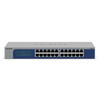
NETGEAR GS524-300NAS 24-Port Gigabit Unmanaged Switch
Overview
The NETGEAR GS524-300NAS is a 24-port Gigabit unmanaged switch designed for straightforward network expansion in small to mid-size IT environments. This model requires no configuration—you power it on, connect your devices, and traffic flows immediately. That simplicity means lower deployment overhead, no learning curve for CLI or web management, and fewer potential configuration errors. If your priority is reliable connectivity without ongoing management overhead, an unmanaged switch like the GS524-300NAS handles it efficiently.
The GS524-300NAS operates on standard AC power (100–240V, 50–60 Hz), making it compatible with typical facility power infrastructure worldwide. The 24 Gigabit ports provide sufficient density for most small-branch or edge-deployment scenarios where you're consolidating endpoints—cameras, access points, PCs, printers—onto a single network segment.
Port configuration and throughput
All 24 ports are RJ-45 Gigabit Ethernet (1000 Mbps each). In an unmanaged architecture, every port operates identically—no port prioritization, no VLAN segmentation at the switch layer, no quality-of-service (QoS) tuning. That's the tradeoff: simplicity in exchange for less granular traffic control. For flat, single-segment deployments (typical of smaller security or warehouse automation installs), this is perfectly adequate. If you later need VLAN isolation or traffic shaping, you'd be looking at a managed network switch in the NETGEAR lineup.
The switch supports a maximum range of 2000 meters (6,562 feet) per port when using standard Cat5e or Cat6 cabling—standard IEEE 802.3 specifications. In practice, most runs stay well under 100 meters, so this headroom is ample for sprawling warehouses or campus deployments.
PoE delivery
The GS524-300NAS does not provide Power over Ethernet (PoE). Every connected device must have its own power supply or rely on a separate PoE injector or midspan device if power delivery is required. For IP camera deployments, this means either running separate power cables to each camera or inserting an external PoE injector between the switch and camera. If you need integrated PoE from the switch itself, consider a managed PoE switch variant in the same family—they add that capability at the cost of power supply overhead and management complexity.
Management and monitoring
This is an unmanaged device. There is no web interface, no CLI, no SNMP trap generation, no syslog output. You cannot monitor port statistics, packet counters, or error rates from a central management station. What you gain is zero configuration burden and zero risk of misconfiguration. For small, stable networks where devices plug in and stay put, that's a net win. For larger estates or where visibility is required for troubleshooting, an unmanaged switch becomes a liability—you cannot see what traffic is flowing or diagnose congestion at the switch level.
Environmental ratings
The GS524-300NAS operates in environments between 32°F and 122°F (0°C to 50°C). This covers typical climate-controlled indoor spaces—server rooms, wiring closets, retail backrooms. If you need to deploy in outdoor or harsh environments (parking lots, loading docks, extreme heat), this switch must be housed in a rated enclosure. There is no IP rating; it is designed for indoor installation only.
Installation notes
The physical footprint is compact: 12.91 inches wide, 6.65 inches tall, 1.69 inches deep, and weighs 3.28 pounds. It fits easily on a rack shelf or under a desk. Standard RJ-45 patch cables connect your devices. The AC power cord is the only external connection. Installation is straightforward: mount (if using a rack), plug in power, connect cables, and you are operational. No firmware updates, no license activation, no agent software required.
Frequently Asked Questions
Q: Can the GS524-300NAS deliver Power over Ethernet to IP cameras or wireless access points?
A: No. The GS524-300NAS is a non-PoE switch. Devices must have independent power supplies or connect through an external PoE injector.
Q: Does the GS524-300NAS support VLAN segmentation or traffic shaping?
A: No. It is an unmanaged switch with no configuration interface. All ports operate in a single broadcast domain. If you need VLANs or QoS, select a managed switch from the NETGEAR portfolio.
Q: What is the maximum cable run length per port?
A: The GS524-300NAS supports 2000 meters of range per port under standard Ethernet specifications, but practical deployments rarely exceed 100 meters.
Q: Is the GS524-300NAS suitable for outdoor deployment?
A: No. It has no IP rating and is designed for indoor, climate-controlled environments (32–122°F). Outdoor use requires an external weatherproof enclosure.
Q: Does the switch have a management interface for monitoring or diagnostics?
A: No. The GS524-300NAS is unmanaged—there is no web GUI, CLI, or SNMP interface. It provides plug-and-play connectivity with no visibility into traffic or port statistics.
Q: What is the warranty on the NETGEAR GS524-300NAS?
A: Warranty details are provided on the support information card included in the package. Check the documentation for specific terms and coverage.
The GS524-300NAS is a straightforward tool for one job: bridging endpoints without management overhead. For small security or warehouse deployments where you are consolidating traffic across 20–24 devices on a single network segment, this switch removes friction—no configuration, no licensing, no CLI syntax to learn. The 24 Gigabit ports and 2000-meter range per port align with typical small-to-mid-size site requirements, but the lack of PoE and zero management visibility come with real tradeoffs that become pain points as your installation scales.
Technical Highlights:
- 24 Gigabit RJ-45 ports: Each port is identical and always-on. No port negotiation, no trunk configuration—devices connect and communicate immediately. Removes configuration errors from the equation, but also removes your ability to prioritize or isolate traffic.
- 2000-meter per-port range: Exceeds practical Ethernet cable runs in most facilities. Gives you flexibility for sprawling warehouse or campus layouts without signal degradation concerns over standard distances.
- AC 100–240V, 50–60 Hz power: Global AC compatibility means no need for DC supplies or regional adapters. The switch itself is always powered; endpoints remain dependent on their own power infrastructure or external PoE injection.
Deployment Considerations:
- No PoE: Every IP camera, access point, or powered device requires a separate power run or external PoE injector. This is a major drawback if you are trying to minimize cable runs in new construction or retrofit scenarios.
- No management visibility: You cannot see link status, packet counts, or error rates from a central station. If a port fails or traffic unexpectedly drops, you have no diagnostic data—you must resort to physical inspection or endpoint-level troubleshooting.
- Indoor-only: The switch lacks environmental hardening. Wiring closets, server rooms, and controlled spaces only. Any outdoor or harsh-environment requirement demands an external enclosure, adding cost and footprint.
Deploy the GS524-300NAS in small, stable security or automation networks where endpoints are fixed, power is already distributed, and configuration overhead is genuinely a burden rather than a feature. In larger or more dynamic sites, a managed PoE switch is worth the complexity.